
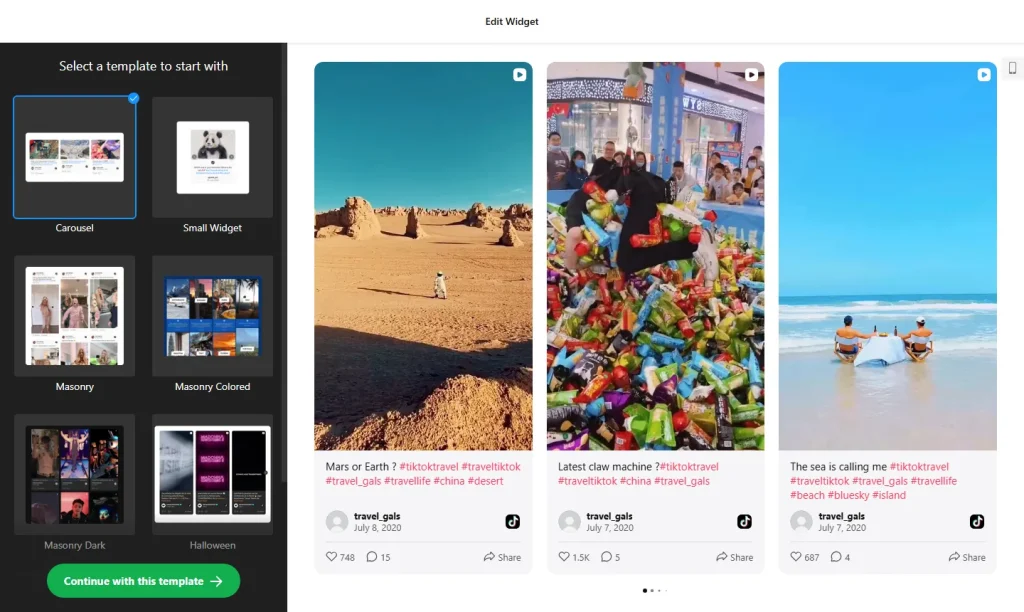
Use the widget builder below to create your free TikTok Feed widget. Show videos from a TikTok profile or hashtag in a grid, masonry, list, carousel or slider layout. Select a template and click “Continue with this template” to get started.
Step-by-step guides: Wix Squarespace WordPress Shopify Webflow Google Sites
How to use the TikTok Feed widget builder
- Choose a template: Pick Carousel, Small Widget, Masonry (light, colored or dark), Slider or a seasonal design, and click “Continue with this template”.
- Add your sources (Sources tab): Connect a TikTok profile or a hashtag. You can combine profiles and hashtags in one feed, add specific video URLs, or filter videos by hashtag or keyword so only the posts you want appear.
- Set up the header (Header tab): Show or hide the title and header, or turn the header off so visitors see only the videos.
- Choose a layout (Layout tab): Grid, Masonry, List, Carousel or Slider. Set the width, columns, rows (with a separate row count for mobile), spacing and the number of videos. Carousels and sliders can auto-slide and show arrows or pagination. The layout adapts to any screen size.
- Style the video cards (Post tab): Show only the video, add text at the bottom of the card on a dark background, or put the text under the card. Show or hide likes, views, the author name and the TikTok logo, and add a Follow button that links to your TikTok profile. Visitors can open any video in a popup with its details and comments, without leaving your site.
- Pick your colors (Theme tab): Choose a brand color and Light or Dark mode, and the Color Theme Generator creates a matching color scheme. You can also set the header, popup, background, text and link colors one by one.
- When the feed looks right, click “Add to website for free” and sign up on the following page to save your widget.
- Copy the embed code and paste it into your website’s HTML editor where you want the videos to appear.
How often does the TikTok feed update?
New videos usually appear in the feed within 12–36 hours. The feed updates automatically on a schedule, which keeps your content fresh while the widget loads fast. You don’t need to change the embed code when you post a new TikTok.
The TikTok Feed widget’s HTML embed code
Paste the embed code on your website’s template, theme, or HTML source code editor in places where you want to embed the TikTok Feed widget. It works on any website platform that accepts custom HTML.
More social media widgets
- Instagram Feed widget
Your latest Instagram posts and reels - Facebook Feed widget
Posts from your Facebook Page - YouTube Gallery widget
Videos from a YouTube channel or playlist - X (Twitter) Feed widget
Posts from an X account - LinkedIn Feed widget
Company posts from LinkedIn - Pinterest Feed widget
Pins, boards and profiles