
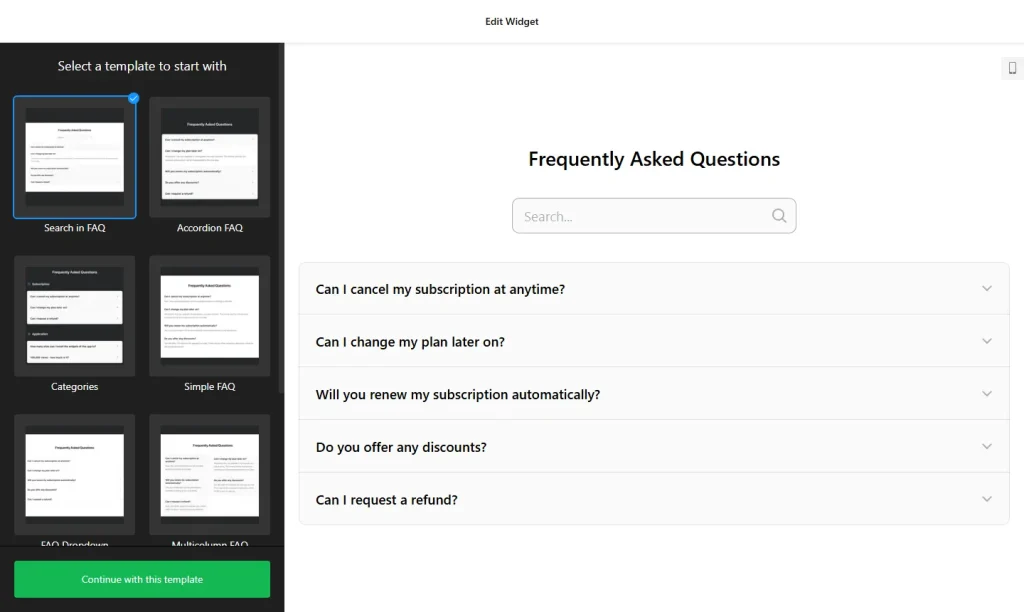
Use the builder below to create a free FAQ widget for your WordPress site. Pick a template and click “Continue with this template” to add your questions.
Blogs, business sites and WooCommerce shops all end up needing an FAQ somewhere: on a service page, a product page or a help page. Instead of installing and configuring another FAQ plugin, you can build the accordion here and paste it into a Custom HTML block. The questions live in the builder, so you can change an answer later without opening the page editor again.
How to add an FAQ widget to WordPress
1. Create your widget
- Choose a template: start from Categories, Collapsible FAQ, FAQ Toggle, Q&A or Knowledge Base, or start from scratch.
- Add categories and questions: create as many categories as you need, each with a title and icon. Answers support HTML, so you can link to related posts, policies or product pages.
- Pick a layout: List for a short FAQ, Accordion to keep a long one compact, or Multicolumn to use a wide content area.
- Style it: choose icons and colors that suit your theme.
- Save it: click “Add to website for free“, sign up on the next page and copy your embed code.
2. Add it to your WordPress site
- Open the page or post in the WordPress block editor.
- Click the block inserter (+) where the FAQ should go and add a Custom HTML block.
- Paste the FAQ code and switch to Preview inside the block to check it.
- Click Update or Publish, then open the live page and try a few questions.
- Using Elementor? Drag in the HTML widget and paste the code there. In the classic editor, paste it into the Text tab, not Visual.
- If the FAQ loads late or not at all, check your performance plugin. If it delays or combines JavaScript, exclude the widget script.
Where to put the FAQ widget on your WordPress site
- On service pages of a business site, under the description, to answer questions about prices, timing and the process.
- On WooCommerce product pages, for shipping, sizing and returns. If the product description uses the classic editor, paste the code into the Text tab.
- On a blog’s start-here or contact page, to answer reader questions about topics, guest posts or sponsorships.
- On a support or help page, with categories, so it works like a small knowledge base.
Do you need a paid WordPress plan?
Self-hosted WordPress (WordPress.org) doesn’t need anything extra. It accepts scripts out of the box, so the FAQ works in a Custom HTML block without a plugin. On WordPress.com it depends on your plan: script tags only work on plans that allow plugins. On other plans, WordPress.com removes the script when you save, and the FAQ won’t appear.
The widget’s own free plan covers one widget with up to 200 views a month on unlimited websites, with a small Elfsight link; paid widget plans start at $5 a month, billed yearly. One embed code can go on several pages, so the same FAQ can sit on a product page and on your help page.
FAQ widget features
- Three layouts: List, Accordion and Multicolumn.
- Unlimited categories, each with a title and icon, or one simple list with titles hidden.
- No strict question limit, from five questions to a full knowledge base.
- HTML in answers, so you can link to posts, product pages and policies.
- 30+ icons plus a cross or arrow icon for the accordion.
- Instant updates from the builder, with no need to edit the WordPress page again.
Frequently asked questions
Do I need a plugin to add the FAQ widget to WordPress?
Not on self-hosted WordPress. Paste the code into a Custom HTML block and it works. On WordPress.com, you need a plan that allows plugins, because other plans remove script tags when you save.
Why doesn’t the FAQ show on my WordPress page?
Check three things: a WordPress.com plan that strips scripts, code pasted into the Visual tab of the classic editor instead of the Text tab, or a performance plugin that delays JavaScript. In the last case, exclude the widget script.
Does the FAQ widget work with Elementor?
Yes. Drag the HTML widget into your Elementor layout, paste the FAQ code and update the page.
Can I edit the questions later?
Yes. Edit the widget in your Elfsight dashboard and save. The FAQ on your WordPress site updates automatically, so you don’t need to replace the code.
Is the FAQ widget free?
Yes. The free plan includes one widget with up to 200 views a month on unlimited websites, with a small Elfsight branding link. Paid plans start at $5 a month, billed yearly.
More WordPress widgets
- FAQ widget
All templates and features - WordPress Form Builder widget
Any form: quotes, sign-ups, surveys - WordPress Google Reviews widget
Your Google Business reviews and rating - WordPress Contact Form widget
A simple contact form - WordPress Instagram Feed widget
Your latest Instagram posts and reels - How to add embed code to any website
Where to paste widget code on every website builder