
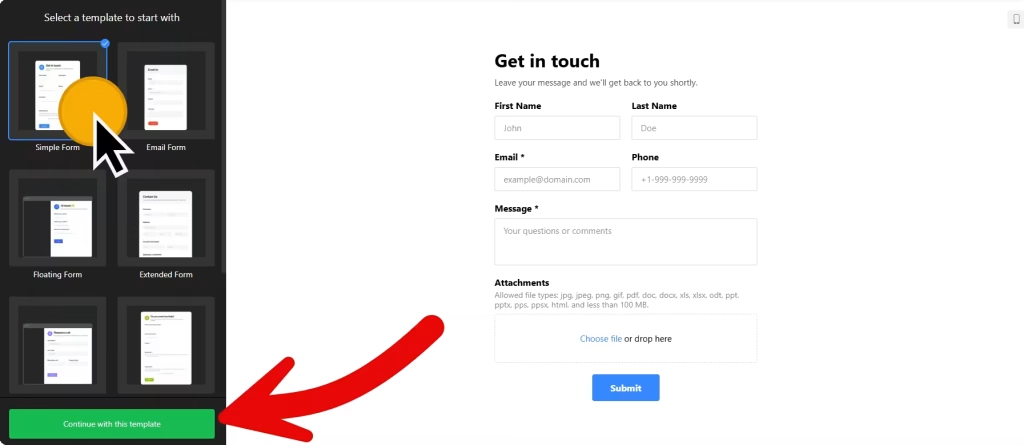
Use the builder below to create a free contact form for your WordPress website. Pick a template and click “Continue with this template” to start building.
WordPress runs blogs, company sites and WooCommerce shops, and nearly all of them need a way for readers or customers to get in touch. Instead of installing and setting up a form plugin, you can build the form here, with your fields, spam protection and email alerts, then paste one short code into a Custom HTML block. It works the same way in the block editor, in Elementor and in the classic editor.
How to add a Contact Form widget to WordPress
1. Create your widget
- Choose a template: Simple Form for a blog’s contact page, Extended Form for a business that needs more detail, or Request a Call for sales and support teams.
- Build the form from 17 field blocks such as short and long text, phone number, drop-down, file upload and consent. Add a label, placeholder or hint to each field and mark the required ones.
- Turn on spam protection: enable Google reCAPTCHA in Settings to filter out bot submissions.
- Connect your tools: set the email that receives each message, write an automatic reply, and send entries to Mailchimp, Google Sheets or Zapier if you use them.
- Save it: click “Add to website for free“, sign up on the next page and copy your embed code.
2. Add it to your WordPress site
- Open the page or post in the WordPress block editor, usually your Contact page.
- Click the block inserter (+) and add a Custom HTML block where the form should appear.
- Paste the form code, then switch to Preview inside the block to check it.
- Click Update or Publish and send a test message from the live page.
- Using Elementor? Drag in the HTML widget and paste the code there. In the classic editor, paste it into the Text tab, not Visual.
- If the form loads late or not at all, check for a performance plugin that delays or combines JavaScript, and exclude the widget script from it.
Where to put the Contact Form widget on your WordPress site
- On your Contact page, the first place most visitors look.
- At the end of popular blog posts, so readers can ask a question or pitch a guest post while the topic is fresh.
- On the service pages of a business site, with a drop-down for the service they’re asking about.
- On a WooCommerce help or returns page, with a field for the order number and a file upload for photos.
Do you need a paid WordPress plan?
On self-hosted WordPress (WordPress.org), no. Scripts work out of the box and no plugin is needed. On WordPress.com, script tags only work on plans that allow plugins. On other WordPress.com plans the script is removed when you save, and the form won’t appear.
For the Floating pane embed type, the code needs to load on every page where the pane should show. Paste it into a Custom HTML block in an area your theme shows on every page, such as the footer. The widget’s free plan covers one widget with up to 200 views a month on unlimited websites, with a small Elfsight link; paid plans start at $5 a month, billed yearly.
Contact Form widget features
- Six templates to start from: Simple Form, Email Form, Floating Form, Extended Form, Request a Call and Blank.
- Google reCAPTCHA spam protection, switched on in Settings.
- Conditional logic, for example showing a WhatsApp number field only when someone picks WhatsApp as their contact method.
- Form pre-fill and language settings, plus custom CSS and custom JavaScript for developers.
- Email notifications and auto-replies, and integrations with Mailchimp, Google Sheets and Zapier.
Frequently asked questions
Do I need a plugin to add this contact form to WordPress?
Not on self-hosted WordPress. The Custom HTML block accepts the code as it is. On WordPress.com you need a plan that allows plugins, because other plans strip script tags when you save.
Why doesn’t my contact form show on WordPress?
Check three things: the code is in a Custom HTML block (or the Text tab in the classic editor), your WordPress.com plan allows plugins, and no performance plugin is delaying or combining the widget script. If one is, exclude the script.
Does the contact form work with Elementor?
Yes. Drag the HTML widget onto the page in Elementor and paste the code into it.
Can I use it on a WooCommerce store?
Yes. Add it to a help, returns or wholesale page with a Custom HTML block. Use a text field for the order number and a file upload for photos.
Is the contact form free?
Yes. The free plan includes one widget with up to 200 views a month on unlimited websites, with a small Elfsight branding link. Paid plans start at $5 a month, billed yearly.
More WordPress widgets
- Contact Form widget
All templates and features - WordPress WhatsApp Chat widget
A WhatsApp chat button or bubble - WordPress AI Chatbot widget
Answers questions using your own content - WordPress Google Reviews widget
Your Google Business reviews and rating - WordPress Instagram Feed widget
Your latest Instagram posts and reels - How to add embed code to any website
Where to paste widget code on every website builder