
Use the widget builder below to create your free G2 reviews widget. Select a template and click “Continue with this template” to get started.
Show your G2 star rating and real customer reviews on your website. No coding or G2 API key needed, and new reviews are added automatically.
How to use the G2 Reviews widget builder
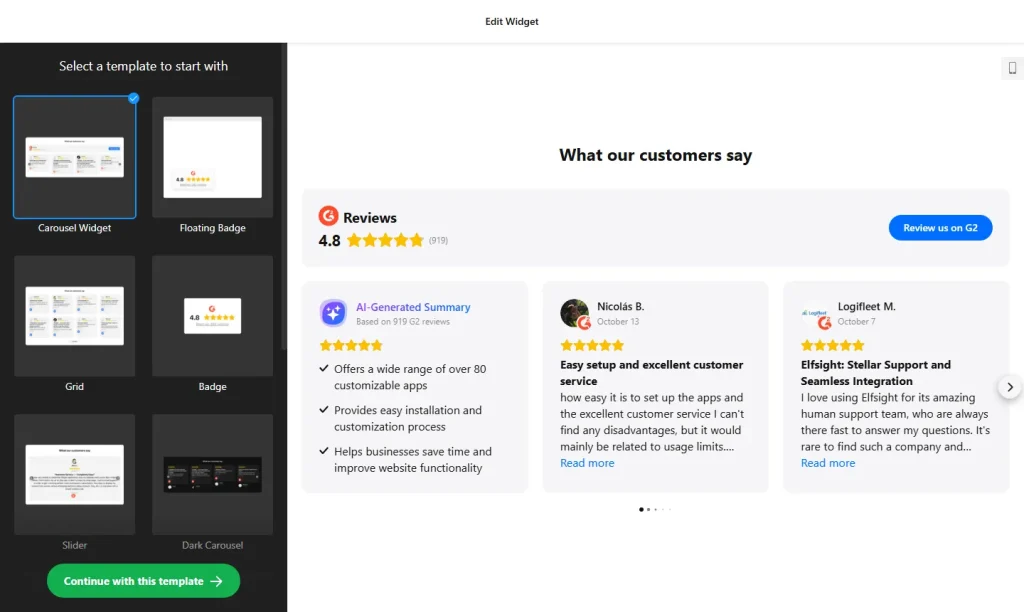
- Choose a template: Pick a design in the builder above and click “Continue with this template”. You can change the layout and style later.
- Add your G2 product: Paste the link to your G2 product profile. The widget collects your rating and reviews from there, with no API key needed.
- Filter reviews: Set a minimum star rating and exclude reviews by author name or keywords.
- Pick a layout: Choose how reviews are displayed, depending on where the widget will sit on your page.
- Edit the header: Show or hide your star rating, the total number of reviews and the review button.
- Set up the review request: Visitors who click “Yes” go to your G2 page to write a review. Visitors who click “No” see a message from you, which can include a link to email you.
- Customize the look: Choose colors and fonts, and adjust the font size of the title and review text.
- Save your widget: Click “Add to website for free” and sign up on the next page to save your widget.
- Copy the embed code: Paste it into your website where you want your G2 reviews to appear.
Key features of the G2 Reviews widget
- Star rating header: Shows your G2 rating and number of reviews, linked to your G2 profile.
- Automatic updates: New G2 reviews are synced every 72 hours, so the widget stays current without manual refreshes.
- Review filters: Show only strong reviews with a minimum rating, and exclude reviews by author or keyword.
- Detailed reviews: Each review shows the author’s name, photo and a link to your G2 profile.
- Review request button: Invite happy customers to post a review on G2, and give everyone else a way to contact you.
- AI review summary: An optional AI summary card highlights common topics and overall sentiment in your reviews.
- Translation: Buttons and labels can be translated on every plan. Automatic translation of review text is available on Pro plans and higher.
Why show G2 reviews on your website?
Software buyers often compare products on G2 before they book a demo or start a trial. Showing your G2 rating and reviews on your own site gives them the same proof at the moment they are deciding, instead of hoping they go looking for it. Because each review links back to your G2 profile, visitors can check that the feedback is real. G2 reviews work well on:
- The homepage and product pages of SaaS and software companies
- Pricing pages, next to your pricing table
- Demo request and free trial sign-up pages
- Comparison and “alternatives” pages
Tip: If you also collect reviews on other sites, the All-in-One Reviews widget can show G2 reviews together with Google, Facebook and other platforms in one feed.
How to add the G2 Reviews widget to your website
After you save the widget, Elfsight gives you a short embed code. Paste it into a custom HTML or embed block where you want the reviews to show. It works on WordPress, Wix, Squarespace, Shopify, Webflow, Google Sites and any other website that accepts custom HTML. For step-by-step instructions for each platform, see our guide on how to add embed code to any website builder.
Good places for G2 reviews are next to your pricing table, right below a demo or free trial button, and on the landing pages you use for ads and email campaigns, where many visitors meet your product for the first time.
How to manage your G2 Reviews widget
Log in to your Elfsight dashboard to edit your widget at any time. Changes go live automatically, so you don’t need to replace the embed code on your website. From the dashboard you can also create more widgets, copy the embed code again and see how many views your widget has used this month.
Frequently asked questions
Is the G2 reviews widget free?
Yes. Elfsight’s free plan includes one widget with up to 200 views per month on unlimited websites, with a small Elfsight branding link. Paid plans start at $5 per month (billed yearly) and add more views and remove the branding.
How often are new G2 reviews added to the widget?
New reviews are synced automatically every 72 hours, so the widget stays up to date without manual work.
Do I need a G2 API key?
No. Add the link to your G2 product profile and the reviews are collected automatically.
Can I show only my best G2 reviews?
Yes. Set a minimum star rating and exclude reviews by author name or keywords.
Can visitors leave a G2 review from my website?
Yes. A customizable button sends visitors to your G2 profile so they can write a review.
More review widgets
- All-in-One Reviews widget
Combine reviews from 20+ platforms in one feed - Google Reviews widget
Show your Google Business rating and reviews - Testimonials Slider
Add your own customer quotes in a carousel - Pricing Table widget
Compare your plans and features - Google Play Reviews widget
Show reviews of your Android app - LinkedIn Recommendations widget
Show endorsements from your LinkedIn profile