
Use the widget builder below to create your free stock ticker widget. Select a template and click “Continue with this template” to get started.
Show stock, index, forex and crypto prices on your website in a scrolling ticker, a table or cards. No coding needed, and prices refresh automatically.
How to use the stock ticker widget builder
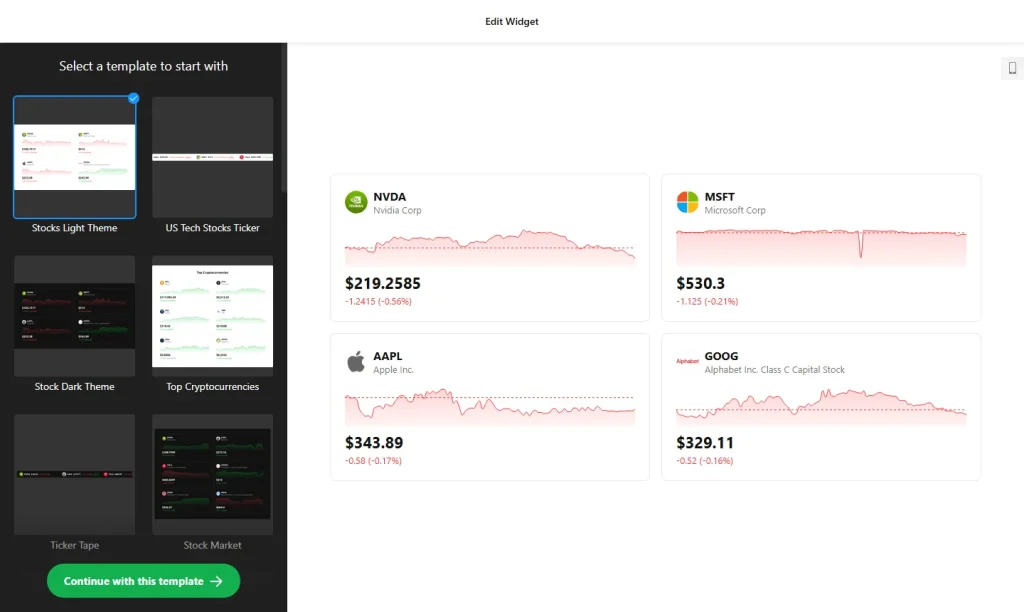
In Elfsight’s editor, this widget is called Stocks.
- Choose a template: Pick a design in the builder above and click “Continue with this template”. You can change the layout and style later.
- Add your assets: Enter the tickers you want to show. You can mix stocks, indices, forex pairs and cryptocurrencies, or stick to one type.
- Pick a layout: Choose Cards Grid, Cards Stack, Ticker, Table or List. Use the ticker for a compact bar, or a table for more detail.
- Choose how changes are shown: Display price changes as values, percentages or both.
- Customize the look: Use the Light or Dark theme or your own, and adjust colors, fonts, sizes and corners. You can also add custom CSS and JavaScript.
- Save your widget: Click “Add to website for free” and sign up on the next page to save your widget.
- Copy the embed code: Paste it into your website where you want the prices to appear.
Key features of the stock ticker widget
- All markets in one widget: Show stocks, indices, forex pairs and cryptocurrencies side by side.
- Automatic refresh: Elfsight shows real-time or near real-time quotes and refreshes the values automatically, so visitors see current numbers without reloading the page.
- Scrolling ticker: Add a moving ticker bar with quotes and price changes, like the ones on trading floors.
- Five layouts: Cards Grid, Cards Stack, Ticker, Table and List, all responsive on any device.
- Charts and icons: Each asset shows its ticker, name, icon and a small live chart for quick recognition.
- Watchlists: Track several companies, indices, currencies or coins in one view for easy comparison.
- Brand styling: Light, Dark or custom themes, plus custom CSS and JavaScript for full control.
Who uses a stock ticker widget?
Live market data makes finance-related pages more useful and gives visitors a reason to come back. A stock ticker widget works well for:
- Finance blogs, newsletters and news sites
- Investor relations pages that show a company’s own share price
- Crypto projects and communities tracking coin prices
- Trading educators, financial advisers and fintech websites
Good to know: The widget displays market data for information only. It isn’t investment advice, so it’s a good idea to say that near the widget and remind visitors to check prices with their broker before trading.
How to add the stock ticker widget to your website
After you save the widget, Elfsight gives you a short embed code. Paste it into a custom HTML or embed block where you want the prices to show. It works on WordPress, Wix, Squarespace, Shopify, Webflow, Google Sites and any other website that accepts custom HTML. For step-by-step instructions for each platform, see our guide on how to add embed code to any website builder.
A ticker bar fits well at the top or bottom of a page, while a table or cards work better inside an article or on a dedicated markets page. If you only need a few headline prices, keep the list short so the widget stays easy to scan, and save the table layout for pages where readers compare many assets.
How to manage your stock ticker widget
Log in to your Elfsight dashboard to edit your widget at any time, for example to add or remove tickers. Changes go live automatically, so you don’t need to replace the embed code on your website. From the dashboard you can also create more widgets, copy the embed code again and see how many views your widget has used this month.
Frequently asked questions
Is the stock ticker widget free?
Yes. Elfsight’s free plan includes one widget with up to 200 views per month on unlimited websites, with a small Elfsight branding link. Paid plans start at $5 per month (billed yearly) and add more views and remove the branding.
What can I show in the stock ticker widget?
Stocks, indices, forex pairs and cryptocurrencies. You can mix them in one widget or focus on one type.
How current are the prices in the widget?
Elfsight shows real-time or near real-time quotes and refreshes the values automatically, so visitors see current numbers without reloading the page.
Can I track several tickers at once?
Yes. You can list multiple companies, indices, currencies or coins in one widget, which works well for watchlists or comparisons.
Which layouts are available?
Five: Cards Grid, Cards Stack, Ticker, Table and List. All layouts are responsive, and price changes can be shown as values, percentages or both.
More live data widgets
- Number Counter widget
Show key figures with animated counters - Weather widget
Show a live weather forecast for any location - Calculator widget
Build loan, mortgage or price calculators - Website Translator widget
Let visitors read your site in their language