
Use the builder below to create a free Facebook feed for your Wix website. Pick a template and click “Continue with this template” to connect your Facebook Page.
Many small businesses on Wix post their news on Facebook first: today’s specials, new opening hours, photos from last weekend’s job. A Facebook feed brings those posts onto your Wix site, so visitors can see you’re active without leaving your page, and you don’t have to post the same update twice. You build the feed here, then add it to any Wix page with an Embed HTML element. No app from the Wix App Market is needed.
How to add a Facebook Feed widget to Wix
1. Create your widget
- Choose a template: Medium Widgets, Small Widgets, Large Widgets, Facebook Posts, Facebook Videos or Full-Width Posts. A smaller template is easier to fit beside other content on a Wix page.
- Connect your Facebook Page: sign in with your Facebook account and pick the Page you manage. The widget fetches its posts from that Page.
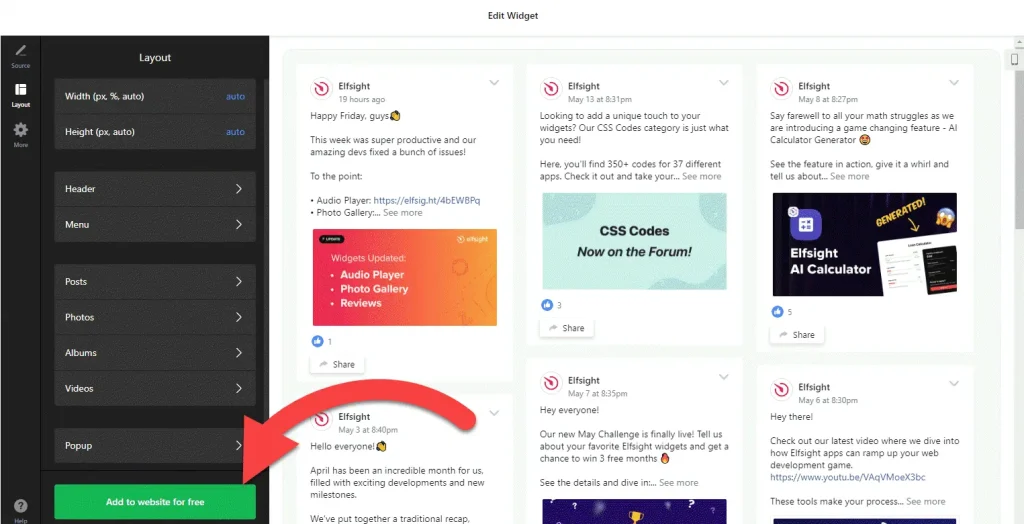
- Adjust the layout: set the width and height and choose which elements to show. Note the height, because you’ll size the Wix embed box to match it.
- Save it: click “Add to website for free“, sign up on the next page and copy your embed code.
2. Add it to your Wix site
- Open your site in the Wix Editor and go to the page where the feed should appear, for example your homepage or a News page.
- Click Add Elements (+), then Embed Code › Popular Embeds › Embed HTML. In Wix Studio the element is called Embed code.
- Click Enter Code, make sure Code is selected, paste the Facebook feed code and click Update.
- Drag the corners of the box until the whole feed shows, with no posts cut off at the bottom or the side.
- Switch to the mobile editor and resize the box there too. Wix embed boxes aren’t responsive, so a feed that fits on desktop can be cut off on a phone.
- Publish your site and check the feed on the live page and on your phone.
Where to put the Facebook Feed widget on your Wix site
- On your homepage, below your main services, so new visitors see recent updates and photos.
- On a News or Updates page, so you post an announcement once on Facebook and it shows on your site too.
- On your Contact or Location page, near your opening hours, where customers look for holiday closures and last-minute changes.
- On a menu, class or event page, using the Facebook Posts or Facebook Videos template for recent specials, clips and photos.
Do you need a paid Wix plan?
No. Wix lists no plan requirement for the Embed HTML element, so the Facebook feed works on a free Wix site as well as a premium one. The only catch is size: an Embed HTML box is a fixed frame, so you set its size by hand in both the desktop and the mobile editor.
You also don’t need Wix’s site-wide Settings › Custom Code, which needs a premium plan with a connected domain. A feed is an inline widget, so it goes only on the pages where you place it. The widget’s own free plan covers one widget with up to 200 views a month on unlimited websites, with a small Elfsight link; paid widget plans start at $5 a month, billed yearly.
Facebook Feed widget features
- Six templates: Medium Widgets, Small Widgets, Large Widgets, Facebook Posts, Facebook Videos and Full-Width Posts.
- Posts from your own Page: connect the Facebook Page you manage and the widget fetches its posts for you.
- A video template for Pages that share more clips than photos.
- Layout settings: set the width and height and choose which elements are visible.
- One dashboard to create more Facebook feeds, edit existing ones and copy the embed code again.
Frequently asked questions
Is the Facebook feed free on Wix?
Yes. The builder is free, and the free plan includes one widget with up to 200 views a month on unlimited websites, with a small Elfsight branding link. Paid plans start at $5 a month, billed yearly. Wix doesn’t charge for the Embed HTML element either.
Why is my Facebook feed cut off on Wix?
The Embed HTML box is smaller than the feed. Select the element in the Wix Editor and drag its corners until all the posts fit. Then check the mobile editor, because Wix keeps a separate box size for mobile.
Which Facebook Page can I show on my Wix site?
A Page you manage. In the builder you sign in with your Facebook account and connect that Page, and the widget fetches its posts.
Do I need to update my Wix page when I post on Facebook?
No. The widget fetches posts from your connected Page, so there is nothing to copy into Wix. To change the layout, edit the widget in your Elfsight dashboard and save; your Wix site updates without pasting the code again.
Can I add the same feed to more than one Wix page?
Yes. Paste the same embed code into an Embed HTML element on each page. It is still one widget, so views from every page count toward the same monthly limit.
More Wix widgets
- Facebook Feed widget
All templates and features - Wix Instagram Feed widget
Your latest Instagram posts and reels - Wix TikTok Feed widget
Your TikTok videos in a grid or slider - Wix YouTube Gallery widget
Videos from a YouTube channel or playlist - Wix LinkedIn Feed widget
Company posts from LinkedIn - 20 best Wix widgets
Our roundup of the best apps and widgets for Wix