
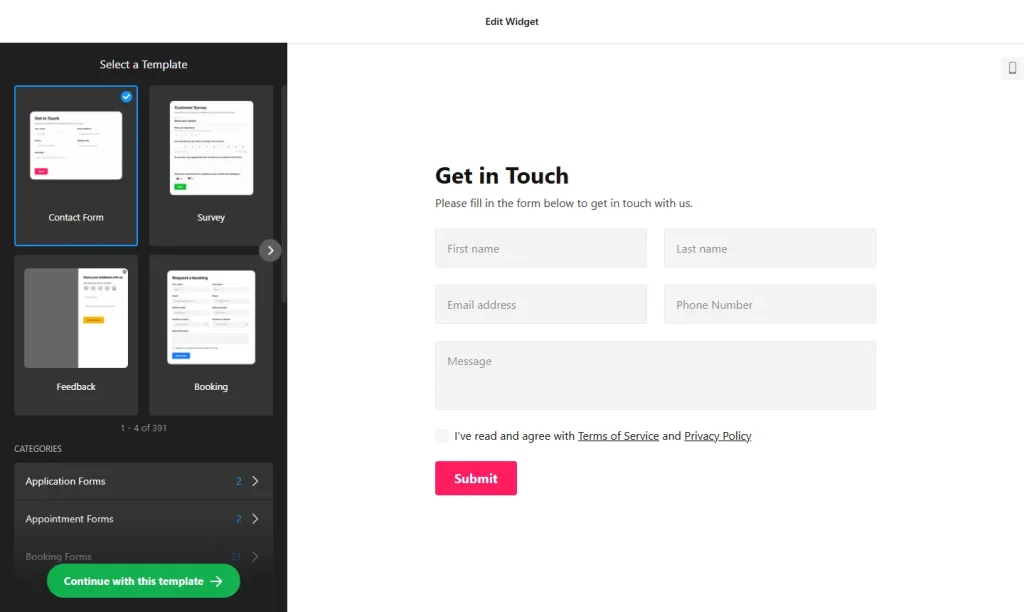
Use the online form builder below to create a free form for your Wix website. Choose a template by category, or start from Blank, and click “Continue with this template“.
Small businesses on Wix use forms for much more than contact. A cleaner needs quote requests, a café takes catering orders, a tutor registers new students, a shop hires staff. This form builder covers all of these with templates grouped by use case, more than 20 field types and an AI tool that drafts a form from a short description. You add the finished form to any Wix page with an Embed HTML element.
How to add a Form Builder widget to Wix
1. Create your widget
- Pick a template or describe your form: browse categories such as Order forms, Appointment forms, Application forms and Customer review forms, or type a short description and let the AI form generator draft it for you.
- Add and order your fields: choose from more than 20 field types, including email, text, date, time, image choice and file upload. Add as many fields as you need and put them in the order you want.
- Choose a layout: Vertical, Horizontal or Multistep for an inline form. Multistep splits a long quote or application form into short steps.
- Set notifications and actions: get an email for each entry, with CC or BCC if a colleague needs a copy, send an automatic reply, and pick a success message, redirect or hidden form after submit.
- Save it: click “Add to website for free“, sign up on the next page and copy your embed code.
2. Add it to your Wix site
- Open your site in the Wix Editor and go to the page for the form, for example Get a Quote or Book Now.
- Click Add Elements (+), then Embed Code › Popular Embeds › Embed HTML. In Wix Studio the element is called Embed code.
- Click Enter Code, make sure Code is selected, paste the form code and click Update.
- Drag the box corners until the whole form fits. For a Multistep form, size the box for the longest step.
- Open the mobile editor and resize the box again. Wix embed boxes aren’t responsive, and the form usually gets taller on a narrow screen, so the mobile box needs its own height.
- Publish and submit a test entry to check the notification email.
Where to put the Form Builder widget on your Wix site
- A Get a Quote page for trades and services, with a drop-down for the job type and a file upload for photos.
- A booking request form on a service page, with date and time selectors.
- An order form for a bakery, florist or caterer that takes orders by request rather than through a full online store.
- A job application page with a file upload for CVs.
- A feedback form after a visit or purchase, built from a Customer review template.
Do you need a paid Wix plan?
No. Wix lists no plan requirement for Embed HTML, so any of these forms can go on a free or premium Wix site. Wix only displays code served over HTTPS, and the form code is. The widget’s free plan covers one widget with up to 200 views a month on unlimited websites, with a small Elfsight link; paid widget plans start at $5 a month, billed yearly.
The Floating pane embed type is the exception. Wix runs embedded code in its own frame, so a pane pasted into Embed HTML stays inside that box. To show a floating form on every page, add the code under Settings › Custom Code, which needs a premium plan and a published site with a connected domain.
Form Builder widget features
- Templates by category: application, appointment, customer review, event registration, newsletter, order, registration and multistep forms.
- AI form generation from a short description of the form you want.
- More than 20 field types and unlimited fields, including file upload with the file types you allow.
- Inline layouts (Vertical, Horizontal, Multistep) and a Floating pane with its own position, width and reopen button.
- Email notifications with CC, BCC and a custom reply-to address, plus auto-replies.
- Mailchimp, Google Sheets and Zapier, which connects to 6,000+ other services.
Frequently asked questions
What kinds of forms can I build for my Wix site?
Quote requests, order forms, job applications, event registrations, newsletter sign-ups, feedback forms and more. Start from a template category or describe the form and let the AI generator draft it.
Do I need Wix premium to embed the form?
No. Embed HTML has no plan requirement on Wix. A premium plan with a connected domain only matters if you want a floating form on every page through Custom Code.
My multistep form is cut off on Wix. How do I fix it?
The Embed HTML box is shorter than one of the steps. Click through every step in Preview, then make the box tall enough for the longest one, both on desktop and in the mobile editor.
Can customers upload photos or files?
Yes. Add the file upload field and choose which file types it accepts, for example images for a quote request or PDFs for a job application.
Can I edit the form after it’s live on Wix?
Yes. Change it in your Elfsight dashboard and save. The form on your Wix site updates by itself. Just check the box size if you added fields.
More Wix widgets
- Form Builder widget
All templates and features - Wix FAQ widget
Questions and answers in an accordion - Wix Google Reviews widget
Your Google Business reviews and rating - Wix Contact Form widget
A simple contact form - Wix Instagram Feed widget
Your latest Instagram posts and reels - 20 best Wix widgets
Our roundup of the best apps and widgets for Wix