
Use the widget builder below to create your free sales notification popup. Select a template and click “Continue with this template” to get started.
Show small popups about recent purchases, sign-ups or bookings to build trust with new visitors. No coding needed, and it works on any website.
How to use the Sales Notification widget builder
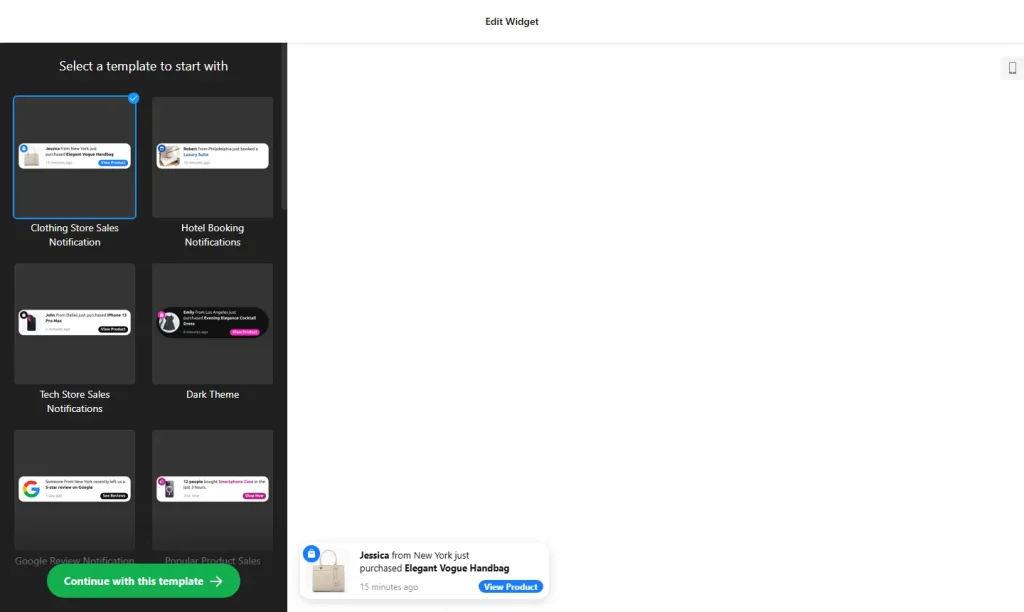
- Choose a template: Pick a design in the builder above, such as Order Notification, Low Stock Notification or Active Visitors Notification, and click “Continue with this template”.
- Add your notifications: Write the message for each popup and add an image, a link and a call-to-action button. You can add as many notifications as you need.
- Set the timing: Choose the delay before the first popup, how long each one stays on screen and the interval between popups.
- Choose the position: Place the popup in one of eight positions on desktop and one of two positions on mobile.
- Add animation and a close button: Let popups fade, slide, bounce or zoom in, and give visitors a button to close them.
- Customize the look: Change colors, fonts, image size and corner radius so the popup matches your website.
- Save your widget: Click “Add to website for free” and sign up on the next page to save your widget.
- Copy the embed code: Paste it into your website, either on every page or only on product and pricing pages.
Key features of the Sales Notification widget
- 20+ ready-made templates: Start from templates for sales, sign-ups, reviews, bookings, new followers, donations and subscriptions.
- Unlimited notifications: Create as many popups as you need and rotate them as visitors browse.
- Timing control: Set the first delay, display time and interval so popups never feel pushy.
- Random order: Shuffle notifications so visitors don’t see the same message over and over.
- Clickable popups: Link each notification to a product or offer page and track clicks with your existing analytics tool.
- Desktop and mobile positions: Eight positions on desktop and two on mobile, set separately.
- Animations and close button: Fade, slide, bounce or zoom effects, plus an optional close button.
When to use a sales notification popup
A sales notification popup is a simple form of social proof. Seeing that other people just bought, booked or signed up tells new visitors that your business is active and trusted, which makes their own decision easier. It works well for:
- Online stores showing recent orders or products that are low in stock
- Service businesses showing new bookings
- Newsletters and communities showing new sign-ups
- Creators showing new followers or subscribers
Show real activity only. You add each notification yourself in the editor, so keep them accurate and update them regularly. Fake or made-up notifications mislead shoppers, damage trust when people notice, and can break consumer-protection rules in many countries. For another kind of social proof, add customer reviews with the All-in-One Reviews widget.
How to add the Sales Notification popup to your website
After you save the widget, Elfsight gives you a short embed code. Paste it into a custom HTML or embed block on your website. Because the popup floats over the page, you can add it to your site-wide footer or theme settings to show it everywhere, or only to the pages where buying decisions happen. It works on WordPress, Wix, Squarespace, Shopify, Webflow, Google Sites and any other website that accepts custom HTML. For step-by-step instructions for each platform, see our guide on how to add embed code to any website builder.
How to manage your Sales Notification widget
Log in to your Elfsight dashboard to edit your widget at any time, for example to add new notifications or remove old ones. Changes go live automatically, so you don’t need to replace the embed code on your website. From the dashboard you can also create more widgets, copy the embed code again and see how many views your widget has used this month.
Frequently asked questions
Is the sales notification popup free?
Yes. Elfsight’s free plan includes one widget with up to 200 views per month on unlimited websites, with a small Elfsight branding link. Paid plans start at $5 per month (billed yearly) and add more views and remove the branding.
What kinds of activity can sales notifications show?
You can show popups for recent purchases, bookings, reviews, sign-ups or new followers. Templates also cover low stock alerts, new blog posts and active visitors.
How many notification popups can I create?
There is no limit. You can create as many notifications as you need and shuffle their order so visitors see a varied sequence.
Can I control how often notifications appear?
Yes. You set the delay before the first popup, how long each popup stays visible and the interval between popups.
Can I use different popup positions on desktop and mobile?
Yes. There are eight positions for desktop and two for mobile, so you can keep the popup away from important content on small screens.
More widgets to boost conversions
- Popup widget
Show offers, announcements and sign-up forms in a popup - Countdown Timer
Add urgency to sales and limited-time deals - Announcement Bar
Highlight free shipping, discounts and news - All-in-One Reviews widget
Show reviews from 20+ platforms in one feed - Spin the Wheel widget
Offer prizes and collect emails - Facebook Reviews widget
Show recommendations from your Facebook Page - PayPal Button widget
Let visitors pay, subscribe or donate through PayPal