
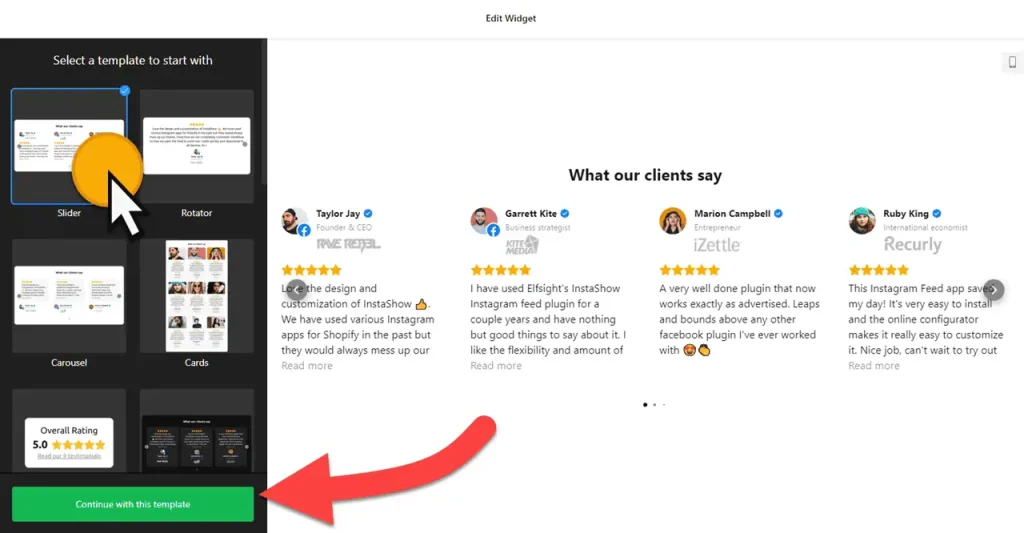
Use the builder below to create a free testimonials slider for your Wix website. Pick a template and click “Continue with this template” to add your first testimonial.
For a Wix site that sells a local service, a few words from happy clients do a lot of the convincing. A cleaner, a hair salon or a personal trainer can show quotes with names, photos and star ratings in a slider that takes up little space. You type in the testimonials yourself, so you can use kind words from emails, messages or feedback forms. Then you add the slider to any Wix page with an Embed HTML element, with no app from the Wix App Market.
How to add a Testimonials Slider widget to Wix
1. Create your widget
- Choose a template: pick one such as Slider, Rotator, Carousel, Cards, Badge, Customer Story, List or Slider without Star Ratings.
- Add your testimonials: click “Add Testimonial” and enter the quote with a star rating, the client’s name, a caption, the date and a profile picture. You can also add a website URL, a logo and photos, and drag testimonials to change their order.
- Pick a layout: choose Carousel, Grid, Masonry, List, Slider, Badge or Floating Badge, and set a maximum width.
- Style it: choose a card style, show or hide ratings and dates, and set a color scheme and accent color that match your Wix theme.
- Save it: click “Add to website for free“, sign up on the next page and copy your embed code.
2. Add it to your Wix site
- Open your site in the Wix Editor and go to the page for your testimonials.
- Click Add Elements (+), then Embed Code › Popular Embeds › Embed HTML. In Wix Studio the element is called Embed code.
- Click Enter Code, make sure Code is selected, paste the slider code and click Update.
- Drag the corners of the box until the whole testimonial card is visible, including the name, photo and star rating.
- Switch to the mobile editor and resize the box there too. Longer quotes wrap onto more lines on a phone, so the box usually needs extra height.
- Publish your site and check the slider on the live page and on your phone.
Where to put the Testimonials Slider widget on your Wix site
- On your homepage, below your list of services, so new visitors see what past clients say.
- Next to your booking or contact form, where people decide whether to get in touch.
- On a service page, with the quotes about that service dragged to the top of the list.
- On your About page, next to your story and photos of your team.
Do you need a paid Wix plan?
No. The Embed HTML element works on Wix’s free and premium plans, so an inline slider can go on any page. The widget’s own free plan covers one widget with up to 200 views a month on unlimited websites, with a small Elfsight link; paid widget plans start at $5 a month, billed yearly.
The Floating Badge layout is different. Wix runs embedded code inside its own frame, so a floating badge pasted into an Embed HTML element stays inside that box instead of following visitors down the page. To show it on every page, add the code under Settings › Custom Code, which Wix offers on premium plans with a connected domain. The other six layouts work inline on any plan.
Testimonials Slider widget features
- Eight templates, from Slider and Rotator to Cards, Customer Story and Badge.
- Seven layouts: Carousel, Grid, Masonry, List, Slider, Badge and Floating Badge.
- Detailed testimonials with star rating, name, caption, date, profile picture, social profile, website, logo and photos.
- Show or hide details such as star ratings and dates.
- Color scheme and accent color, plus custom CSS for anything the editor doesn’t cover.
- Extra settings for language, Schema.org markup and custom JavaScript.
Frequently asked questions
Is the testimonials slider free on Wix?
Yes. The builder is free, and the free plan includes one widget with up to 200 views a month on unlimited websites, with a small Elfsight branding link. Paid plans start at $5 a month, billed yearly, for more views and no branding.
Do I need a Wix premium plan for the testimonials slider?
Not for an inline slider. The Embed HTML element works on free Wix sites. Only a Floating Badge on every page needs site-wide custom code, which requires a premium plan with a connected domain.
Why is my testimonials slider cut off on Wix?
The Embed HTML box is too small for the cards. Select the element in the Wix Editor and drag its corners until the whole testimonial fits, then check the mobile editor too and publish again.
Where do the testimonials come from?
You add them yourself in the builder: paste a quote from an email, message or feedback form and add the client’s name and photo. To show reviews from your Google Business Profile instead, use the Google Reviews widget.
Can I add new testimonials after the slider is on my Wix site?
Yes. Add or edit them in your Elfsight dashboard and save. The slider on your Wix site updates on its own, so you don’t need to paste the code again.
More Wix widgets
- Testimonials Slider widget
All templates and features - Wix All-in-One Reviews widget
Reviews from 50+ platforms in one feed - Wix Google Reviews widget
Your Google Business reviews and rating - Wix Contact Form widget
A simple contact form - Wix Instagram Feed widget
Your latest Instagram posts and reels - 20 best Wix widgets
Our roundup of the best apps and widgets for Wix