
Use the widget builder below to create your free FAQ widget. Select a template and click “Continue with this template” to get started.
Add a clean accordion FAQ section to any website. Group questions into categories, add icons and links, and update answers without touching your site’s code.
Step-by-step guides: Wix Squarespace WordPress Shopify Webflow Google Sites
How to use the FAQ widget builder
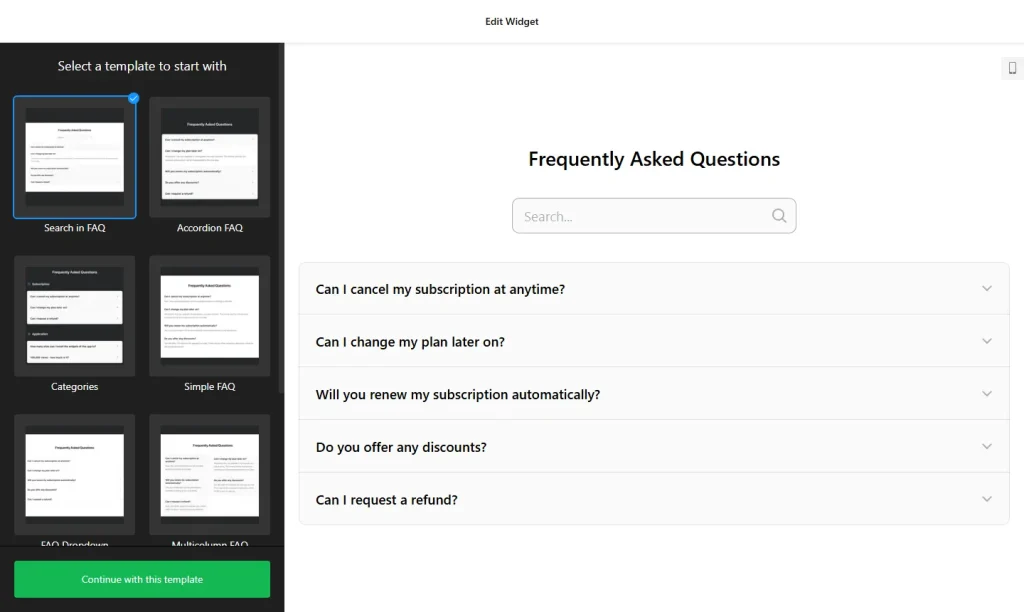
- Choose a template: Pick a design in the builder above, such as Categories, Collapsible FAQ, FAQ Toggle, Q&A or Knowledge Base, and click “Continue with this template”. You can also start from scratch.
- Create categories: Group related questions under categories, each with its own title and icon. You can hide category titles if you prefer one simple list.
- Add questions and answers: Type your questions and answers. Answers support HTML, so you can add links, bold text and line breaks.
- Pick a layout: Choose List to show answers below each question, Accordion to reveal answers on click, or Multicolumn to split the content into columns.
- Choose icons: Select from over 30 icons for your categories, and pick a cross or arrow icon for the accordion.
- Customize the look: Change colors and styles so the FAQ section matches your website.
- Save your widget: Click “Add to website for free” and sign up on the next page to save your widget.
- Copy the embed code: Paste it into your website where you want the FAQ section to appear.
Key features of the FAQ widget
- Three layouts: List, Accordion and Multicolumn, so short and long FAQs both stay easy to read.
- Unlimited categories: Create as many categories as you need, each with a title and icon, to keep large FAQ sections organized.
- No strict question limit: Build a short list of five questions or a full knowledge base on the same widget.
- HTML in answers: Add links, bold text and line breaks to make detailed answers easier to follow.
- 30+ icons: Make categories easy to recognize, and choose cross or arrow icons for the accordion.
- Ready-made templates: Start from templates like FAQ Dropdown, FAQ Page and Knowledge Base, then adjust them to your style.
- Instant updates: Edit a question in the builder and the change appears on your website automatically.
When to add an FAQ section to your website
An FAQ section answers the questions visitors would otherwise email you about. When answers are easy to find, fewer people contact support and more people move on to buy or book. An FAQ widget is useful on:
- Pricing and product pages, to clear up doubts about plans, delivery or returns
- Service and booking pages, to explain how the process works
- Contact and support pages, to answer common questions before people write to you
- A dedicated FAQ or help page that works like a small knowledge base
Tip: Use the questions your customers actually ask by email, chat or phone, and write short, direct answers. For questions that need a personal reply, place a contact form right below the FAQ.
How to add the FAQ widget to your website
After you save the widget, Elfsight gives you a short embed code. Paste it into a custom HTML or embed block where you want the FAQ section to show. It works on WordPress, Wix, Squarespace, Shopify, Webflow, Google Sites and any other website that accepts custom HTML. For step-by-step instructions for each platform, see our guide on how to add embed code to any website builder.
You can use the same widget on several pages, or create separate FAQ widgets for different products and topics. Put the most important questions at the top and group the rest into categories, so visitors can scan the list quickly.
How to manage your FAQ widget
Log in to your Elfsight dashboard to add, edit or remove questions at any time. Changes go live automatically, so you don’t need to replace the embed code on your website. From the dashboard you can also create more widgets, copy the embed code again and see how many views your widget has used this month.
Frequently asked questions
Is the FAQ widget free?
Yes. Elfsight’s free plan includes one widget with up to 200 views per month on unlimited websites, with a small Elfsight branding link. Paid plans start at $5 per month (billed yearly) and add more views and remove the branding.
How many questions can I add?
There is no strict limit on the number of questions. You can build a short FAQ list or a large knowledge base with many categories.
Can I group questions into categories?
Yes. You can create any number of categories, each with its own title and icon. You can also hide category titles to show one simple list.
Can I add links or formatting to answers?
Yes. Answers support HTML, so you can add links, bold text, line breaks and other basic formatting.
Will the FAQ widget work on my website builder?
Yes. It works on any website that lets you add custom HTML, including WordPress, Wix, Squarespace, Shopify, Webflow and Google Sites.
More widgets to help your visitors
- Contact Form widget
Collect questions and leads with an easy form - AI Chatbot widget
Answer visitor questions 24/7 - Business Hours widget
Show your opening hours and contact details - All-in-One Chat widget
Let visitors reach you on WhatsApp, Messenger, Telegram and more - Accessibility widget
Let visitors adjust text size, colors and spacing - Website Translator widget
Let visitors read your site in their language - Poll widget
Ask visitors a question and show live results