
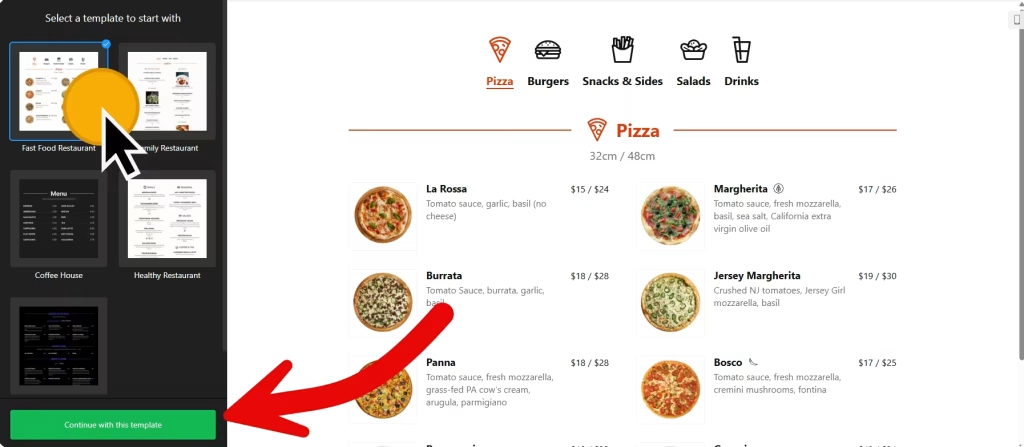
Use the builder below to create a free restaurant menu for your Wix website. Pick a template, click “Continue with this template” and add your dishes.
On a café, takeaway or family restaurant site, the menu needs to be easy to read on a phone and easy to keep up to date. A photo of a printed menu is hard to read on a small screen, and a PDF has to be replaced every time a price changes. This widget puts your menu on the page as real text, with prices, photos, badges and nutrition info. You change it in your Elfsight dashboard and add it to Wix once with an Embed HTML element.
How to add a Restaurant Menu widget to Wix
1. Create your widget
- Choose a template: start from one such as Fast Food Restaurant, Family Restaurant, Coffee House, Healthy Restaurant or Cocktail Bar, then click “Continue with this template“.
- Add your menus: in the Menus tab, click “Add Menu” and enter a name, caption and icon for each one, for example Breakfast, Lunch and Drinks.
- Add items: click “Add item” and fill in the caption, price, image and badges. You can also add calories, fat, carbs and protein.
- Choose layouts: show menus as tabs or a list, and sections as a list, masonry or tabs. Tabs keep the widget shorter, which makes the Wix embed box easier to size.
- Style and save: pick a light, dark or custom color scheme, an accent color and a font, then click “Add to website for free“, sign up and copy your embed code.
2. Add it to your Wix site
- Open your site in the Wix Editor and go to your menu page, or add a new page for it.
- Click Add Elements (+), then Embed Code › Popular Embeds › Embed HTML. In Wix Studio the element is called Embed code.
- Click Enter Code, make sure Code is selected, paste the menu code and click Update.
- Drag the corners of the box until your longest menu fits. If you use tabs, size the box for the tallest tab, because the box doesn’t grow when a longer tab opens.
- Switch to the mobile editor and resize the box there too. On a phone the menu is narrower and usually taller, so the mobile box needs its own height.
- Publish your site, then click through every tab on the live page and on your phone.
Where to put the Restaurant Menu widget on your Wix site
- On a dedicated Menu page, linked from your site’s main menu so it’s one tap away on a phone.
- On your homepage, below your opening hours or booking button, with a short menu of popular dishes or today’s specials.
- On a catering or events page, with a separate menu for group orders.
- On a takeaway page, next to your phone number or ordering link, so people can choose before they call.
Do you need a paid Wix plan?
No. The Embed HTML element works on Wix’s free and premium plans, so you can add your menu to any page without upgrading. Wix only displays HTTPS code, so paste the code exactly as the builder gives it. The widget’s own free plan covers one widget with up to 200 views a month on unlimited websites, with a small Elfsight link. A busy menu page can pass that, so check your traffic; paid widget plans start at $5 a month, billed yearly.
Wix runs embedded code inside its own frame, and the box keeps the height you set. That’s why the tallest tab matters, and why an item popup opens inside the box rather than over the page. If you use item popups, leave enough room in the box for them.
Restaurant Menu widget features
- Templates such as Fast Food Restaurant, Family Restaurant, Coffee House, Healthy Restaurant and Cocktail Bar.
- Several menus in one widget, each with its own name, caption and icon.
- Item details: caption, price, image and badges for every dish.
- Nutrition info: calories, fat, carbs and protein for each item.
- Layouts and item settings: menus as tabs or a list, sections as a list, masonry or tabs, plus item layout, visible elements and popup settings.
- Appearance: a light, dark or custom color scheme, accent color and font, with custom CSS and JavaScript for anything else.
Frequently asked questions
Do I need a Wix premium plan to add the menu?
No. Wix lists no plan requirement for the Embed HTML element, so the menu works on free and premium Wix sites alike.
Why is part of my menu cut off on Wix?
The Embed HTML box is shorter than the menu, often because it was sized for a shorter tab. Drag the box until your tallest tab fits, then resize it again in the mobile editor.
Can I change prices without editing my Wix site?
Yes. Change the price in your Elfsight dashboard and save. The menu on your Wix site updates on its own, so you don’t need to open the Wix Editor or paste the code again.
Can I show calories and badges on dishes?
Yes. Each item can have badges and nutrition info, including total calories, fat, carbs and protein. You can also show or hide item elements in the item settings.
Is the restaurant menu widget free?
Yes. The free plan includes one widget with up to 200 views a month on unlimited websites, with a small Elfsight branding link. Paid plans start at $5 a month, billed yearly, for more views and no branding.
More Wix widgets
- Restaurant Menu widget
All templates and features - Wix Appointment Booking widget
Online booking with time slots - Wix Business Hours widget
Opening hours with an open-now status - Wix Event Calendar widget
Upcoming events in a calendar or list - Wix Google Reviews widget
Your Google Business reviews and rating - 20 best Wix widgets
Our roundup of the best apps and widgets for Wix