
Use the widget builder below to create your free store locator widget. Select a template and click “Continue with this template” to get started.
Show all your stores, branches and service points on a searchable map. No coding or Google Maps API key needed.
How to use the Store Locator widget builder
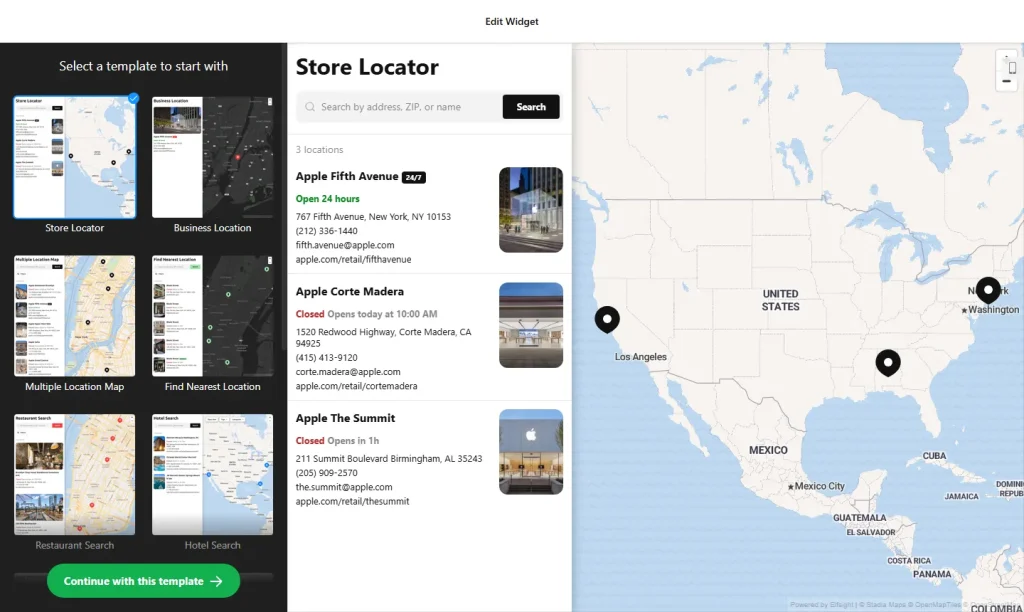
- Choose a template: Pick a design such as Store Locator Map, Find Nearest Location, Dealer Locator or Bank Branch Locator, and click “Continue with this template”.
- Add your locations: Enter each location by address or business name, and the widget fetches the details from Google Maps. For many locations, import them all at once from a CSV file.
- Complete the location cards: Add phone numbers, email, website, business hours, a short description, a logo and photos for each store.
- Add buttons: Put call-to-action buttons on the location cards to send visitors where you want them to go next.
- Pick a layout: Choose one of the ready-made layouts and set the map zoom to automatic or a fixed level.
- Customize the look: Select a visual theme, fonts and colors, and translate the interface text into your language. Custom CSS and JavaScript are available for advanced changes.
- Save your widget: Click “Add to website for free” and sign up on the next page to save your widget.
- Copy the embed code: Paste it into the page where you want the store locator to appear, such as a “Locations” or “Find a store” page.
Key features of the Store Locator widget
- Location search: Visitors can search by ZIP code, store name or address to find the nearest location.
- Unlimited locations: Add as many stores as you need, one by one or in bulk with CSV import and export.
- Google Maps auto-fetch: Business details are filled in automatically, so you don’t have to type everything by hand.
- Detailed location cards: Show address, phone, email, website, description, logo and photos for every store.
- Open and closed status: The widget shows whether each store is open right now, based on the hours you set.
- No API key required: All map features work without separate Google Maps credentials.
- Mobile-friendly: The map and list adapt to every screen size, with automatic or manual zoom.
Who needs a store locator on their website?
A store locator turns website visitors into in-store customers by showing them exactly where to go, when you’re open and how to reach you. It’s built for any business with more than one place customers can visit:
- Retail chains and franchises with several stores
- Brands that sell through dealers, resellers or stockists
- Banks, credit unions and insurance offices with branches
- Restaurant groups, clinics and gyms with multiple sites
- Service businesses with pickup points or service areas
If you only have one location, a simpler Google Maps widget together with a Business Hours widget is usually all you need.
How to add the Store Locator widget to your website
After you save the widget, Elfsight gives you a short embed code. Paste it into a custom HTML or embed block where you want the map to show. It works on WordPress, Wix, Squarespace, Shopify, Webflow, Google Sites and any other website that accepts custom HTML. For step-by-step instructions for each platform, see our guide on how to add embed code to any website builder.
The best place for a store locator is a dedicated locations page linked from your main menu and footer. You can also add it to your contact page so visitors find addresses and hours in one place, and link to it from product pages so shoppers who want to see an item in person can find the closest store.
How to manage your Store Locator widget
Log in to your Elfsight dashboard to edit your widget at any time, for example to add a new store or change opening hours. Changes go live automatically, so you don’t need to replace the embed code on your website. From the dashboard you can also create more widgets, copy the embed code again and see how many views your widget has used this month.
Frequently asked questions
Is the store locator widget free?
Yes. Elfsight’s free plan includes one widget with up to 200 views per month on unlimited websites, with a small Elfsight branding link. Paid plans start at $5 per month (billed yearly) and add more views and remove the branding.
Do I need a Google Maps API key?
No. The store locator works without any API keys, so you don’t need to set up a Google Cloud account.
Can I import many locations at once?
Yes. You can add locations one by one or import and export them in bulk with a CSV file that includes addresses, hours and contact details.
Can visitors search by ZIP code?
Yes. Visitors can search by ZIP code, store name or address to find the location nearest to them.
What details can each location show?
Each location can show its address, phone, email, website, business hours with open or closed status, a description, a logo and photos.
More location widgets
- Google Maps widget
Add an interactive map with your business details - Business Hours widget
Show your opening hours and contact details - Click to Call widget
Let mobile visitors call you with one tap - 8 website widgets every restaurant needs
- Team Showcase widget
Introduce the people behind your business - Yelp Reviews widget
Show your Yelp rating and reviews