
Use the builder below to create a free Facebook feed for your Squarespace website. Pick a template and click “Continue with this template” to connect your Facebook Page.
Studios, photographers and service businesses on Squarespace often share new work, schedule changes and client stories on Facebook. A Facebook feed shows those posts on your Squarespace site in a layout you choose, so the site stays current between redesigns. You build the feed here and paste it into a Code Block. Check your Squarespace plan first: the widget runs on JavaScript, which Code Blocks only allow on higher-tier plans.
How to add a Facebook Feed widget to Squarespace
1. Create your widget
- Choose a template: Medium Widgets, Small Widgets, Large Widgets, Facebook Posts, Facebook Videos or Full-Width Posts. Full-Width Posts suits a full-width section; Small Widgets fits a narrow column.
- Connect your Facebook Page: sign in with your Facebook account and pick the Page you manage, so the widget can fetch its posts.
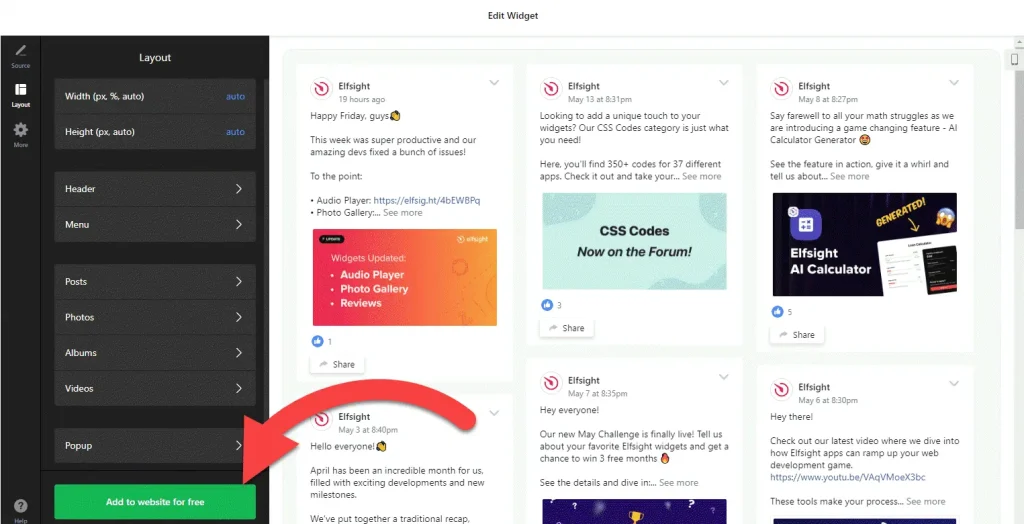
- Adjust the layout: set the width and height and hide any elements you don’t need, so the feed sits cleanly next to your images and text.
- Save it: click “Add to website for free“, sign up on the next page and copy your embed code.
2. Add it to your Squarespace site
- Go to the page where the feed should appear and click Edit.
- Click an Add Block point (+) in the section you want, then choose Code.
- Paste the Facebook feed code, set the mode to HTML and turn off Display Source.
- Save the page, then open the live site, not just the editor, to check that the posts load.
- If the block is empty on the live site, check your plan. Without JavaScript support, Squarespace shows nothing and gives no error.
Where to put the Facebook Feed widget on your Squarespace site
- On your homepage, in a section below your main image, to show that your studio or practice is active.
- On your About page, next to your story, with recent behind-the-scenes posts.
- On a Classes, Services or Events page, where clients look for the schedule changes you announce on Facebook.
- On a Work or Portfolio page, using the Facebook Posts or Full-Width Posts template to show projects you’ve shared on your Page.
Do you need a paid Squarespace plan?
Usually, yes. Plain HTML works in a Squarespace Code Block on every plan, but JavaScript needs a higher-tier paid plan: Core or above on current plans, Business or above on older ones. The Facebook feed loads with a script, so on a plan without JavaScript the block simply stays empty, with no error message. The same rule applies to site-wide code under Settings › Advanced › Code Injection, but a feed belongs on a page, so a Code Block is the right place for it.
The widget itself has a free plan: one widget, up to 200 views a month, unlimited websites and a small Elfsight link. Paid widget plans start at $5 a month, billed yearly, if you need more views or want to remove the link.
Facebook Feed widget features
- Six templates: Medium Widgets, Small Widgets, Large Widgets, Facebook Posts, Facebook Videos and Full-Width Posts.
- Posts from your own Page: connect the Facebook Page you manage and the widget fetches its posts for you.
- A video template for Pages that share reels and clips more than photos.
- Layout settings: set the width and height and choose which elements are visible.
- One dashboard to create more Facebook feeds, edit existing ones and copy the embed code again.
Frequently asked questions
Which Squarespace plan do I need for the Facebook feed?
One that allows JavaScript in Code Blocks: Core or above on current plans, or Business or above on older plans. On lower plans the widget’s script doesn’t run, so the feed doesn’t appear.
Why is my Facebook feed blank on Squarespace?
Most often your plan doesn’t allow JavaScript, and Squarespace shows nothing instead of an error. Also check that the Code Block is set to HTML with Display Source turned off, and look at the live site rather than the editor.
Is the Facebook feed widget free?
Yes. The free plan includes one widget with up to 200 views a month on unlimited websites, with a small Elfsight branding link. Paid plans start at $5 a month, billed yearly. Your Squarespace plan still needs to allow JavaScript.
Can I show a Facebook Page I don’t manage?
No. The builder connects through your Facebook account, and you choose a Page you manage. The widget then fetches posts from that Page.
Do I need to paste the code again after changing the feed?
No. Edit the widget in your Elfsight dashboard and save. The feed on your Squarespace site updates on its own, and the Code Block stays as it is.
More Squarespace widgets
- Facebook Feed widget
All templates and features - Squarespace Instagram Feed widget
Your latest Instagram posts and reels - Squarespace TikTok Feed widget
Your TikTok videos in a grid or slider - Squarespace YouTube Gallery widget
Videos from a YouTube channel or playlist - Squarespace LinkedIn Feed widget
Company posts from LinkedIn - 25 best Squarespace widgets
Our roundup of plugins and widgets for Squarespace