
Use the widget builder below to create your free OpenTable reviews widget. Select a template and click “Continue with this template” to get started.
Show your OpenTable rating and real diner reviews on your restaurant website. No coding needed, and new reviews are added automatically.
How to use the OpenTable Reviews widget builder
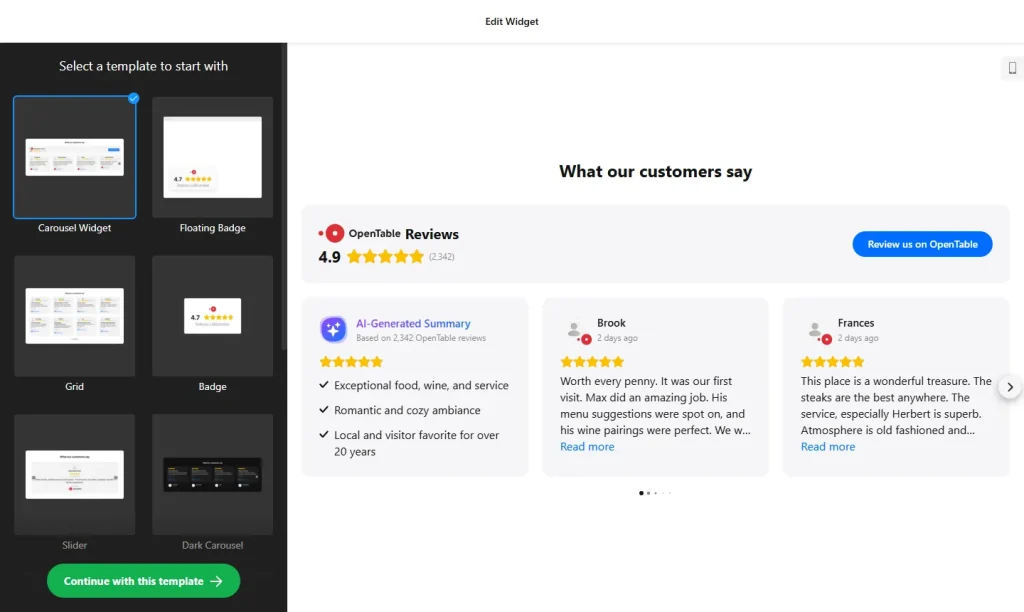
- Choose a template: Pick a design in the builder above and click “Continue with this template”. You can change the layout and style later.
- Add your restaurant: Add your OpenTable restaurant page as the review source. The widget pulls your rating and guest reviews from it.
- Filter reviews: Show only positive reviews, exclude reviews by keyword or author, and hide reviews without any text.
- Sort reviews: Show the newest reviews first or display them in random order.
- Pick a layout and header: Choose how reviews are displayed, then show or hide your star rating, total number of reviews and the review button.
- Choose review details: Decide whether each review shows the author name, profile photo, rating, date and review source.
- Customize the look: Recolor the text, review background and rating stars, pick a transparent, color or image background, or start from the Dark or Light color scheme.
- Save your widget: Click “Add to website for free” and sign up on the next page to save your widget.
- Copy the embed code: Paste it into your website where you want your OpenTable reviews to appear.
Key features of the OpenTable Reviews widget
- Star rating header: Shows your overall OpenTable rating and the total number of reviews.
- Automatic updates: New reviews are synced about every 72 hours, with smart caching that keeps the widget fast.
- Filters and sorting: Show the reviews you want, newest first or in random order.
- Clickable reviews: Each review can show the diner’s name and photo, with a link to your OpenTable page.
- AI review summary: An optional AI summary card sums up the common themes and overall sentiment of your guest feedback.
- Review button: An optional button invites guests to leave their own review on OpenTable.
- Translation: All interface text can be translated. Automatic translation of review text is available on Pro plans and higher.
Why show OpenTable reviews on your restaurant website?
People who visit a restaurant website are usually deciding where to eat soon. Recent reviews from guests who actually dined with you, about the food, the atmosphere and the service, help them choose, and they see that proof right next to your menu and booking options. Because each review links back to your OpenTable page, visitors can see that the feedback is genuine. Good places for the widget:
- Your homepage, below the main photo or banner
- Next to your online menu
- Your reservations or contact page
- Event, catering and private dining pages
Tip: If guests also review you on other sites, add the Yelp Reviews widget or the Tripadvisor Reviews widget, or combine every source with the All-in-One Reviews widget. For more ideas, see 8 website widgets every restaurant needs.
How to add the OpenTable Reviews widget to your website
After you save the widget, Elfsight gives you a short embed code. Paste it into a custom HTML or embed block where you want the reviews to show. It works on WordPress, Wix, Squarespace, Shopify, Webflow, Google Sites and any other website that accepts custom HTML. For step-by-step instructions for each platform, see our guide on how to add embed code to any website builder.
Keep the widget close to your reservation button or booking form. Guests who are reading reviews are often close to booking a table, so make that next step easy to find.
How to manage your OpenTable Reviews widget
Log in to your Elfsight dashboard to edit your widget at any time. Changes go live automatically, so you don’t need to replace the embed code on your website. From the dashboard you can also create more widgets, copy the embed code again and see how many views your widget has used this month.
Frequently asked questions
Is the OpenTable reviews widget free?
Yes. Elfsight’s free plan includes one widget with up to 200 views per month on unlimited websites, with a small Elfsight branding link. Paid plans start at $5 per month (billed yearly) and add more views and remove the branding.
How often are OpenTable reviews refreshed?
New reviews are synced automatically about every 72 hours. Smart caching keeps the widget loading fast while the reviews stay fresh.
Can I choose which review details are shown?
Yes. You can show or hide the author name, profile photo, rating, date and review source.
Can guests leave a review through the widget?
An optional button sends visitors to OpenTable, where they can leave their own review.
How are the reviews sorted?
You can show the newest reviews first or display them in random order, so returning visitors see variety.
More restaurant and review widgets
- Restaurant Menu widget
Show your dishes, drinks and prices - Yelp Reviews widget
Show your Yelp rating and reviews - Tripadvisor Reviews widget
Show guest reviews from Tripadvisor - All-in-One Reviews widget
Combine reviews from 20+ platforms in one feed