
Use the builder below to create a free business hours widget for your Webflow website. Pick a template, add your hours and click “Continue with this template“.
Webflow sites are often built by a designer and handed to a client who doesn’t want to touch the layout. Opening hours typed into a text block then go out of date the first time the business changes its schedule. A business hours widget solves that: the hours live in an Elfsight dashboard that anyone on the team can edit, while the Code Embed stays where you placed it. You choose a template, match the colors and fonts to the site, and drop it into the page.
How to add a Business Hours widget to Webflow
1. Create your widget
- Choose a template: there are seven responsive layouts, from the compact Open Status to Full Business Details.
- Add the schedule: set hours for each day, with more than one time range where needed.
- Add special days and contact details: holidays, schedule changes, logo, phone, email and address.
- Match the design: set the layout width and alignment, colors, fonts, sizes, borders and button styles. Use the custom CSS field for anything else.
- Save it: click “Add to website for free“, sign up on the next page and copy your embed code.
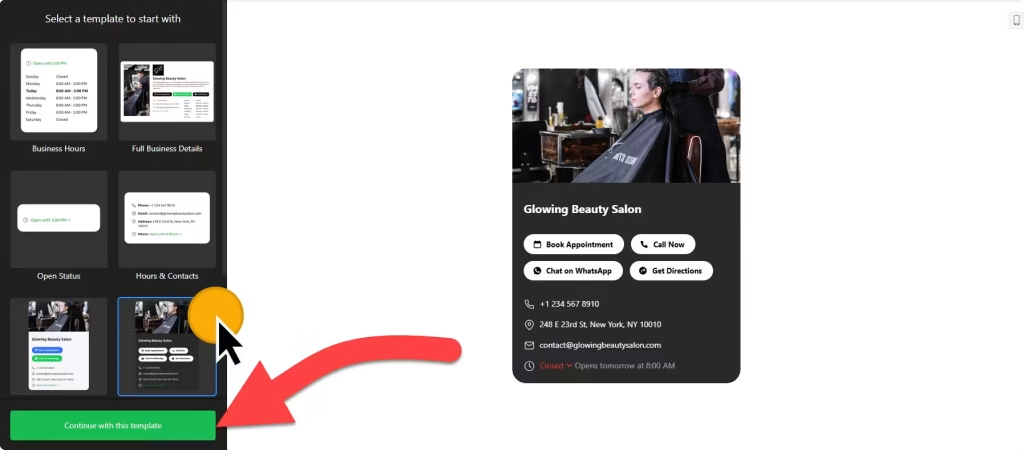
2. Add it to your Webflow site
- Open the page in the Webflow Designer, for example your Contact or Location page.
- Open the Add panel and drag a Code Embed element where the hours should appear, such as a column beside your address.
- Paste the widget code and click Save & Close.
- Don’t worry if the canvas shows an empty element: scripts don’t render inside the Designer.
- Publish the site, or use Preview, and check the hours at desktop and phone widths.
Where to put the Business Hours widget on your Webflow site
- In the contact section of a landing page, next to your address, map and form.
- In your site footer, if it’s a shared component, so the hours appear on every page that uses it.
- On a location page for each studio, restaurant or clinic, with a Directions button.
- Above a booking form or menu on a restaurant or salon site, using a template with Book, Order or Menu buttons.
Do you need a paid Webflow plan?
Yes. Webflow’s Code Embed element and custom code require a paid site plan or workspace plan, so check this before you build the widget.
The hours widget sits inline, so you don’t need the site-wide footer code under Site settings › Custom code › Footer code. The widget’s own free plan covers one widget with up to 200 views a month, with a small Elfsight link; paid widget plans start at $5 a month, billed yearly.
Business Hours widget features
- Seven responsive templates, including Hours & Contacts, Small Contacts Card and Dark Contacts Card.
- Layout settings for width and alignment, so the widget fits your grid.
- Full design control: colors, fonts, sizes, button styles and borders, plus custom CSS and JavaScript fields.
- Several time ranges per day and special days for holidays and changes.
- Call-to-action buttons such as Call, Directions, Book, Order, Menu and Pricing, plus links to services like OpenTable, Uber Eats and TripAdvisor.
- Time zone, time format and language settings.
Frequently asked questions
Which Webflow plan do I need for the business hours widget?
A paid site plan or workspace plan, because Webflow requires one for the Code Embed element and custom code.
Why does the widget look empty in the Webflow Designer?
Scripts don’t render inside the Designer canvas. Publish the site or open Preview to see your hours.
Can my client update the hours without opening Webflow?
Yes. Hours, special days and contact details are edited in the Elfsight dashboard. Changes appear on the live site on their own, without touching the Code Embed.
Can I match the widget to my Webflow design?
Yes. Set colors, fonts, sizes, borders and button styles in the builder, choose the layout width and alignment, or add your own CSS.
Is the business hours widget free?
The widget has a free plan with one widget and up to 200 views a month on unlimited websites, with a small Elfsight branding link. Paid plans start at $5 a month, billed yearly. Your Webflow site still needs a paid plan for the embed.
More Webflow widgets
- Business Hours widget
All templates and features - Webflow Appointment Booking widget
Online booking with time slots - Webflow Event Calendar widget
Upcoming events in a calendar or list - Webflow Restaurant Menu widget
Your menu with prices and photos - Webflow Google Reviews widget
Your Google Business reviews and rating - How to add embed code to any website
Where to paste widget code on every website builder