
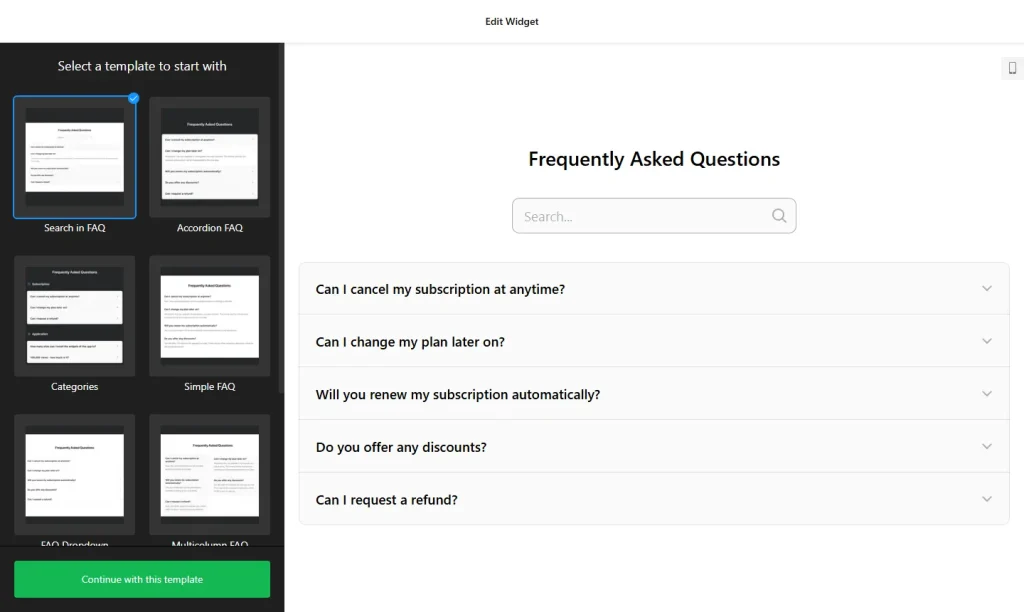
Use the builder below to create a free FAQ widget for your Google Site. Pick a template and click “Continue with this template” to add your questions.
Schools, clubs, sports teams, nonprofits and internal company sites on Google Sites all collect the same questions: term dates, membership fees, what to bring, how to request time off. An FAQ widget groups those answers into categories in an accordion, so a long list takes up little space on the page. You build it here and add it with the Google Sites Embed tool.
How to add an FAQ widget to Google Sites
1. Create your widget
- Choose a template: start from Categories, Collapsible FAQ, FAQ Toggle, Q&A or Knowledge Base, or start from scratch.
- Add categories: for example Joining, Fees, Training and Events for a club, or HR, IT and Office for an internal site. Each one gets a title and icon.
- Write the answers: answers support HTML, so you can link to sign-up forms, documents or calendars.
- Pick a layout: Accordion keeps a long FAQ short on the page; List shows every answer at once.
- Save it: click “Add to website for free“, sign up on the next page and copy your embed code.
2. Add it to your Google Site
- Open your site in Google Sites and go to the page for the FAQ.
- In the Insert panel on the right, click Embed and open the Embed code tab.
- Paste the FAQ code, click Next, then Insert.
- Drag the edges of the embed box so the whole FAQ fits. Google Sites shows every embed inside its own box, so make it tall enough for your longest answer to open without being cut off.
- Publish the site, then open the live page and test a few questions on a computer and on a phone.
Where to put the FAQ widget on your Google Site
- On a school or class site, as a parents’ FAQ about schedules, uniforms, trips and who to contact.
- On a club or team site, covering membership, fees, training times and what to bring.
- On a nonprofit site, answering questions about volunteering, donations and events.
- On an internal company site, with a category per department, so staff find answers before they send a ticket.
Do you need a paid Google Sites plan?
No. Google Sites is free, and the Embed tool is available on every site. The limit to know is the box: every embed sits in its own isolated frame, and there’s no way to add code to every page at once. That’s fine for an FAQ, because it’s an inline section. Add the embed to each page where you want it; the same code works on several pages.
The widget’s own free plan covers one widget with up to 200 views a month on unlimited websites, with a small Elfsight link. That’s often enough for a small club. A busy school or company site may need a paid widget plan, which starts at $5 a month, billed yearly.
FAQ widget features
- Three layouts: List, Accordion and Multicolumn.
- Unlimited categories, each with a title and icon, to keep a big FAQ tidy.
- No strict question limit, so it can work like a small knowledge base.
- HTML in answers, for links to forms, documents and calendars.
- 30+ icons and color settings to match your site’s theme.
- Instant updates: change an answer in the builder and the Google Site shows it without being republished.
Frequently asked questions
Does the FAQ widget work on Google Sites?
Yes. Paste the code with Insert › Embed › Embed code. The FAQ appears inside its own embed box on the page.
Why is my FAQ cut off on Google Sites?
The embed box is too small. Click the box in the editor and drag its edges until the whole FAQ fits, with room for long answers to open. Then publish again.
Can I show the FAQ on every page of my Google Site?
Not automatically. Google Sites has no way to add code to every page at once, so add the embed to each page where you want the FAQ. You can reuse the same code.
Do I need to republish my Google Site to change an answer?
No. Edit the widget in your Elfsight dashboard and save. The FAQ inside the embed box updates on its own.
Is the FAQ widget free?
Yes. The free plan includes one widget with up to 200 views a month on unlimited websites, with a small Elfsight branding link. Paid plans start at $5 a month, billed yearly.
More Google Sites widgets
- FAQ widget
All templates and features - Google Sites Form Builder widget
Any form: quotes, sign-ups, surveys - Google Sites Google Reviews widget
Your Google Business reviews and rating - Google Sites Contact Form widget
A simple contact form - Google Sites Instagram Feed widget
Your latest Instagram posts and reels - Essential Google Sites widgets
10+ widgets that work well on Google Sites