
Use the widget builder below to create your Restaurant Menu widget for free. Select a template and click “Continue with this template” button to get started.
Step-by-step guides: Wix Squarespace WordPress Webflow Google Sites
How to use the Restaurant Menu Widget Generator
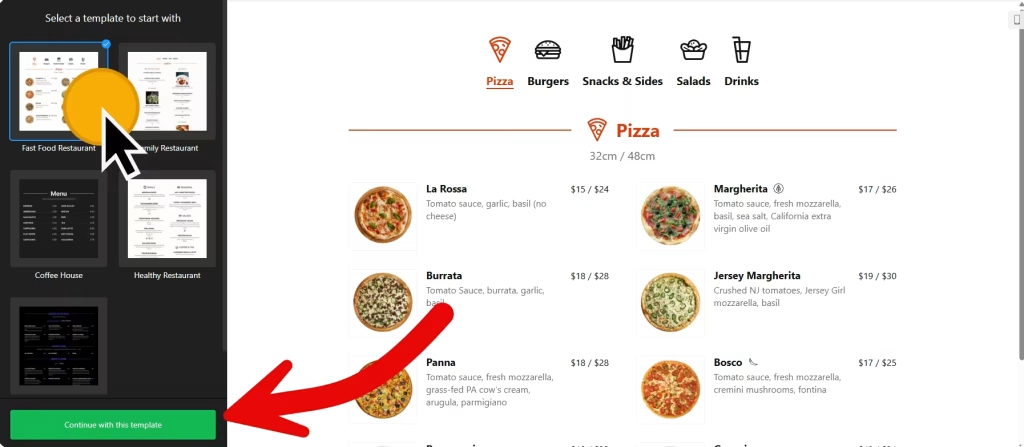
- Choose a template: Select a preferred template and click the “Continue with this template” button. Some available templates are Fast Food Restaurant, Family Restaurant, Coffee House, Healthy Restaurant, and Cocktail Bar.
- Add menu: Click the “Add Menu” button in the Menus tab and enter your menu name, caption, and icon.
- Add menu items: Once the menu is added to your widget, click “Add item” and enter the details for the menu item. Available options are caption, price, image, badges, and nutritional info. Nutritional information includes options to add total calories, fat, carbs, and protein to each item.
- Layout settings: You can select a different layout for your menus and sections. Menu layouts include Tabs and lists as options, and section layouts include List, Masonry, and Tabs.
- Item settings: This section enables you to modify the layout of items, display or hide item elements, and adjust popup settings.
- Change appearance: Select a color scheme (light, dark, or custom), accent color, and font family, and customize elements without needing to code. Furthermore, you can utilize custom CSS and JavaScript to add your styles and tracking scripts.
- Once you’ve customized the widget, click the “Add to website for free” button. This will allow you to add a restaurant menu to your website at no cost. You will also need to register to save your changes.
The Restaurant Menu widget’s HTML embed code
Insert the embed code into your website’s template, theme, or HTML source code editor where you want the restaurant menu widget to appear.
More business widgets
- Appointment Booking widget
Online booking with time slots - Business Hours widget
Opening hours with an open-now status - Event Calendar widget
Upcoming events in a calendar or list - Google Maps widget
An interactive map with your locations - Store Locator widget
Help customers find your nearest store - Team Showcase widget
A meet-the-team section