
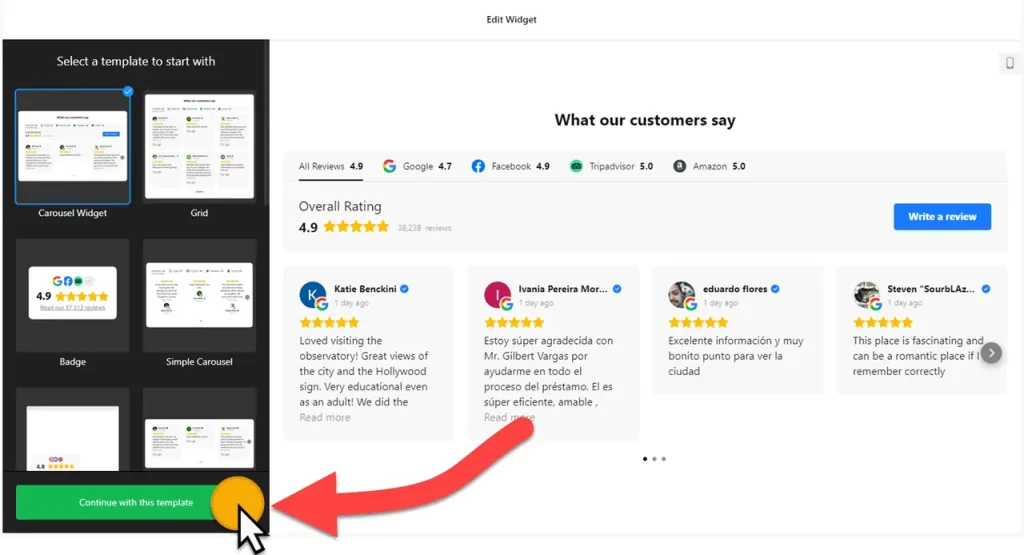
Use the builder below to create a free reviews widget for your Google Sites page. Pick a template, click “Continue with this template” and add your review sources.
Tutors, summer camps, sports clubs, nonprofits and small local services often run their website on Google Sites, while their reviews are spread across Google, Facebook and other platforms. The All-in-One Reviews widget brings them into one feed that you can place on any page. It goes in through the Embed tool, sits in its own box, and needs no coding.
How to add an All-in-One Reviews widget to Google Sites
1. Create your widget
- Choose a template: start from Carousel Widget, Badge, Grid, List, Slider or Sidebar Widget.
- Add your review sources: pick from 50+ supported platforms, such as Google, Facebook, Tripadvisor, Booking.com, Airbnb and LinkedIn. You can also add custom sources, such as reviews people sent you directly.
- Filter the reviews: include or exclude them by keyword or reviewer name, and set a maximum number. Set it to 0 to show all of them.
- Set the look: choose a layout, add a header title and caption, and group sources by platform if you use more than one. Then pick a review style, choose which elements show (verified badge, rating, owner reply) and set your colors.
- Save it: click “Add to website for free“, sign up on the next page and copy your embed code.
2. Add it to your Google Site
- Open your site in Google Sites and go to the page where the reviews should appear.
- In the Insert panel on the right, click Embed, then open the Embed code tab.
- Paste the widget code, click Next, then Insert.
- Drag the edges of the embed box until the whole widget fits. A carousel or slider needs much less height than a grid or list, so size the box for the layout you chose.
- Publish the site and check the reviews on the live page, on a computer and on a phone.
Where to put the reviews widget on Google Sites
- On the homepage of a tutoring service, camp or local business, as a carousel near the top.
- On a sign-up or enrollment page, so parents and new members read what others say before they register.
- On a club or nonprofit About page, with reviews from members, families and volunteers.
- On a Testimonials page, using a grid or list to show every review, grouped by platform.
Do you need a paid Google Sites plan?
No. There’s no plan to buy for the Embed tool in Google Sites. What matters is that Google Sites boxes every embed in its own isolated frame. The reviews only show inside the box you draw, so size it to fit, and there’s no way to add one piece of code to every page at once. To show reviews on several pages, add an embed box to each one.
Because of that box, skip the Floating Badge layout on Google Sites. A floating badge can’t move outside its frame, so it would sit in one spot on the page instead of staying in the corner of the screen. Use Badge, Carousel, Grid, Masonry, List or Slider instead. The widget’s free plan covers one widget with up to 200 views a month on unlimited websites, with a small Elfsight link; paid plans start at $5 a month, billed yearly.
All-in-One Reviews widget features
- 50+ review sources, including Google, Facebook, Tripadvisor, Booking.com, Airbnb, LinkedIn and Shopify, plus custom sources.
- Seven layouts: Carousel, Grid, Masonry, List, Slider, Badge and Floating Badge.
- Filters by keyword and reviewer name, with a limit on how many reviews show.
- Header options, including grouping reviews by platform.
- Review display controls for the verified badge, rating and business owner reply.
- Language and auto-translation, Schema.org markup, rating format, custom CSS and custom JavaScript.
Frequently asked questions
Can I show Google and Facebook reviews together on Google Sites?
Yes. Add both as sources in the builder, along with any of the other 50+ supported platforms. You can group the reviews by platform in the header so visitors see where each one came from.
Why is my reviews widget cut off on Google Sites?
The embed box is too small for the layout. Click the box in the Google Sites editor, drag its edges until every review card fits, then publish again.
Can I use the Floating Badge layout on Google Sites?
Not as a floating element. Google Sites keeps every embed inside its own frame, so the badge can’t follow visitors around the screen. Use the regular Badge layout, or a carousel, in a small embed box instead.
Do I need to paste the code again after changing the widget?
No. Edit the widget in your Elfsight dashboard and save. The reviews on your Google Sites page update on their own.
Is the reviews widget free?
Yes. The free plan covers one widget with up to 200 views a month on unlimited websites, with a small Elfsight branding link. Paid plans start at $5 a month, billed yearly, for more views and no branding.
More Google Sites widgets
- All-in-One Reviews widget
All templates and features - Google Sites Google Reviews widget
Your Google Business reviews and rating - Google Sites Testimonials Slider widget
Your own customer quotes in a slider - Google Sites Contact Form widget
A simple contact form - Google Sites Instagram Feed widget
Your latest Instagram posts and reels - Essential Google Sites widgets
10+ widgets that work well on Google Sites