
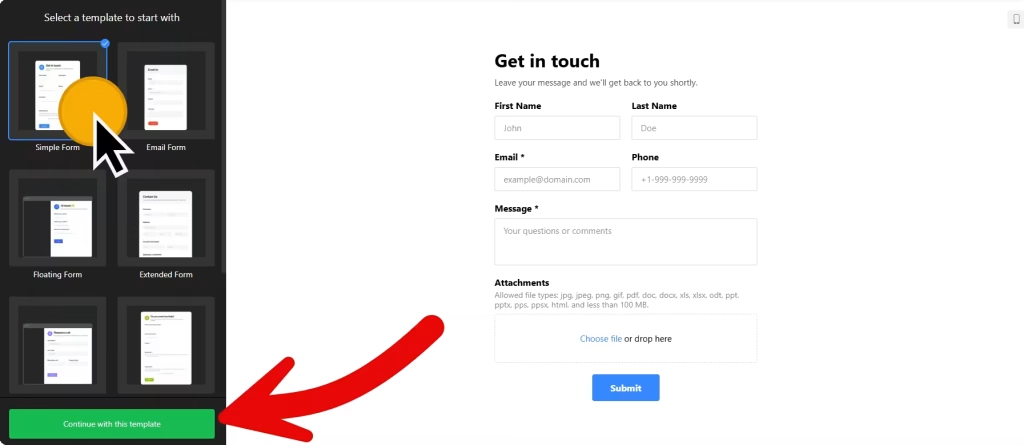
Use the builder below to create a free contact form for your Wix website. Pick a template and click “Continue with this template” to start adding your fields.
Most Wix sites belong to small businesses and local services: a salon, a cleaner, a tutor, a repair shop. For them, the contact form is often where new work comes from. This builder gives you a form with exactly the fields you need, an email for every message and an automatic reply to the sender. You add it to any Wix page with an Embed HTML element, so no app from the Wix App Market is needed.
How to add a Contact Form widget to Wix
1. Create your widget
- Choose a template: Simple Form and Email Form suit a basic contact page, and Request a Call works well for trades and local services that ring customers back. Blank starts from scratch.
- Add your fields: pick from 17 field blocks, including short and long text, phone number, date, time, file upload, drop-down and consent. Set the label, placeholder and hint for each one, and mark the fields you need as required.
- Set up email notifications: choose the address that receives each message and write the automatic reply that every sender gets.
- Choose the layout and style: pick the Inline embed type for a form on the page, arrange the fields vertically or horizontally, then set the color scheme and accent color to match your site.
- Save it: click “Add to website for free“, sign up on the next page and copy your embed code.
2. Add it to your Wix site
- Open your site in the Wix Editor and go to your Contact page, or whichever page the form should appear on.
- Click Add Elements (+), then Embed Code › Popular Embeds › Embed HTML. In Wix Studio the element is called Embed code.
- Click Enter Code, make sure Code is selected, paste the form code and click Update.
- Drag the corners of the box until every field and the submit button are visible. If you use conditional logic, make the box tall enough for the fields that appear after an answer is picked.
- Switch to the mobile editor and resize the box there too. Wix embed boxes don’t resize on their own, and a form gets taller on a narrow phone screen.
- Publish your site, then send a test message from the live page to check that the email notification arrives.
Where to put the Contact Form widget on your Wix site
- On your Contact page, next to your phone number, address and opening hours.
- On each service page, so a visitor reading about a service can ask about it straight away.
- At the bottom of your homepage, as a short form for quick questions.
- On a call-back page, using the Request a Call template so customers can leave a number and a good time to call.
Do you need a paid Wix plan?
No. Wix lists no plan requirement for the Embed HTML element, so an inline contact form works on free and premium Wix sites alike. Wix only displays code served over HTTPS, and the form code is. The widget’s own free plan covers one widget with up to 200 views a month on unlimited websites, with a small Elfsight link; paid widget plans start at $5 a month, billed yearly.
The Floating pane embed type works differently. Wix runs embedded code inside its own frame, so a pane pasted into an Embed HTML element stays stuck inside that box. To show a floating contact form on every page, add the code under Settings › Custom Code, which needs a premium plan and a published site with a connected domain.
Contact Form widget features
- Six templates: Simple Form, Email Form, Floating Form, Extended Form, Request a Call and Blank.
- 17 field blocks, from short text and phone number to file upload, image choice and consent.
- Conditional logic that shows or hides fields based on earlier answers.
- Email notifications for you and an automatic reply for every sender.
- Spam protection with Google reCAPTCHA, plus a success message, redirect or hidden form after someone submits.
- Integrations with Mailchimp, Google Sheets and Zapier.
Frequently asked questions
Is the contact form free on Wix?
Yes. The builder is free, and the free plan includes one widget with up to 200 views a month on unlimited websites, with a small Elfsight branding link. Paid plans start at $5 a month, billed yearly, for more views and no branding.
Do I need a Wix premium plan for the contact form?
Not for a form on a page. Embed HTML has no plan requirement on Wix. Only site-wide Custom Code, which you would use for a floating form on every page, needs a premium plan with a connected domain.
Why is the bottom of my form cut off on Wix?
The Embed HTML box is shorter than the form. Click the element, drag its bottom edge down until the submit button shows, and do the same in the mobile editor. If fields appear through conditional logic, size the box with those fields showing.
Where do messages from my Wix contact form go?
To the email address you set in Email Notifications. You can also send entries to Google Sheets or Mailchimp, or to other tools through Zapier.
Can I add fields later without editing my Wix site?
Yes. Edit the form in your Elfsight dashboard and save. The form on your Wix site updates on its own, so you don’t need to paste the code again. If the form gets longer, make the Embed HTML box taller.
More Wix widgets
- Contact Form widget
All templates and features - Wix WhatsApp Chat widget
A WhatsApp chat button or bubble - Wix AI Chatbot widget
Answers questions using your own content - Wix Google Reviews widget
Your Google Business reviews and rating - Wix Instagram Feed widget
Your latest Instagram posts and reels - 20 best Wix widgets
Our roundup of the best apps and widgets for Wix