
Use the widget builder below to create your free Vimeo gallery widget. Select a template and click “Continue with this template” to get started.
Show videos from your Vimeo channel, album or playlist in a clean gallery on your website. No coding needed, and new uploads are added automatically.
How to use the Vimeo Gallery widget builder
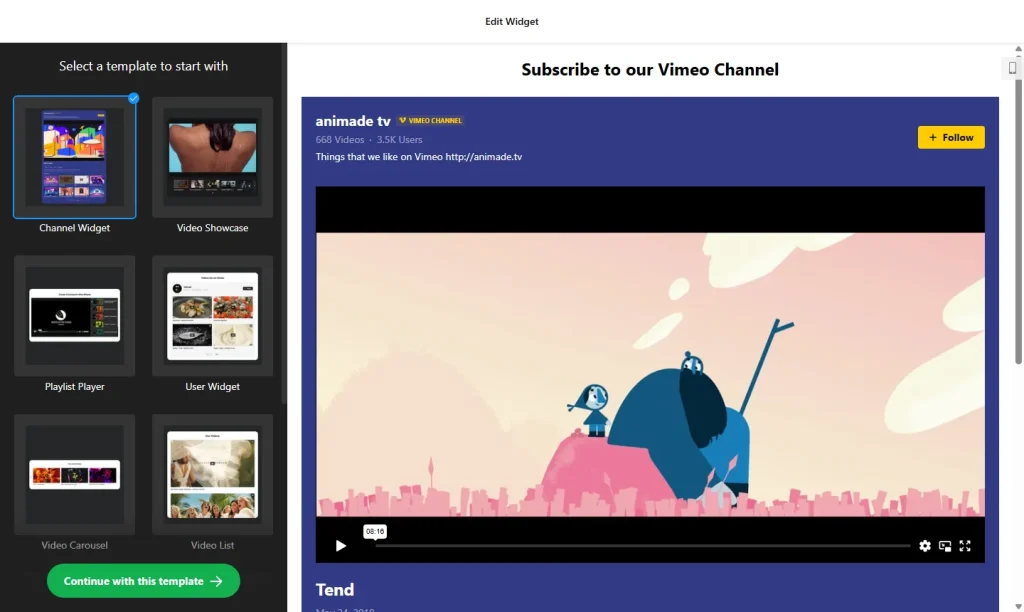
- Choose a template: Pick a design in the builder above and click “Continue with this template”. You can change the layout and style later.
- Add your Vimeo source: Paste a link or enter a username. You can show videos from a Vimeo user, channel, album, playlist or group, or add single video links. Each gallery uses one type of source.
- Pick a layout: Show videos in a Grid or Slider, or use the Playlist layout to list them in order with numbers.
- Set the playback: In the Playlist layout, the next video can start automatically when the previous one ends.
- Edit the header: When you use a channel as the source, the header can show your channel details and a Follow button.
- Customize the look: Set the widget width, choose which details appear with each video, and pick the colors of the interface.
- Save your widget: Click “Add to website for free” and sign up on the next page to save your widget.
- Copy the embed code: Paste it into your website where you want your Vimeo videos to appear.
Key features of the Vimeo Gallery widget
- Several source types: Users, channels, albums, playlists, groups or hand-picked video links.
- Automatic updates: The gallery checks your source regularly and adds new videos. Caching keeps your pages loading quickly.
- Grid, Slider and Playlist layouts: Build a classic video gallery or a numbered playlist for non-stop watching.
- Playlists in the right order: Paste a playlist URL and the videos appear in the same order as on Vimeo.
- Popup player: Each video opens in a popup on your site with its details and options to share and comment.
- Channel header with Follow button: Help visitors subscribe to your Vimeo channel without leaving your website.
- Design control: Adjust width, info elements and colors to match your website.
Why show your Vimeo videos in a gallery?
Embedding videos one by one gets messy and has to be updated by hand. A Vimeo gallery puts your best work in one tidy place and keeps itself up to date when you upload something new. It is especially useful for:
- Filmmakers, videographers and agencies showing a video portfolio
- Course creators and teachers sharing lessons or previews in order
- Businesses showing product demos, testimonials and event recaps
- Churches, schools and clubs sharing recorded events
Good to know: Autoplay in the Playlist layout depends on the visitor’s browser, since many browsers limit autoplay until the visitor interacts with the page. If your videos are on YouTube, TikTok or several platforms, the Video Gallery widget can mix sources in one gallery.
How to add the Vimeo Gallery widget to your website
After you save the widget, Elfsight gives you a short embed code. Paste it into a custom HTML or embed block where you want the gallery to show. It works on WordPress, Wix, Squarespace, Shopify, Webflow, Google Sites and any other website that accepts custom HTML. For step-by-step instructions for each platform, see our guide on how to add embed code to any website builder.
Good places for a Vimeo gallery are your portfolio or work page, a course or resources page, and your homepage below the main banner.
How to manage your Vimeo Gallery widget
Log in to your Elfsight dashboard to edit your widget at any time. Changes go live automatically, so you don’t need to replace the embed code on your website. From the dashboard you can also create more widgets, copy the embed code again and see how many views your widget has used this month.
Frequently asked questions
Is the Vimeo gallery widget free?
Yes. Elfsight’s free plan includes one widget with up to 200 views per month on unlimited websites, with a small Elfsight branding link. Paid plans start at $5 per month (billed yearly) and add more views and remove the branding.
What Vimeo content can I show in the gallery?
Videos from a Vimeo user, channel, album, playlist or group, or single video links. Each gallery pulls from one type of source.
Do new Vimeo videos appear automatically?
Yes. The gallery checks your source regularly and adds new videos, using caching so your pages stay fast.
Can I show a Vimeo playlist in its original order?
Yes. Paste the playlist URL and the videos appear in the same order as on Vimeo. The Playlist layout can play them one after another, although autoplay depends on the visitor’s browser.
Can visitors follow my Vimeo channel from the widget?
Yes. When a channel is the source, the gallery header can show a Follow button so visitors can subscribe from your website.
More video widgets
- Video Gallery widget
Show videos from YouTube, TikTok, Vimeo and more - YouTube Gallery widget
Show videos and playlists from your YouTube channel - Portfolio widget
Present your projects and work samples - Image Slider widget
Showcase photos and offers in a slider