
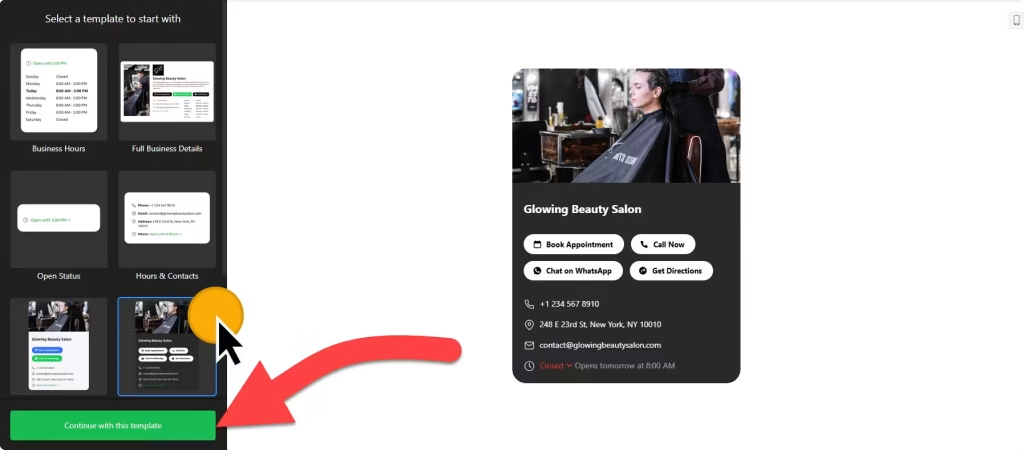
Use the builder below to create a free business hours widget for your WordPress website. Pick a template, add your hours and click “Continue with this template“.
On many WordPress business sites, the opening hours are a line of text in the footer that nobody remembers to update. A business hours widget gives you a proper weekly schedule with holidays, an open-now status and buttons to call or get directions, without installing another plugin. You build it in your browser, paste the code into a Custom HTML block, and change the hours later from your Elfsight dashboard. It works for a local business site, a blog with a shop, or a WooCommerce store with a counter for pickups.
How to add a Business Hours widget to WordPress
1. Create your widget
- Choose a template: start from Business Hours, Open Status, Contact Info or one of the four other responsive designs.
- Set your hours: add the times for each day. A day can have several time ranges.
- Add special days and contacts: enter holidays and schedule changes, then your business name, logo, phone, email and address.
- Choose buttons and settings: add buttons such as Call, Directions or Order, then set the time zone, time format, language, colors and fonts.
- Save it: click “Add to website for free“, sign up on the next page and copy your embed code.
2. Add it to your WordPress site
- Edit the page or post in the block editor, for example your Contact page.
- Click the block inserter (+) and add a Custom HTML block.
- Paste the widget code, then switch to Preview inside the block to check it.
- Using Elementor? Drag in the HTML widget and paste the code there. In the classic editor, paste into the Text tab, not Visual.
- Click Update or Publish and check the live page.
Where to put the Business Hours widget on your WordPress site
- On your Contact page, beside your contact form and map, using the Hours & Contacts or Full Business Details template.
- In your footer or sidebar, if your theme lets you add a Custom HTML block there, so your hours appear on every page.
- On a WooCommerce store with a physical shop, on the pickup or contact page, so buyers know when they can collect orders.
- On branch or location pages, with one widget per location. More than one widget needs a paid widget plan.
Do you need a paid WordPress plan?
Not on self-hosted WordPress. WordPress.org sites accept the widget script out of the box, on any host, with no plugin. On WordPress.com, script tags only work on plans that allow plugins; on other plans they’re removed when you save, and the block stays empty.
If you use a performance plugin that delays or combines JavaScript, exclude the widget’s script when the hours load late or not at all. The widget’s own free plan covers one widget with up to 200 views a month, with a small Elfsight link; paid widget plans start at $5 a month, billed yearly.
Business Hours widget features
- Seven responsive templates, including Open Status, Hours & Contacts and Dark Contacts Card.
- Several time ranges per day and special days for holidays and temporary changes.
- Business details: logo, phone number, email address and physical address, with a location photo on some templates.
- Call-to-action buttons such as Call, Directions, Share, Message, Book, Order, Menu and Pricing, plus links to WhatsApp, Uber Eats, OpenTable and Yelp.
- Time zone, time format and language settings.
- Appearance controls for colors, fonts, sizes, borders and button styles, with custom CSS and JavaScript fields.
Frequently asked questions
Do I need a plugin to add business hours to WordPress?
No. On self-hosted WordPress, paste the code into a Custom HTML block and it works. On WordPress.com, you need a plan that allows plugins, because script tags are removed on other plans.
Why is the business hours widget not showing on WordPress?
Check three things: that you used a Custom HTML block or the Text tab in the classic editor, that you’re not on a WordPress.com plan that strips scripts, and that a caching or performance plugin isn’t delaying the widget script. Exclude it from those optimizations if needed.
Can I show my hours on every page of my WordPress site?
Yes, if your theme lets you add a Custom HTML block to the footer or sidebar. Put the same code there and it loads wherever that area appears.
Does the business hours widget work with Elementor?
Yes. Drag the HTML widget into your Elementor layout, paste the code and update the page.
Do I have to edit WordPress when my hours change?
No. Change the hours or add a special day in your Elfsight dashboard and save. The widget on your WordPress site updates on its own.
More WordPress widgets
- Business Hours widget
All templates and features - WordPress Appointment Booking widget
Online booking with time slots - WordPress Event Calendar widget
Upcoming events in a calendar or list - WordPress Restaurant Menu widget
Your menu with prices and photos - WordPress Google Reviews widget
Your Google Business reviews and rating - How to add embed code to any website
Where to paste widget code on every website builder