
Use the widget builder below to create your free team showcase widget. Select a template and click “Continue with this template” to get started.
Introduce the people behind your business with photos, job titles, bios and contact details. No coding needed.
How to use the Team Showcase widget builder
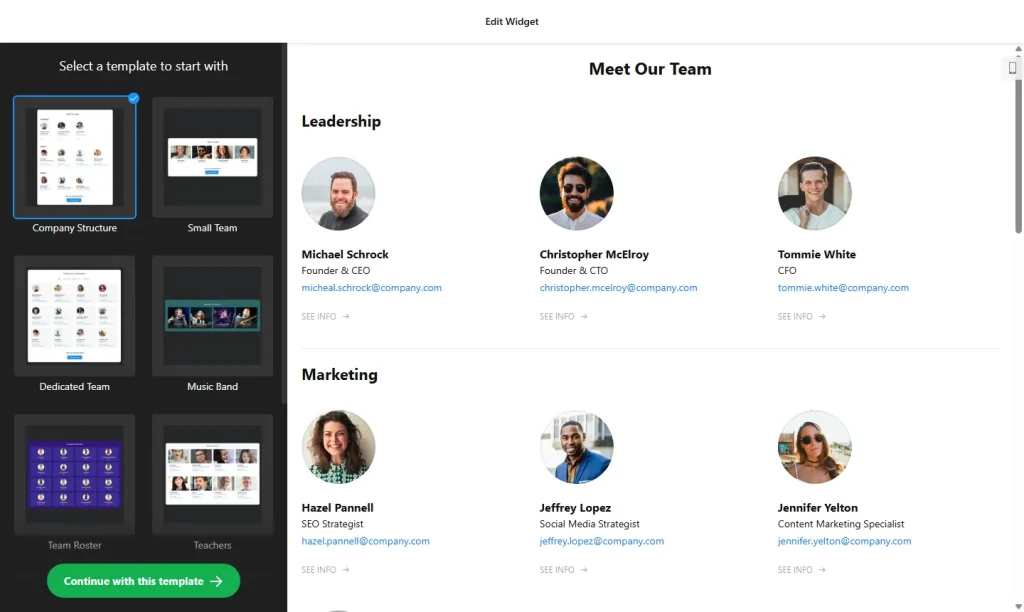
- Choose a template: Pick a design in the builder above and click “Continue with this template”. You can change the layout and colors later.
- Add team members: For each person, add a photo, name, position, a short description of their role and, if you like, a favorite quote.
- Add contact details: Enter email, phone, location and a website link, and connect each person’s social profiles.
- Create groups: Sort people into departments, offices or roles. Show all groups in one list or let visitors switch between them with a filter.
- Pick a layout: Display your team as a grid, list, gallery or cards. Visitors can click a profile to open a popup with all the details.
- Add a title and button: Give the section a heading and add a button for people who want to join your team.
- Customize the look: Choose colors for the interface elements and turn on the search bar if your team is large.
- Save your widget: Click “Add to website for free” and sign up on the next page to save your widget.
- Copy the embed code: Paste it into your About Us or Team page where you want the profiles to appear.
Key features of the Team Showcase widget
- Detailed profiles: Photo, name, position, bio, quote, contact details and social links for every team member.
- Profile popups: Keep the page tidy and show the full profile when a visitor clicks on a person.
- Groups and filters: Organize people by department, location or qualification, with as many groups as you need.
- Four layouts: Grid, list, gallery and cards, all adjusting automatically to the available space.
- Search bar: Let visitors find people by name, position, email, phone or location.
- Clickable contacts: Email and website links are clickable, and social icons open each profile in a new tab.
- Hide without deleting: Temporarily remove someone from the page while keeping their details saved.
Why add a team section to your website?
Visitors feel more confident choosing a business when they can see the real people behind it. A clear team page also helps them contact the right person straight away instead of sending a general enquiry. A team showcase is especially useful for:
- Agencies, consultancies and law firms
- Clinics, dental practices and wellness studios
- Real estate agencies and other teams of advisors
- Schools, nonprofits and boards
- Companies with several offices, grouped by location
Tip: use photos with a similar crop and background so the section looks consistent, and keep bios to two or three sentences. If you’re hiring, point the “join our team” button to a careers page built with our Job Board widget.
How to add the Team Showcase widget to your website
After you save the widget, Elfsight gives you a short embed code. Paste it into a custom HTML or embed block where you want your team to show. It works on WordPress, Wix, Squarespace, Shopify, Webflow, Google Sites and any other website that accepts custom HTML. For step-by-step instructions for each platform, see our guide on how to add embed code to any website builder.
The natural home for a team showcase is your About Us or Team page. Smaller versions also work well on service pages, showing the experts who handle that service.
How to manage your Team Showcase widget
Log in to your Elfsight dashboard to edit your widget at any time, for example when someone joins or leaves your team. Changes go live automatically, so you don’t need to replace the embed code on your website. From the dashboard you can also create more widgets, copy the embed code again and see how many views your widget has used this month.
Frequently asked questions
Is the team showcase widget free?
Yes. Elfsight’s free plan includes one widget with up to 200 views per month on unlimited websites, with a small Elfsight branding link. Paid plans start at $5 per month (billed yearly) and add more views and remove the branding.
What size should team photos be?
There is no fixed size. The widget scales images to fit each layout automatically, so square photos that are optimized for the web work best.
Can I group team members by department or location?
Yes. Create as many groups as you need, such as departments, offices or roles, and assign each person to a group. Show all groups together or let visitors filter them.
Can visitors search for a team member?
Yes. You can turn on a search bar that finds people by name, position, email, phone or location, which helps on large team pages.
Can I hide a team member without deleting them?
Yes. You can hide individual members so they disappear from your website while their details stay saved in the widget.
More widgets for your About Us page
- Job Board widget
List your current job openings - Logo Showcase widget
Show the clients and partners you work with - Testimonials Slider
Add customer quotes in a carousel - Portfolio widget
Present your projects and work samples - Image Slider widget
Showcase photos and offers in a slider - Store Locator widget
Help visitors find your locations on a map - Timeline widget
Show your company history and milestones