
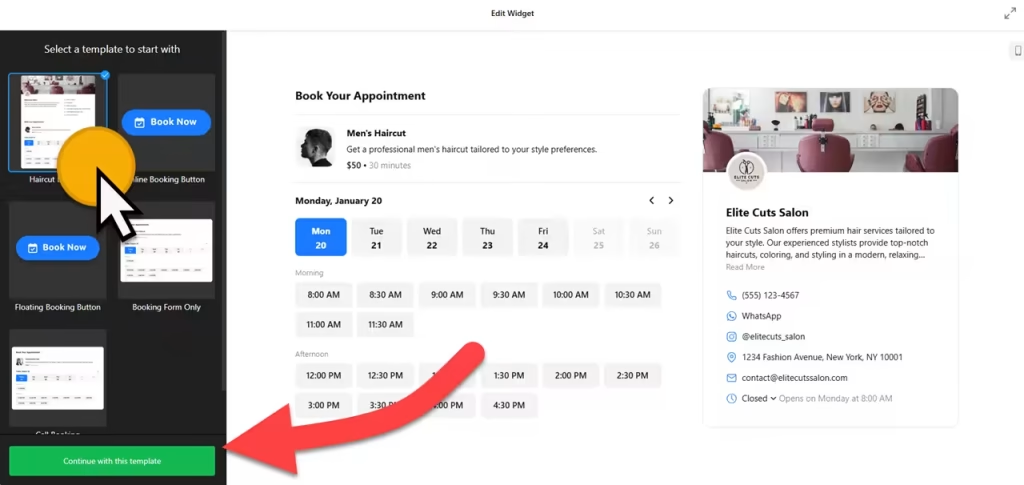
Use the builder below to create a free appointment booking widget for your WordPress website. Pick a template and click “Continue with this template” to set up your services and hours.
Consultants, agencies, clinics, local services and WooCommerce stores that offer fittings or consultations all need a simple way for clients to book a time. This widget gives your WordPress site a booking form without installing and configuring a booking plugin. Set your services, prices and hours here, connect Google Calendar, Google Sheets or Zapier if you use them, and paste the code into a Custom HTML block. It works in the block editor, Elementor and the classic editor.
How to add an Appointment Booking widget to WordPress
1. Create your widget
- Choose a template: start from Call Booking, Floating Booking button or Booking Form Only.
- Add your services: name, short description, image, duration and price. Set a fixed rate, make it free, hide the price or show a minimum rate, and pick your currency.
- Set your hours: the times people can book, plus the minimum and maximum advance booking time.
- Finish the details: add your contact details, website and logo, choose an inline form or a floating button, and turn email notifications for you and the client on or off.
- Save it: click “Add to website for free“, sign up on the next page and copy your embed code.
2. Add it to your WordPress site
- Create or edit the page where clients should book. A dedicated Book an Appointment page keeps things simple.
- In the block editor, click the block inserter (+) and add a Custom HTML block. In Elementor, drag in the HTML widget; in the classic editor, use the Text tab, not Visual.
- Paste the booking code, then switch to Preview inside the block to check it.
- Click Update or Publish, then make a test booking on the live page.
- If the form loads late or not at all, exclude the widget script from your performance plugin’s settings that delay or combine JavaScript.
Where to put the Appointment Booking widget on your WordPress site
- On a Book an Appointment page, linked from your main menu and your contact page.
- On service pages for a consultancy, agency or clinic, below what each service includes.
- At the end of blog posts that bring in clients, for readers who are ready to talk.
- On a WooCommerce store that offers fittings, repairs or consultations, on a page near the related products.
- As a floating button on every page: put the code in an area that loads site-wide, such as a footer widget area or the footer template part.
Do you need a paid WordPress plan?
On self-hosted WordPress (WordPress.org), no. It accepts the widget script out of the box, with no plugin needed. On WordPress.com, script tags only work on plans that allow plugins; on other plans WordPress removes them when you save, so the booking form can’t load.
The widget has its own free plan: one widget, up to 200 views a month on unlimited websites, with a small Elfsight link. Paid widget plans start at $5 a month, billed yearly, for more views and no branding.
Appointment Booking widget features
- Templates including Call Booking, Floating Booking button and Booking Form Only.
- Inline form or floating button embed types.
- Services with flexible pricing: duration, image and a fixed, free, hidden or minimum price in your currency.
- Working hours with minimum and maximum advance booking times.
- Email notifications to you and the client, each one optional.
- Integrations with Google Calendar, Google Sheets and Zapier, plus language settings and custom CSS and JavaScript.
Frequently asked questions
Do I need a booking plugin for this widget?
No. The widget runs from a short embed code, so you paste it into a Custom HTML block instead of installing a booking plugin. Services, hours and notifications are managed in your Elfsight dashboard.
Does the booking widget work on WordPress.com?
Yes, on WordPress.com plans that allow plugins. On other WordPress.com plans, script tags are removed when you save, so the form can’t load. Self-hosted WordPress needs no special plan.
Why isn’t the booking form showing in WordPress?
Make sure you used a Custom HTML block, or the Text tab in the classic editor, not a Paragraph block or the Visual tab. If it still doesn’t load, exclude the widget script from your performance plugin’s delay or combine JavaScript settings.
Can bookings go to Google Calendar or Google Sheets?
Yes. Connect Google Calendar or Google Sheets in the widget’s integrations, or use Zapier to send bookings to other tools you already use.
Is the appointment booking widget free?
Yes. The builder is free, and the free plan includes one widget with up to 200 views a month on unlimited websites, with a small Elfsight branding link. Paid plans start at $5 a month, billed yearly.
More WordPress widgets
- Appointment Booking widget
All templates and features - WordPress Business Hours widget
Opening hours with an open-now status - WordPress Event Calendar widget
Upcoming events in a calendar or list - WordPress Restaurant Menu widget
Your menu with prices and photos - WordPress Google Reviews widget
Your Google Business reviews and rating - How to add embed code to any website
Where to paste widget code on every website builder