
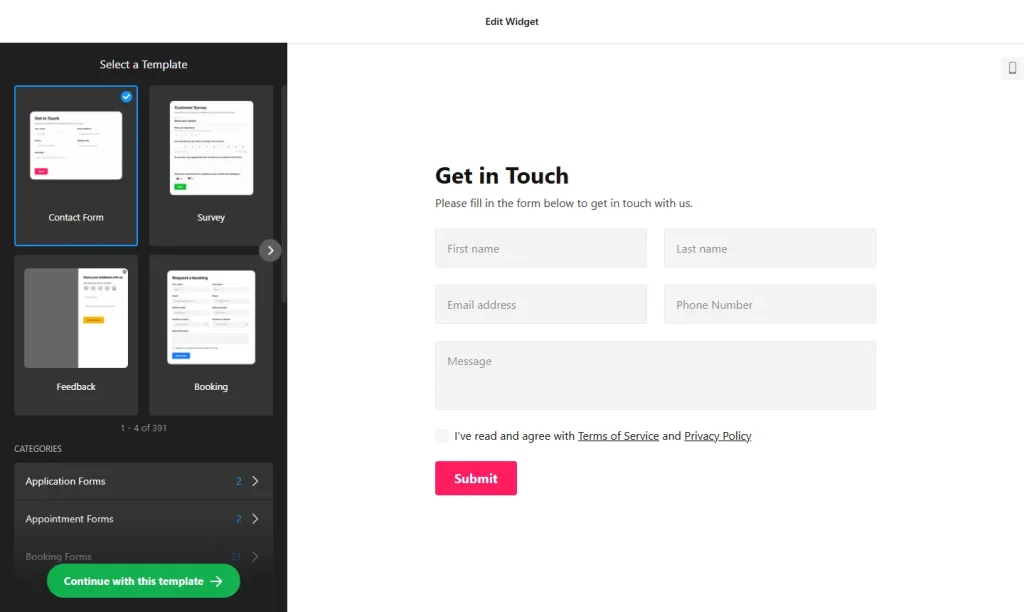
Use the online form builder below to create a free form for your Shopify store. Choose a template and click “Continue with this template” to start building.
Shopify handles checkout, but stores still need forms for everything around it: a personalization request on a product page, a wholesale application, a warranty registration, a post-purchase survey. This form builder covers those with templates, more than 20 field types and an AI tool that drafts a form from a description. You add the finished form through a Custom Liquid section in the theme editor, so there’s no app to install.
How to add a Form Builder widget to Shopify
1. Create your widget
- Pick a template from categories such as Order forms, Application forms, Registration forms and Customer review forms, or describe what you need and let AI generate the form.
- Add store-specific fields: image choice for colors or styles, a file upload for a logo or artwork (limited to the file types you allow), and text fields for engraving wording or order numbers.
- Choose the embed type: Inline to sit in a template section, with a Vertical, Horizontal or Multistep layout and an optional width limit, or a Floating pane with its own position, width and reopen button.
- Connect your tools: email notifications with CC and BCC, an auto-reply for customers, and Mailchimp, Google Sheets or Zapier for the data.
- Save it: click “Add to website for free“, sign up on the next page and copy your embed code.
2. Add it to your Shopify site
- In the Shopify admin, go to Online Store › Themes and click Customize.
- Open the right template with the page selector at the top: a custom page for a wholesale form, the product template for a personalization request, or the home page.
- Click Add section, select Custom Liquid and paste the form code.
- Drag the section to where the form should sit and click Save.
- Check which pages share that template. A section on the default product template appears on every product page, which suits a general request form but not one meant for a single product.
- Open the live store and submit a test entry.
Where to put the Form Builder widget on your Shopify site
- On product pages, under the description, for personalization or custom order requests.
- On a Wholesale page, with an application form that collects business details and documents.
- On a warranty or product registration page, which you can link from your packaging or order emails.
- On the home page, as a short survey or a newsletter sign-up connected to Mailchimp.
- In the footer area, as a Floating pane shoppers can open on any page.
Do you need a paid Shopify plan?
No. You don’t need an app or a particular Shopify plan. The form goes in through a Custom Liquid section in the theme editor, so if you can customize your theme, you can add it. Menu names can shift slightly as Shopify updates the editor.
For a Floating pane on every page, add the Custom Liquid section to your theme’s footer area, which appears site-wide. The widget’s free plan covers one widget with up to 200 views a month on unlimited websites, with a small Elfsight link. A busy store, or a pane on every page, may outgrow that; paid plans start at $5 a month, billed yearly.
Form Builder widget features
- Order and application templates, plus registration, appointment, newsletter and customer review forms.
- Image choice and file upload fields, with the allowed file types you set.
- Multistep layout for longer wholesale or custom order forms.
- Floating pane with adjustable position, width and reopen button.
- Email notifications with CC, BCC and reply-to, and auto-replies to customers.
- Zapier for 6,000+ services, plus Mailchimp and Google Sheets.
Frequently asked questions
Do I need a Shopify app to add custom forms?
No. Paste the form code into a Custom Liquid section in the theme editor. There’s nothing to install.
How do I put a form on just one product?
A section added to a product template appears on every product that uses the template. To limit it, add the form to a template that only that product uses, or link to a separate page that holds the form.
Can customers upload a logo or artwork?
Yes. Add a file upload field and choose which file types it accepts, for example PNG or PDF.
Where do form entries from my Shopify store go?
To your email, with optional CC and BCC copies. You can also send them to Google Sheets or Mailchimp, or to 6,000+ other services through Zapier.
Is the form builder free for Shopify stores?
Yes. The free plan includes one widget with up to 200 views a month on unlimited websites, with a small Elfsight branding link. Paid plans start at $5 a month, billed yearly.
More Shopify widgets
- Form Builder widget
All templates and features - Shopify FAQ widget
Questions and answers in an accordion - Shopify Google Reviews widget
Your Google Business reviews and rating - Shopify Contact Form widget
A simple contact form - Shopify Instagram Feed widget
Your latest Instagram posts and reels - How to add embed code to any website
Where to paste widget code on every website builder