
Use the builder below to create a free event calendar for your Wix website. Pick a template, click “Continue with this template” and add your events.
Small businesses and local services on Wix often run on a schedule: weekly classes, workshops, tastings, open days and community meetups. An event calendar puts all of them on one page, so visitors can see what’s coming up and when. You can type events in or sync them from Google Calendar, then add the calendar to any Wix page with an Embed HTML element. You don’t need an app from the Wix App Market.
How to add an Event Calendar widget to Wix
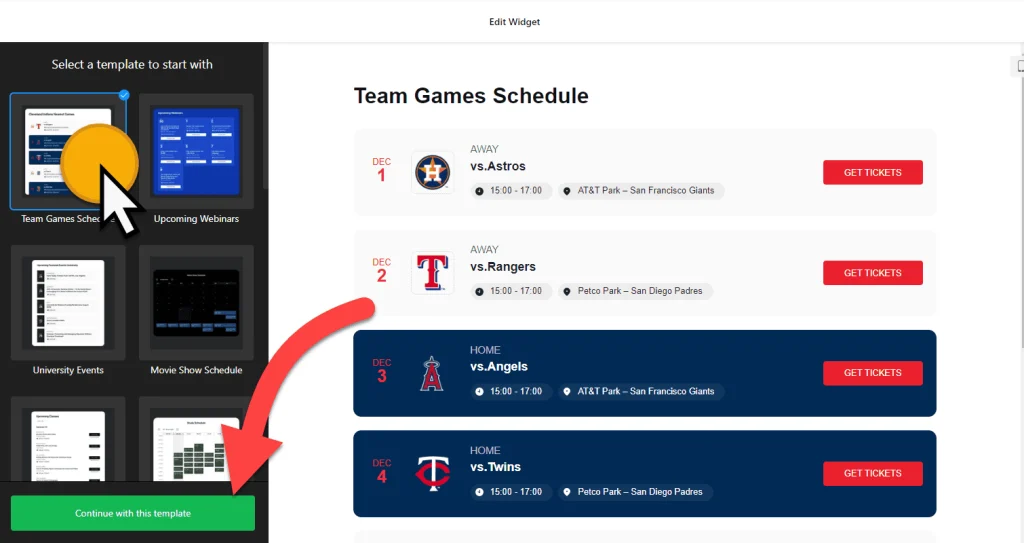
1. Create your widget
- Choose a template: there are 17 to start from, such as Upcoming Webinars, Club Events, Movie Show Schedule, Convention Center and Slider Exhibition.
- Add your events: type them in, or connect Google Calendar so events sync automatically. Each event can have a description, image, call-to-action button, video or file attachment.
- Organize them: add event types, hosts and venues so visitors can quickly find the events they care about.
- Pick a layout and style: choose List, Grid, Masonry, Slider, Month, Week or Day, set the maximum width, font and background, and decide whether past events stay visible.
- Save it: click “Add to website for free“, sign up on the next page and copy your embed code.
2. Add it to your Wix site
- Open your site in the Wix Editor and go to the page where the calendar should appear, for example an Events or Classes page.
- Click Add Elements (+), then Embed Code › Popular Embeds › Embed HTML. In Wix Studio the element is called Embed code.
- Click Enter Code, make sure Code is selected, paste the calendar code and click Update.
- Drag the corners of the box until the whole calendar fits. A Month layout needs a tall, wide box; a List layout needs enough height for every event you show.
- Switch to the mobile editor and resize the box there too. Wix embed boxes don’t resize on their own, so the phone view needs its own size.
- Publish your site and check the calendar on the live page and on your phone.
Where to put the Event Calendar widget on your Wix site
- On a dedicated Events or Classes page, with a Month or Week layout so visitors can scan the whole schedule.
- On your homepage, with a List or Slider layout that shows the next few events and a button to book or learn more.
- On an About or Visit Us page, so people planning a visit can see open days, tastings or workshops coming up.
- On a membership or community page, listing meetups, club nights or volunteer days for your regulars.
Do you need a paid Wix plan?
No. The Embed HTML element works on Wix’s free and premium plans, so you can add the calendar to any page. The widget’s own free plan covers one widget with up to 200 views a month on unlimited websites, with a small Elfsight link; paid widget plans start at $5 a month, billed yearly.
One thing to know: Wix shows embedded code inside its own frame, and that frame keeps the size you give it. If you later switch from a List to a Month layout, or add many more events, open the editor and resize the box on desktop and mobile so nothing gets cut off.
Event Calendar widget features
- 17 responsive templates for webinars, club events, show schedules, conventions and exhibitions.
- Seven layouts: List, Grid, Masonry, Slider, Month, Week and Day.
- Google Calendar sync, or add and edit events by hand.
- Rich event details: descriptions, images, call-to-action buttons, videos and file attachments.
- Event types, hosts and venues to keep a busy schedule organized.
- Display settings for what happens when someone clicks an event, which elements show, the language, and custom CSS.
Frequently asked questions
Is the event calendar free on Wix?
Yes. The builder is free, and the free plan includes one widget with up to 200 views a month on unlimited websites, with a small Elfsight branding link. Paid plans start at $5 a month, billed yearly, for more views and no branding.
Do I need a Wix premium plan to add the calendar?
No. The calendar goes into an Embed HTML element, which Wix offers on free sites too. A premium plan is only needed for other things, such as a connected domain, not for the calendar itself.
Why is my event calendar cut off on Wix?
The Embed HTML box is smaller than the calendar. Click the element in the Wix Editor and drag its corners until every event or the full month fits, then do the same in the mobile editor and publish again.
Can I sync my Google Calendar events to Wix?
Yes. Connect Google Calendar in the widget builder and your events sync automatically. The calendar on your Wix page shows them without any extra work in the Wix Editor.
How do I add new events after the calendar is on my Wix site?
Add or edit events in your Elfsight dashboard and save. The calendar on your Wix site updates on its own, so you don’t need to paste the code again.
More Wix widgets
- Event Calendar widget
All templates and features - Wix Appointment Booking widget
Online booking with time slots - Wix Business Hours widget
Opening hours with an open-now status - Wix Restaurant Menu widget
Your menu with prices and photos - Wix Google Reviews widget
Your Google Business reviews and rating - 20 best Wix widgets
Our roundup of the best apps and widgets for Wix