
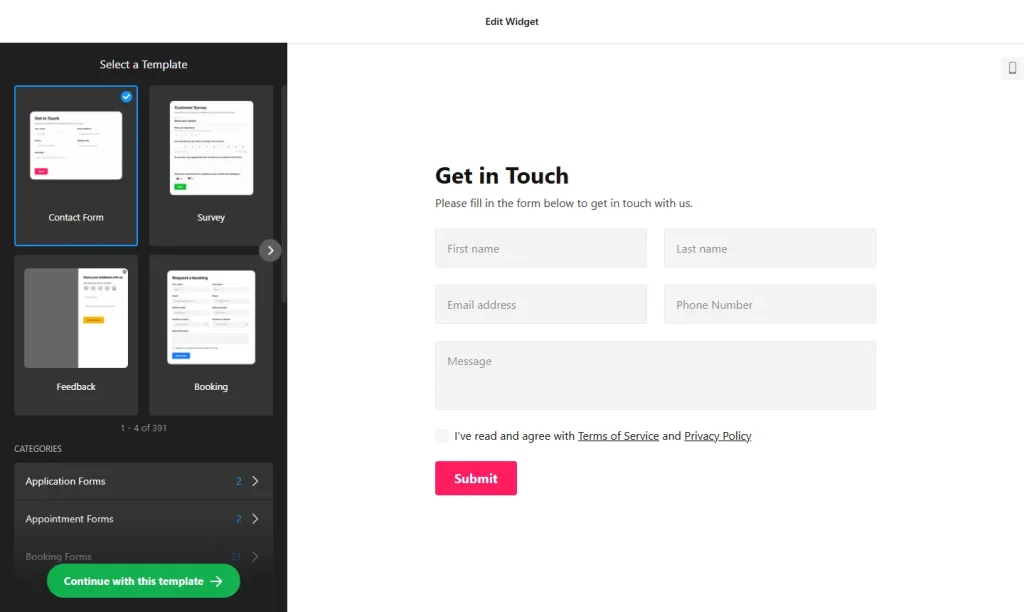
Use the online form builder below to create a free form for your Squarespace website. Pick a template and click “Continue with this template” to start editing.
Studios, photographers, coaches and agencies on Squarespace often run their whole client process through forms: an enquiry, then an intake questionnaire, then a booking or workshop registration. This form builder handles each of those, with multistep layouts for long questionnaires, file uploads for briefs and styling options to match your template. You add the form with a Squarespace Code Block, which needs a plan that allows JavaScript.
How to add a Form Builder widget to Squarespace
1. Create your widget
- Start from a template in categories such as Appointment forms, Event registration forms, Application forms or Multistep forms, or describe the form and let the AI tool generate it.
- Build the questions: use more than 20 field types, from text and email to image choice and date and time selectors. For file upload, set which file types clients can send, for example PDFs or images.
- Break long forms into steps with the Multistep layout, so each screen of an intake questionnaire shows only a few questions.
- Style it to match your site: set the color scheme, accent color, field style, font and size, and limit the form width so it sits neatly in your page layout.
- Save it: click “Add to website for free“, sign up on the next page and copy your embed code.
2. Add it to your Squarespace site
- Edit the page where the form should live, such as Work With Me, Book a Session or a workshop page.
- Click an Add Block point (+) and choose Code.
- Paste the form code, set the mode to HTML and switch off Display Source.
- Save, then open the live page to check every step of the form and the submit button.
- Submit a test entry and confirm that the notification email reaches you, along with any CC or BCC copies.
Where to put the Form Builder widget on your Squarespace site
- A client intake questionnaire on a page you link to from your welcome email after someone books.
- A workshop or class registration form on the event page, with date choices.
- A session booking request on your services page, with date and time selectors.
- A print or commission order form for artists and photographers who take orders by request.
- A newsletter sign-up at the foot of your blog, connected to Mailchimp.
Do you need a paid Squarespace plan?
Most likely, yes. HTML and CSS work in a Code Block on every Squarespace plan, but JavaScript needs Core or above on current plans, or Business or above on older ones. The form loads with a script, so on a lower plan the Code Block shows nothing at all and Squarespace gives no error. Check your plan before you spend time on a long questionnaire.
A Floating pane form for every page goes in Settings › Advanced › Code Injection, which has the same plan requirement. The widget’s free plan covers one widget with up to 200 views a month on unlimited websites, with a small Elfsight link; paid widget plans start at $5 a month, billed yearly.
Form Builder widget features
- Multistep layout for long questionnaires and applications.
- File upload with allowed file types, so clients send briefs and images in a format you can use.
- Appearance controls: color scheme, accent color, field style, font, size and custom CSS.
- AI form generation and templates for appointments, events, applications, reviews and orders.
- Post-submit actions: a success message, a redirect to another page or hiding the form.
- Integrations with Mailchimp, Google Sheets and Zapier.
Frequently asked questions
Will the form builder work on my Squarespace plan?
It needs a plan that allows JavaScript in Code Blocks: Core or above on current plans, or Business or above on older ones. On other plans, the block stays empty.
Why does my Code Block show nothing on Squarespace?
The most common cause is a plan without JavaScript, which Squarespace blocks without an error. Also make sure the block is in HTML mode with Display Source switched off, and check the live page rather than the editor.
Can I build a multistep client questionnaire?
Yes. Choose the Multistep layout for an inline form, or start from a Multistep forms template, and split your questions into steps.
Can I send new sign-ups to Mailchimp?
Yes. Connect Mailchimp in the builder’s integrations. Google Sheets and Zapier are available too.
Do I need to re-paste the code after editing the form?
No. Save your changes in the Elfsight dashboard and the form on your Squarespace page updates on its own.
More Squarespace widgets
- Form Builder widget
All templates and features - Squarespace FAQ widget
Questions and answers in an accordion - Squarespace Google Reviews widget
Your Google Business reviews and rating - Squarespace Contact Form widget
A simple contact form - Squarespace Instagram Feed widget
Your latest Instagram posts and reels - 25 best Squarespace widgets
Our roundup of plugins and widgets for Squarespace