
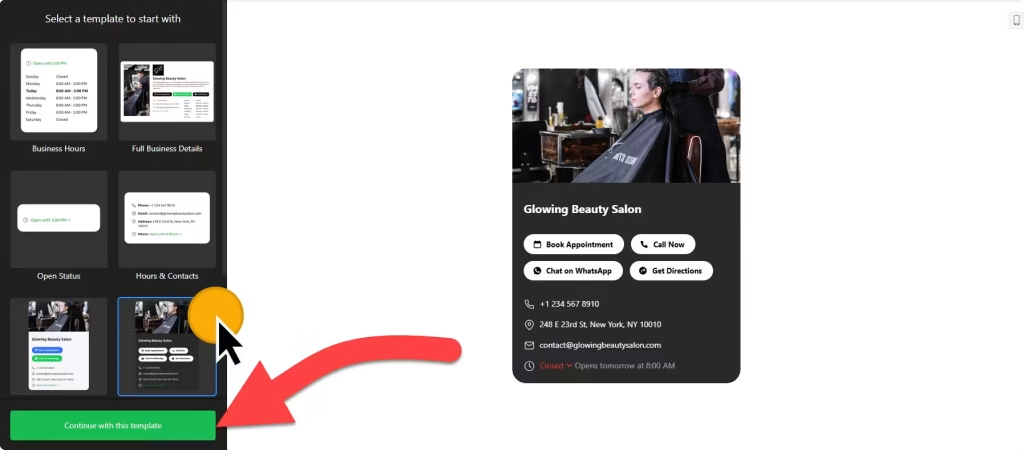
Use the builder below to create a free business hours widget for your Squarespace website. Pick a template, add your hours and click “Continue with this template“.
Studios, salons, galleries and other service businesses on Squarespace often have hours that don’t fit on one line: a late opening on Thursdays, a split day, a studio that closes for two weeks in August. A business hours widget lays out the full week, can show whether you’re open right now, and puts your phone number, address and booking button beside it. You build it once and add it with a Code Block. Check your Squarespace plan first, because the widget runs on JavaScript.
How to add a Business Hours widget to Squarespace
1. Create your widget
- Choose a template: pick one of the seven responsive designs, such as Hours & Contacts, Small Contacts Card or Full Business Details.
- Enter your schedule: add your hours for each day. Days can have more than one time range, which suits split shifts and evening sessions.
- Add special days for holidays and studio closures, then fill in your business details, logo and contacts.
- Pick buttons and style it: add buttons such as Book, Call or Directions, then match the colors, fonts and borders to your Squarespace template.
- Save it: click “Add to website for free“, sign up on the next page and copy your embed code.
2. Add it to your Squarespace site
- Check your plan: JavaScript in a Code Block needs Core or above on current plans, or Business or above on older ones.
- Edit the page where your hours should appear, for example your Contact or Visit page.
- Click an Add Block point (+) and choose Code.
- Paste the widget code, set the mode to HTML and turn off Display Source.
- Save the page and check your hours on the live site, not just in the editor.
Where to put the Business Hours widget on your Squarespace site
- On your Contact page, beside your address, map or form, using the Hours & Contacts or Full Business Details template.
- On a Visit or Location page for a studio, gallery or shop, with a Directions button.
- On your services or booking page, with a Book button, so clients see when you’re available before they get in touch.
- In a homepage section, using a compact template such as Open Status or Small Contacts Card.
Do you need a paid Squarespace plan?
Yes, for most sites. Squarespace accepts plain HTML in a Code Block on every plan, but JavaScript in a Code Block needs a higher-tier paid plan: Core or above on current plans, Business or above on older ones. The business hours widget uses a script, so on a plan without JavaScript the block shows nothing, and Squarespace doesn’t show an error.
Site-wide code under Settings › Advanced › Code Injection has the same plan requirement, but you don’t need it here: the hours widget sits inline on the page. The widget’s own free plan covers one widget with up to 200 views a month, with a small Elfsight link; paid widget plans start at $5 a month, billed yearly.
Business Hours widget features
- Seven responsive templates: Full Business Details, Business Hours, Open Status, Small Contacts Card, Contact Info, Hours & Contacts and Dark Contacts Card.
- Several time ranges per day for split days and evening hours.
- Special days for holidays, closures and other changes to the regular schedule.
- Call-to-action buttons such as Book, Call, Directions, Message, Pricing and Share, plus links to WhatsApp, Booking.com, TripAdvisor and Yelp.
- Location photo and logo, depending on the template you choose.
- Layout and design settings: width, alignment, colors, fonts, sizes, button styles and borders, plus custom CSS.
Frequently asked questions
Which Squarespace plan do I need for the business hours widget?
A plan that allows JavaScript in Code Blocks: Core or above on current plans, or Business or above on older plans. Plain HTML works on every plan, but this widget runs on a script.
Why is my Code Block blank on Squarespace?
Usually your plan doesn’t allow JavaScript, so the script is skipped without an error. Also check that the block is set to HTML, that Display Source is off, and look at the live site rather than the editor.
Is the business hours widget free?
Yes. The free plan includes one widget with up to 200 views a month on unlimited websites, with a small Elfsight branding link. Paid plans start at $5 a month, billed yearly. Your Squarespace plan still needs to allow JavaScript.
Can I show holiday closures?
Yes. Add them in the Special days section of the widget editor and save. Your Squarespace page updates on its own, so you don’t need to edit the Code Block again.
Can I add a booking button next to my hours?
Yes. Button options include Book, Call, Directions, Message and Menu, plus links to services such as WhatsApp, OpenTable and Booking.com. Point the Book button at your booking page.
More Squarespace widgets
- Business Hours widget
All templates and features - Squarespace Appointment Booking widget
Online booking with time slots - Squarespace Event Calendar widget
Upcoming events in a calendar or list - Squarespace Restaurant Menu widget
Your menu with prices and photos - Squarespace Google Reviews widget
Your Google Business reviews and rating - 25 best Squarespace widgets
Our roundup of plugins and widgets for Squarespace