
Use the builder below to create a free business hours widget for your Wix website. Pick a template, add your hours and click “Continue with this template“.
Most Wix sites belong to small local businesses: salons, cafés, repair shops, clinics and studios. Their visitors usually want two answers fast: are you open, and how do I reach you? A business hours widget gives both in one block. You enter your weekly schedule, holidays and contact details once, pick a template, and add it to any Wix page with an Embed HTML element. You don’t need an app from the Wix App Market.
How to add a Business Hours widget to Wix
1. Create your widget
- Choose a template: there are seven, including Full Business Details, Open Status, Hours & Contacts and Dark Contacts Card. All of them are responsive.
- Add your hours: enter your weekly schedule. You can set more than one time range per day, for example to show a lunch break.
- Add special days and details: list holidays and one-off schedule changes, then add your logo, phone number, email and address.
- Add buttons and style it: pick call-to-action buttons such as Call, Directions or Book, then set colors, fonts, the time zone, time format and language.
- Save it: click “Add to website for free“, sign up on the next page and copy your embed code.
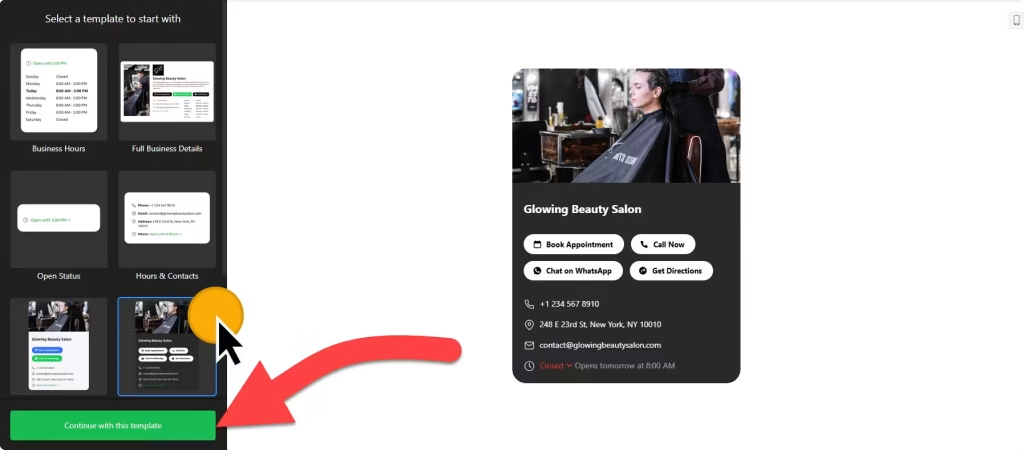
2. Add it to your Wix site
- Open your site in the Wix Editor and go to the page where your hours should appear, such as your Contact or About page.
- Click Add Elements (+), then Embed Code › Popular Embeds › Embed HTML. In Wix Studio the element is called Embed code.
- Click Enter Code, make sure Code is selected, paste the widget code and click Update.
- Drag the corners of the box until the whole week, your contact details and any buttons are visible. Templates with a logo or location photo need a taller box.
- Switch to the mobile editor and resize the box there too. Wix embed boxes don’t resize on their own, so the phone layout needs its own height.
- Publish your site and check the hours on the live page and on your phone.
Where to put the Business Hours widget on your Wix site
- On your Contact page, next to your contact form or map, so visitors find your hours, phone number and address in one place.
- Near the bottom of your homepage, where people look for opening times before they visit or call.
- On your booking or services page, with a Book button, so customers can check when you’re open before they choose a time.
- On each location page if you run more than one shop or office, with a separate widget for each set of hours. More than one widget needs a paid widget plan.
Do you need a paid Wix plan?
No. The Embed HTML element works on Wix’s free and premium plans, so you can add your hours to any page. The widget’s own free plan covers one widget with up to 200 views a month, with a small Elfsight link; paid widget plans start at $5 a month, billed yearly.
Because the hours widget sits inline on the page, you don’t need Wix’s site-wide Settings › Custom Code feature, which needs a premium plan with a connected domain. Wix runs embedded code inside its own frame, so anything outside the box is hidden. That is why the box size matters on desktop and mobile.
Business Hours widget features
- Seven responsive templates, from a compact Open Status layout to Full Business Details with your logo and contacts.
- Several time ranges per day, so split shifts and lunch breaks show correctly.
- Special days for holidays and temporary changes to your regular schedule.
- Contact details and buttons: phone, email and address, plus buttons such as Call, Directions, Message, Book, Order and Menu, and links to services like WhatsApp, OpenTable, Uber Eats and Yelp.
- Time zone, time format and language settings, so your hours read correctly.
- Design controls for colors, fonts, sizes, borders and button styles, with custom CSS and JavaScript fields.
Frequently asked questions
Is the business hours widget free on Wix?
Yes. The builder is free, and the free plan includes one widget with up to 200 views a month on unlimited websites, with a small Elfsight branding link. Paid plans start at $5 a month, billed yearly, for more views and no branding.
Do I need a Wix premium plan to show my hours?
No. The Embed HTML element works on free Wix sites too. A premium plan with a connected domain is only needed for site-wide Custom Code, which an inline hours widget doesn’t use.
Why are my business hours cut off on Wix?
The Embed HTML box is smaller than the widget. Click the element in the Wix Editor and drag its corners until every day and button fits. Then open the mobile editor and resize the box there as well.
How do I show holiday hours on my Wix site?
Add them in the Special days section of the widget editor and save. Your Wix site shows the change on its own, so you don’t need to paste the code again.
Will the hours match my local time?
Yes, once you set your time zone in the widget settings. You can also choose the time format and language your visitors see.
More Wix widgets
- Business Hours widget
All templates and features - Wix Appointment Booking widget
Online booking with time slots - Wix Event Calendar widget
Upcoming events in a calendar or list - Wix Restaurant Menu widget
Your menu with prices and photos - Wix Google Reviews widget
Your Google Business reviews and rating - 20 best Wix widgets
Our roundup of the best apps and widgets for Wix