
Use the builder below to create a free TikTok feed for your WordPress website. Pick a template and click “Continue with this template” to add your TikTok account.
Bloggers, creators and businesses on WordPress often post short videos on TikTok that never make it to their site. A TikTok feed shows them in a grid or slider inside any post or page, so readers can see your latest clips without leaving. There’s no plugin to install or keep updated: build the feed here, then paste one code into a Custom HTML block, Elementor or the classic editor.
How to add a TikTok Feed widget to WordPress
1. Create your widget
- Choose a template and click “Continue with this template“.
- Add your TikTok account as the source, so the widget shows your videos. You can also use a hashtag, or combine a profile and a hashtag in one feed.
- Pick a grid or a slider: a grid suits a dedicated videos page, while a slider fits inside a blog post without pushing the text far down.
- Check the preview and adjust the layout to suit your theme’s content width.
- Save it: click “Add to website for free“, sign up on the next page and copy your embed code.
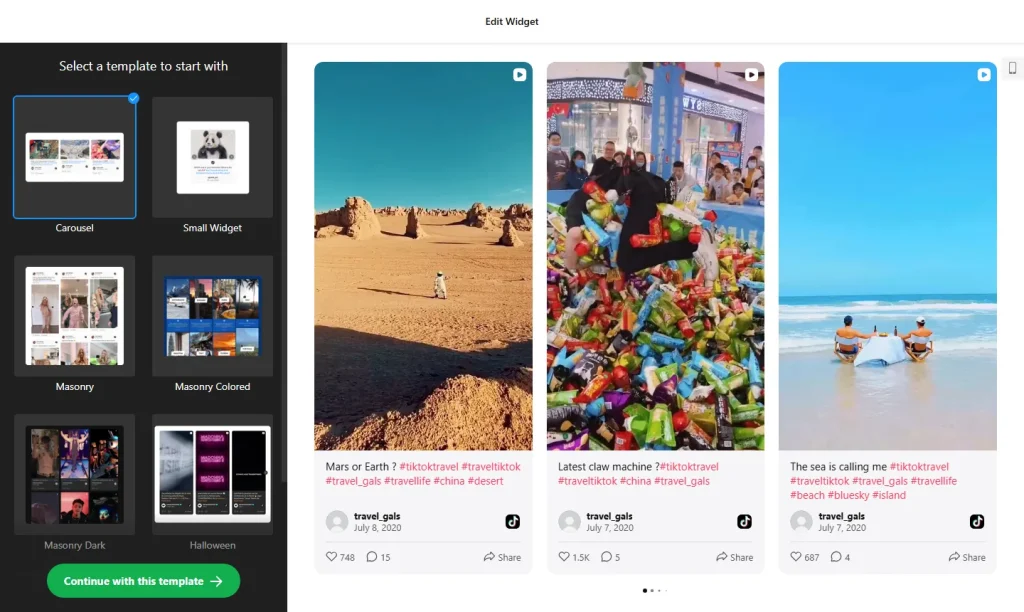
2. Add it to your WordPress site
- Open the page or post in the WordPress block editor.
- Click the block inserter (+) and add a Custom HTML block where the videos should go.
- Paste the TikTok feed code, then switch to Preview inside the block to check it.
- Click Update or Publish and view the page.
- Using Elementor? Drag in the HTML widget and paste the code there. In the classic editor, paste the code into the Text tab, not Visual.
Where to put the TikTok Feed widget on your WordPress site
- At the end of blog posts, so readers who liked the post can keep watching your newest clips.
- On your homepage or About page, to introduce yourself with video rather than text alone.
- On a Videos or Media page, using the grid layout so visitors can browse.
- On WooCommerce product or shop pages, with a slider of product clips and how-to videos.
Do you need a paid WordPress plan?
Not on self-hosted WordPress. WordPress.org sites accept the widget’s script out of the box, on any host, with no plugin. On WordPress.com it depends on your plan: <script> tags only work on plans that allow plugins, and on other plans they’re removed when you save, which leaves the block empty.
Using a caching or performance plugin that delays or combines JavaScript? Exclude the widget’s script if the feed loads late or not at all. The widget’s own free plan covers one widget with up to 200 views a month on unlimited websites, with a small Elfsight link; paid plans start at $5 a month, billed yearly.
TikTok Feed widget features
- Your TikTok videos on your site, from a profile, a hashtag or both. New videos usually appear within 12–36 hours.
- Five layouts: Grid, Masonry, List, Carousel or Slider, from a full wall of videos to a compact row that takes less space.
- Video cards and popup: show or hide likes, views and author names, add a Follow button, and let visitors open a video with its comments in a popup.
- No plugin: build the feed in your browser and paste one short code into a Custom HTML block.
- Easy updates: change the widget in your Elfsight dashboard and your site updates without editing the post again.
- Free plan: one widget with up to 200 views a month, on unlimited websites.
Frequently asked questions
Do I need a plugin to add a TikTok feed to WordPress?
No. On self-hosted WordPress you paste the code into a Custom HTML block, or Elementor’s HTML widget, and it works. On WordPress.com you need a plan that allows plugins, because other plans remove script tags when you save.
Why is my TikTok feed missing on WordPress?
Check that the code is in a Custom HTML block or the classic editor’s Text tab, that your WordPress.com plan allows plugins, and that no performance plugin is delaying or combining the widget’s script. Exclude the script there if needed.
Does the TikTok feed work with Elementor?
Yes. Drag the HTML widget into your layout, paste the embed code and update the page.
Can I add the TikTok feed to WooCommerce product pages?
Yes. Add the code where you edit the product content: a Custom HTML block, Elementor’s HTML widget, or the Text tab if your product description uses the classic editor.
Is the TikTok feed widget free for WordPress?
Yes. The free plan includes one widget with up to 200 views a month on unlimited websites, with a small Elfsight branding link. Paid plans start at $5 a month, billed yearly, for more views and no branding.
More WordPress widgets
- TikTok Feed widget
All templates and features - WordPress Instagram Feed widget
Your latest Instagram posts and reels - WordPress Facebook Feed widget
Posts from your Facebook Page - WordPress YouTube Gallery widget
Videos from a YouTube channel or playlist - WordPress LinkedIn Feed widget
Company posts from LinkedIn - How to add embed code to any website
Where to paste widget code on every website builder