
Use the widget builder below to create your free spin the wheel widget. Select a template and click “Continue with this template” to get started.
Turn discounts and promo codes into a quick game. Visitors spin a prize wheel, you collect their email, and the reward is sent to them automatically.
How to use the Spinning Wheel widget builder
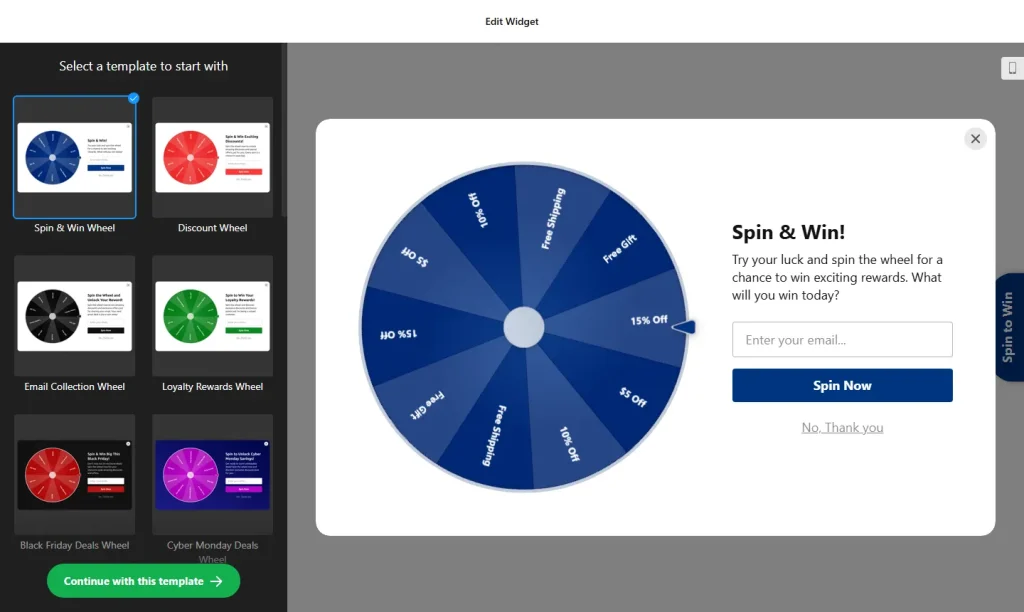
- Choose a template: Pick a design in the builder above and click “Continue with this template”. You can change the prizes and style later.
- Add your prizes: Add up to 10 prize segments, each with its own text and promo code, and give each segment its own color.
- Set the odds: Give each prize a weight to decide how often it can be won.
- Collect emails: Turn on the form that asks visitors for their email before they spin.
- Choose when the wheel appears: Show it after a set time on the page, at a certain scroll depth or when a visitor is about to leave (exit intent on desktop). You can also schedule it for specific dates.
- Limit spins: Set how many times each visitor can spin, and optionally send people to a page of your choice after they spin.
- Customize the look: Change colors and fonts so the wheel matches your brand.
- Save your widget: Click “Add to website for free” and sign up on the next page to save your widget.
- Copy the embed code: Paste it into your website on the pages where you want the wheel to appear.
Key features of the Spinning Wheel widget
- Up to 10 prizes: Each segment has its own text, promo code and color.
- Win probability: Set a weight for every prize to control how often it comes up.
- Email capture: Ask for an email before the spin to grow your mailing list.
- Automatic prize delivery: Rewards are sent to winners automatically, and you can see how many people take part.
- Smart triggers: Open the wheel by time on page, scroll depth or exit intent.
- Scheduling: Show the wheel only during the dates and times of your campaign.
- Spin limits and redirects: Limit spins per visitor and send people to a URL after they spin or fill in the form.
When to use a spin the wheel widget
A prize wheel works best when you already have an offer to give away and want more people to notice it. The game format gets attention, and the email form turns that attention into subscribers. Common uses:
- A welcome discount for first-time visitors
- Growing your newsletter list
- Seasonal sales and holiday campaigns with a fixed start and end date
- A last-chance offer for visitors who are about to leave
- Loyalty rewards for returning customers
Show clear prize terms. Before people spin, tell them what they can win, how long each code is valid and whether there is a minimum order. If you collect emails, say that you will send them offers. Clear terms prevent disappointed customers and support requests. To show when your offer ends, pair the wheel with a countdown timer.
How to add the Spinning Wheel widget to your website
After you save the widget, Elfsight gives you a short embed code. Paste it into a custom HTML or embed block on your website. To show the wheel on every page, add the code to your site-wide footer or theme settings. It works on WordPress, Wix, Squarespace, Shopify, Webflow, Google Sites and any other website that accepts custom HTML. For step-by-step instructions for each platform, see our guide on how to add embed code to any website builder.
How to manage your Spinning Wheel widget
Log in to your Elfsight dashboard to edit your widget at any time, for example to change prizes for a new campaign. Changes go live automatically, so you don’t need to replace the embed code on your website. From the dashboard you can also create more widgets, copy the embed code again and see how many views your widget has used this month.
Frequently asked questions
Is the spin the wheel widget free?
Yes. Elfsight’s free plan includes one widget with up to 200 views per month on unlimited websites, with a small Elfsight branding link. Paid plans start at $5 per month (billed yearly) and add more views and remove the branding.
How many prizes can I add to the wheel?
You can add up to 10 prize segments on one wheel, each with its own text and promo code.
Can I control which prizes people win?
Yes. Each prize segment has a weight, so you can make some prizes come up more often and others less often.
Can I ask for an email before the spin?
Yes. A lead capture form can appear before the spin, and prizes are sent to winners automatically.
Can I stop visitors from spinning more than once?
Yes. You can limit the number of spins per visitor. The widget remembers visitors using cookies or local storage.
More widgets for promotions
- Popup widget
Show offers, announcements and sign-up forms in a popup - Countdown Timer
Add urgency to sales and limited-time deals - Subscription Form
Collect newsletter sign-ups without a game - Banner widget
Promote offers and discounts with an eye-catching banner - Sales Notification popup
Show recent purchases as social proof