
Use the builder below to create a free Facebook feed for your Shopify store. Pick a template and click “Continue with this template” to connect your Facebook Page.
Many Shopify stores use their Facebook Page for new arrivals, restocks, behind-the-scenes clips and answers to customer questions. A Facebook feed shows those posts inside your store, so shoppers can see you’re active and find a reason to follow you, without you posting the same news twice. You don’t need an app from the Shopify App Store: build the feed here and add it with a Custom Liquid section in the theme editor.
How to add a Facebook Feed widget to Shopify
1. Create your widget
- Choose a template: Medium Widgets, Small Widgets, Large Widgets, Facebook Posts, Facebook Videos or Full-Width Posts. Full-Width Posts or Large Widgets fill a home page section; Small Widgets sits neatly below product details.
- Connect your Facebook Page: sign in with your Facebook account and pick your store’s Page, which must be a Page you manage.
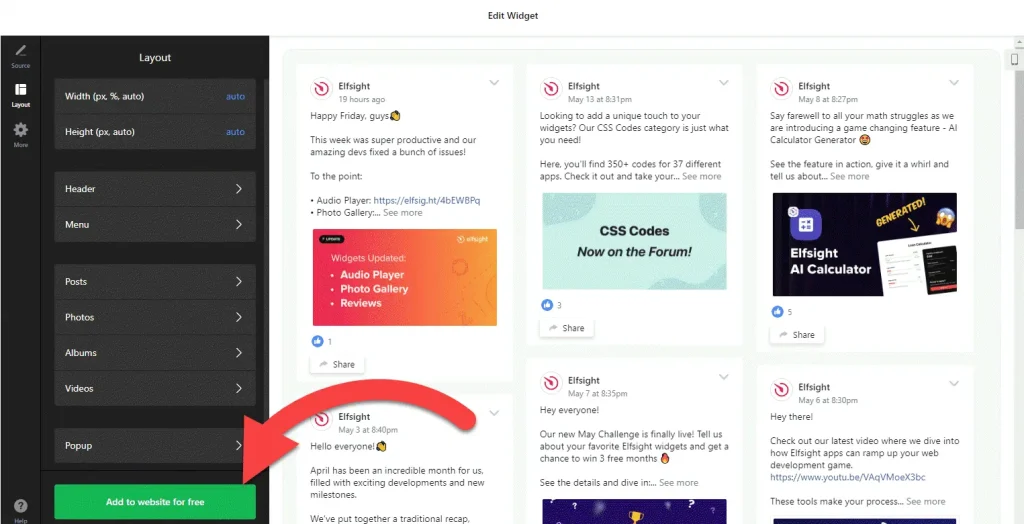
- Adjust the layout: set the width and height and choose which elements to show, so the feed matches the width of your theme’s other sections.
- Save it: click “Add to website for free“, sign up on the next page and copy your embed code.
2. Add it to your Shopify site
- In your Shopify admin, go to Online Store › Themes and click Customize.
- Use the page selector at the top to open the template you want: the home page, the default product template or a custom page.
- Click Add section and choose Custom Liquid.
- Paste the Facebook feed code into the section, then drag the section into position, for example above the footer.
- Click Save and check the feed in your live store on desktop and mobile.
Where to put the Facebook Feed widget on your Shopify site
- On the home page, after your featured collections, as a section that shows the store’s recent news.
- On the product template, below the product details. A section on the default product template shows on every product page that uses it.
- On a collection template, under the product grid, for collections you promote on Facebook.
- On an About or Our Story page, with posts about your team, workshop or packing days.
- In the footer area, if you want the feed on every page. Sections added there appear site-wide.
Do you need a paid Shopify plan?
No upgrade or extra app is needed for the feed. It goes into a Custom Liquid section in your theme editor, the same place Shopify gives you for other embed code, so there is nothing to install from the Shopify App Store and nothing to remove later except the section itself.
Think about views before you choose a template. A section on the default product template loads on every product page, and one in the footer loads on every page, so a busy store can use up the widget’s free 200 views a month quickly. The free plan covers one widget on unlimited websites with a small Elfsight link; paid plans start at $5 a month, billed yearly.
Facebook Feed widget features
- Six templates: Medium Widgets, Small Widgets, Large Widgets, Facebook Posts, Facebook Videos and Full-Width Posts.
- Posts from your own Page: connect the Facebook Page you manage and the widget fetches its posts for you.
- A video template for stores that share product clips and unboxing videos.
- Layout settings: set the width and height and choose which elements are visible.
- One dashboard to create more Facebook feeds, edit existing ones and copy the embed code again.
Frequently asked questions
Do I need a Shopify app to show my Facebook feed?
No. Paste the embed code into a Custom Liquid section in the theme editor, under Online Store, Themes, Customize. Nothing is installed in your store.
Why does the Facebook feed show on all my product pages?
You added it to the default product template, which every product page uses. Add it to the home page or a custom page instead if you want it in one place only.
Can I show the Facebook feed on every page of my store?
Yes. Add the Custom Liquid section to your theme’s footer area, which appears on every page. Keep in mind that every page view then counts toward the widget’s monthly views.
Is the Facebook feed widget free for Shopify?
Yes. The free plan includes one widget with up to 200 views a month on unlimited websites, with a small Elfsight branding link. Paid plans start at $5 a month, billed yearly, which suits stores with more traffic.
Do I need to edit my theme again when I change the feed?
No. Edit the widget in your Elfsight dashboard and save. The feed in your Shopify store updates on its own, so the Custom Liquid section stays as it is.
More Shopify widgets
- Facebook Feed widget
All templates and features - Shopify Instagram Feed widget
Your latest Instagram posts and reels - Shopify TikTok Feed widget
Your TikTok videos in a grid or slider - Shopify YouTube Gallery widget
Videos from a YouTube channel or playlist - Shopify LinkedIn Feed widget
Company posts from LinkedIn - How to add embed code to any website
Where to paste widget code on every website builder