
Use the builder below to create a free contact form for your Shopify store. Choose a template and click “Continue with this template” to set up your fields.
Shoppers have questions before they buy: does it fit, when will it ship, can I order in bulk? A contact form lets them ask without leaving your store. This builder gives you a form with the fields a store needs, such as an order number, a product or topic choice and a photo upload, and sends every message to your inbox. You add it through a Custom Liquid section in the Shopify theme editor, so no app is needed.
How to add a Contact Form widget to Shopify
1. Create your widget
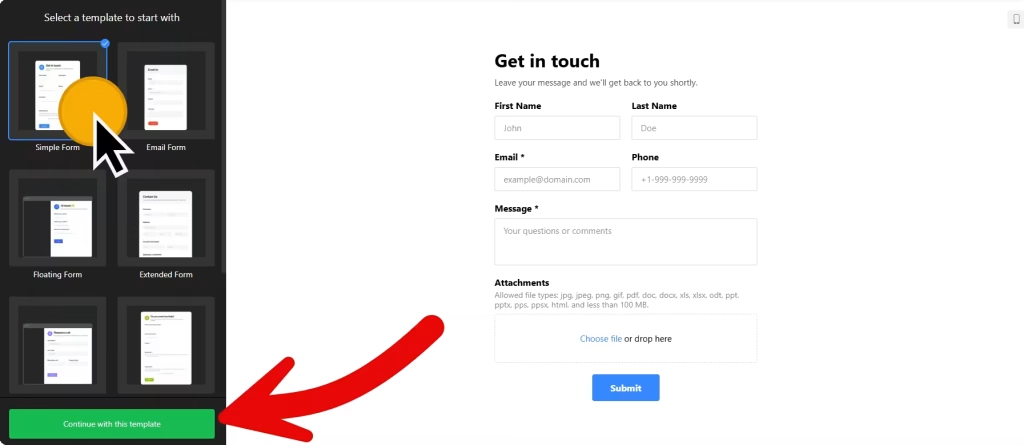
- Choose a template: Simple Form for a general Contact page, Extended Form for wholesale or custom orders, or Floating Form for a pane shoppers can open from any page.
- Add store fields: short text for an order number, a drop-down for the product or topic, file upload for photos of a damaged item, and a consent box for marketing emails.
- Show fields only when needed with conditional logic, for example asking for the order number only when the topic is Returns.
- Set up notifications and integrations: get an email for every message, send an automatic reply, and pass contacts to Mailchimp if you collect marketing consent.
- Save it: click “Add to website for free“, sign up on the next page and copy your embed code.
2. Add it to your Shopify site
- In your Shopify admin, go to Online Store › Themes and click Customize.
- Use the page selector at the top to open the template you want: the page template your Contact page uses, the product template or the home page.
- Click Add section, choose Custom Liquid and paste the form code.
- Drag the section into position, for example under the product description or below your contact details, then click Save.
- Remember that a section added to a template shows on every page that uses it. Added to the default product template, the form appears on all product pages.
- Open the live store and send a test message to check the notification email.
Where to put the Contact Form widget on your Shopify site
- On your Contact page, for general questions, with a topic drop-down such as Order status, Returns and Wholesale.
- On product pages, under the description, so shoppers can ask about sizing or stock without leaving the product.
- On a wholesale or custom order page, using the Extended Form template to collect company details and quantities.
- On a returns page, with an order number field and a file upload for photos.
- As a floating pane across the whole store, added to the footer area so shoppers can open it on any page.
Do you need a paid Shopify plan?
No. You don’t need an app or a particular Shopify plan for this. The form goes in through a Custom Liquid section in the theme editor, so if you can customize your theme, you can add it. Shopify sometimes renames menu items as it updates the editor, but the section is listed under Add section.
For a floating contact pane on every page, add the Custom Liquid section to your theme’s footer area, which appears site-wide. Keep views in mind: the widget’s free plan covers one widget with up to 200 views a month on unlimited websites, with a small Elfsight link, and a pane on every page uses views faster than a form on one page. Paid plans start at $5 a month, billed yearly.
Contact Form widget features
- 17 field blocks, including phone number, drop-down, file upload, image choice and consent.
- Conditional logic to show or hide fields based on earlier answers.
- Two embed types: Inline inside a section, or a Floating pane.
- Mailchimp, Google Sheets and Zapier integrations, so entries reach the tools you already use.
- Google reCAPTCHA spam protection and a choice of success message, redirect or hidden form after submission.
Frequently asked questions
Do I need a Shopify app for this contact form?
No. You paste the code into a Custom Liquid section in the theme editor. There’s no app to install.
Why does the form show on every product page?
Because you added it to the product template, and every product that uses the template shows the same sections. To show it on fewer products, add it to a template that only those products use, or place the form on a separate page instead.
Can customers attach photos of a damaged order?
Yes. Add the file upload field in the builder. Pair it with an order number field so you have what you need to reply.
How do I show the form as a floating pane on my whole store?
Choose the Floating pane embed type in the builder, then add the code with a Custom Liquid section in your theme’s footer area, which appears on every page.
Is the contact form free for Shopify stores?
Yes. The free plan includes one widget with up to 200 views a month on unlimited websites, with a small Elfsight branding link. Paid plans start at $5 a month, billed yearly.
More Shopify widgets
- Contact Form widget
All templates and features - Shopify WhatsApp Chat widget
A WhatsApp chat button or bubble - Shopify AI Chatbot widget
Answers questions using your own content - Shopify Google Reviews widget
Your Google Business reviews and rating - Shopify Instagram Feed widget
Your latest Instagram posts and reels - How to add embed code to any website
Where to paste widget code on every website builder