
Use the widget builder below to create your free Tripadvisor reviews widget. Select a template and click “Continue with this template” to get started.
Show your Tripadvisor rating and guest reviews on your hotel, restaurant or tour website. No coding needed, and new reviews are added automatically.
How to use the Tripadvisor Reviews widget builder
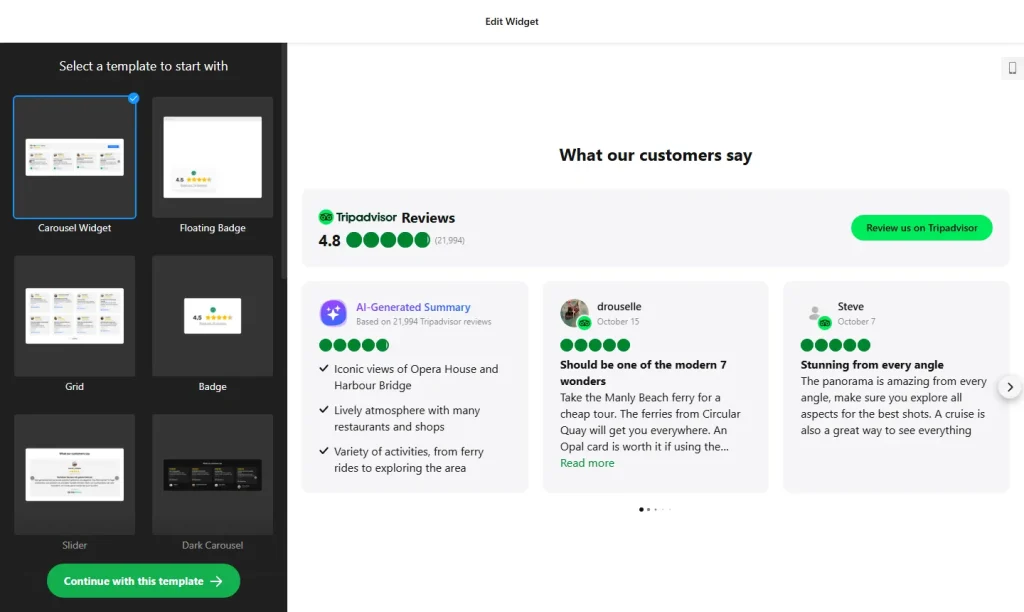
- Choose a template: Pick a design in the builder above and click “Continue with this template”. You can change the layout and style later.
- Add your Tripadvisor page: Paste the link to your hotel, restaurant or attraction page on Tripadvisor. The widget pulls your rating and reviews from that page.
- Filter reviews: Show all reviews or only positive ones, hide reviews that contain certain words, and set how many reviews appear.
- Pick a layout: Display reviews as a List, Grid, Slider or Badge, and adjust the widget’s width and height.
- Edit the header: Show or hide your star rating, the total number of reviews, and the button that invites guests to write a review.
- Set up review cards: Turn the author’s name and photo, date, rating and Tripadvisor icon on or off, and choose between full text or a “Show more” link.
- Customize the look: Change colors, fonts and text sizes so the widget matches your website.
- Save your widget: Click “Add to website for free” and sign up on the next page to save your widget.
- Copy the embed code: Paste it into your website where you want your Tripadvisor reviews to appear.
Key features of the Tripadvisor Reviews widget
- Star rating header: Shows your overall Tripadvisor rating and number of reviews, linked to your Tripadvisor profile.
- Four layouts: List, Grid, Slider and Badge, so the widget fits a full reviews page or a small sidebar.
- Automatic updates: Reviews are refreshed every 72 hours. The caching keeps your pages loading fast while the content stays up to date.
- Review filters: Show only positive reviews, exclude comments with unwanted keywords, and control how many reviews are shown.
- Review request button: Invite happy guests to write a review on Tripadvisor. Visitors who click “No” see a message from you instead, which can include a link to email you.
- AI review summary: An optional AI summary card highlights what guests mention most often.
- Mobile-friendly: The widget adapts to desktop, tablet and phone screens.
Why show Tripadvisor reviews on your website?
Travelers often compare hotels, restaurants and tours on Tripadvisor before they book. When they land on your website, seeing the same recognizable rating and real guest stories reassures them that they are making a good choice, right where they can book. A Tripadvisor reviews widget is a good fit for:
- Hotels, guesthouses, B&Bs and vacation rentals
- Restaurants, cafés and bars
- Tour operators, travel agencies and activity providers
- Museums, attractions and event venues
Tip: Place the widget near your booking or reservation button, where guests make their decision. If you also get reviews on Booking.com or Airbnb, you can show those with the Booking.com Reviews and Airbnb Reviews widgets.
How to add the Tripadvisor Reviews widget to your website
After you save the widget, Elfsight gives you a short embed code. Paste it into a custom HTML or embed block where you want the reviews to show. It works on WordPress, Wix, Squarespace, Shopify, Webflow, Google Sites and any other website that accepts custom HTML. For step-by-step instructions for each platform, see our guide on how to add embed code to any website builder.
Good places for Tripadvisor reviews are your homepage, your rooms or menu page, and your booking or contact page. A Grid or Slider works well on a dedicated reviews section, while the Badge layout fits a sidebar or footer.
How to manage your Tripadvisor Reviews widget
Log in to your Elfsight dashboard to edit your widget at any time. Changes go live automatically, so you don’t need to replace the embed code on your website. From the dashboard you can also create more widgets, copy the embed code again and see how many views your widget has used this month.
Frequently asked questions
Is the Tripadvisor reviews widget free?
Yes. Elfsight’s free plan includes one widget with up to 200 views per month on unlimited websites, with a small Elfsight branding link. Paid plans start at $5 per month (billed yearly) and add more views and remove the branding.
How often are new Tripadvisor reviews added?
The widget refreshes reviews every 72 hours. This caching keeps your pages fast while the reviews stay reasonably up to date.
Can I hide negative Tripadvisor reviews?
Yes. You can show only positive reviews, exclude reviews that contain specific words, and set exactly how many reviews are displayed.
Which layouts can I use?
You can show Tripadvisor reviews as a List, Grid, Slider or Badge, and adjust the widget’s width, height and header.
Will the Tripadvisor reviews widget work on my website builder?
Yes. It works on any website that lets you add custom HTML, including WordPress, Wix, Squarespace, Shopify, Webflow and Google Sites.
More review widgets
- Booking.com Reviews widget
Show verified guest reviews from your Booking.com listing - Airbnb Reviews widget
Display reviews from your Airbnb guests - Google Reviews widget
Show your Google Business rating and reviews - 8 website widgets every restaurant needs
- Yelp Reviews widget
Show your Yelp rating and reviews - Facebook Reviews widget
Show recommendations from your Facebook Page - OpenTable Reviews widget
Show diner reviews from OpenTable