
Use the widget builder below to create your free video gallery widget. Select a template and click “Continue with this template” to get started.
Put videos from YouTube, TikTok, Instagram Reels, Vimeo, Twitch and your own hosting into one gallery. Videos play right on your page, and new uploads appear automatically.
How to use the Video Gallery widget builder
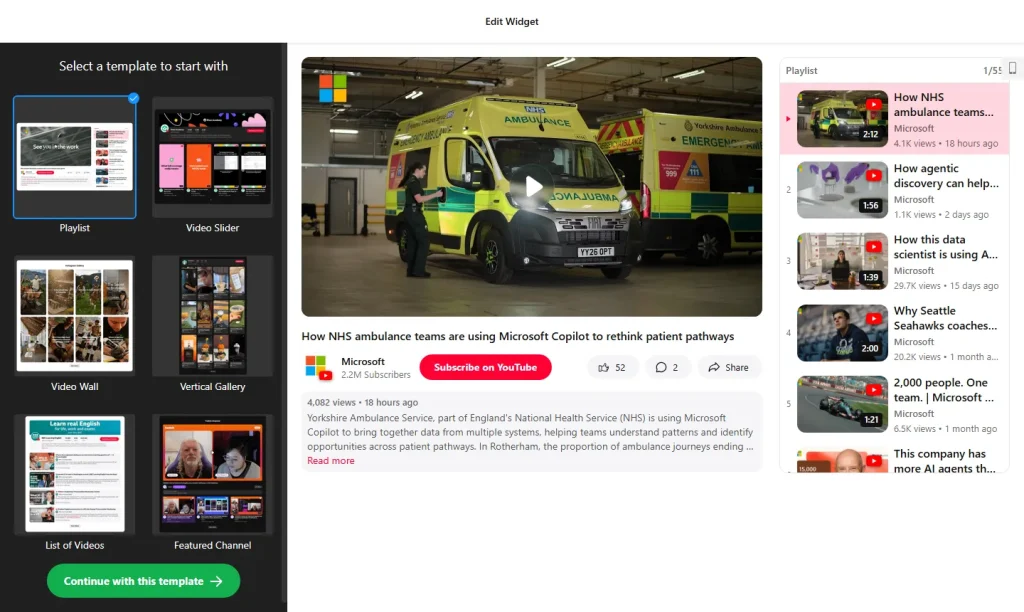
- Choose a template: Pick a ready-made template, for example for a YouTube channel, video testimonials, product videos or a portfolio, and click “Continue with this template”.
- Connect your videos: Add a YouTube channel, playlist, Shorts, live stream or specific videos, a TikTok account or hashtag, Instagram Reels, a Vimeo showcase or user, a Twitch channel or category, or an MP4 file by link.
- Combine sources: Add several sources to one gallery and let visitors switch between them with tabs.
- Filter and sort: Include or exclude videos by keywords in the title or description, show only videos published after a certain date, and choose the sort order.
- Pick a layout: Choose one of seven layouts, from a single player to a masonry wall, and set the columns, rows, rows on mobile and spacing.
- Choose how videos open: Play videos in a popup on your page (classic or vertical style) or in a new tab on the original platform. You can also show a call-to-action card when a video ends.
- Customize the look: Switch between light and dark themes, set your accent color and font, and pick Classic, Plain or Minimal video cards.
- Save your widget: Click “Add to website for free” and sign up on the next page to save your widget.
- Copy the embed code: Paste it into your website where you want the video gallery to appear.
Key features of the Video Gallery widget
- All your video sources in one place: YouTube, TikTok, Instagram Reels, Vimeo, Twitch and self-hosted videos, alone or together.
- Automatic updates: Connect a channel, playlist or account once and new videos show up on their own.
- Popup player: Visitors watch on your page instead of being sent to YouTube or another platform.
- Call-to-action card: When a video ends, show a link to a product, booking or sign-up page, or replay or play the next video.
- Channel header with subscribe button: Show your banner, subscriber count and a subscribe or follow button.
- Video Schema.org markup: Add video structured data for every video in the gallery with one setting.
- Google Analytics events: See which videos get watched and which lead to clicks.
- Fast loading: The widget is lazy-loaded by default, so your page stays fast.
Ways to use a video gallery on your website
A video gallery keeps your best videos on your own website, where they can lead to sales and sign-ups instead of more browsing on YouTube or TikTok. Popular uses include:
- Product demos and how-to videos next to the buy button
- Customer video testimonials on your homepage or pricing page
- A video portfolio for your reel, client work or productions
- A tutorial library or webinar archive
- Team stories and office tours on your careers page
- Property tours on real estate listings
If you only need to show videos from one YouTube channel, the YouTube Gallery widget is a simpler option.
How to add the Video Gallery widget to your website
After you save the widget, Elfsight gives you a short embed code. Paste it into a custom HTML or embed block where you want the videos to show. It works on WordPress, Wix, Squarespace, Shopify, Webflow, Google Sites and any other website that accepts custom HTML. For step-by-step instructions for each platform, see our guide on how to add embed code to any website builder.
How to manage your Video Gallery widget
Log in to your Elfsight dashboard to edit your widget at any time, for example to add a new source or change the layout. Changes go live automatically, so you don’t need to replace the embed code on your website. From the dashboard you can also create more widgets, copy the embed code again and see how many views your widget has used this month.
Frequently asked questions
Is the video gallery widget free?
Yes. Elfsight’s free plan includes one widget with up to 200 views per month on unlimited websites, with a small Elfsight branding link. Every video source, layout and setting is available on the free plan. Paid plans start at $5 per month (billed yearly) and add more views and remove the branding.
Which video platforms can I add to the gallery?
YouTube (channels, playlists, Shorts, live streams and single videos), TikTok accounts and hashtags, Instagram Reels, Vimeo, Twitch and MP4 videos hosted anywhere by link. You can combine several sources in one gallery.
Will the gallery update when I publish new videos?
Yes. Connect a channel, playlist or account once and new videos appear in the widget automatically.
Can visitors watch videos without leaving my website?
Yes. Videos can open in a popup player on your page, in a classic or vertical style. If you prefer, videos can open in a new tab on the original platform instead.
Does the video gallery help with SEO?
You can turn on Schema.org markup, and the widget adds video structured data for every video in the gallery. This helps search engines understand your videos, without a plugin or code.
More video and gallery widgets
- YouTube Gallery widget
Show videos and playlists from a YouTube channel - Photo Gallery widget
Display your images in a stylish gallery - Portfolio widget
Present your work and projects - TikTok Feed widget
Show your latest TikTok videos - Image Slider widget
Showcase photos and offers in a slider - Vimeo Gallery widget
Show selected Vimeo videos and channels