
Use the widget builder below to create your free poll widget. Select a template and click “Continue with this template” to get started.
Ask your visitors a question and show the results live. Collect feedback, test ideas and measure interest with a mobile-friendly poll. No coding needed.
How to use the Poll widget builder
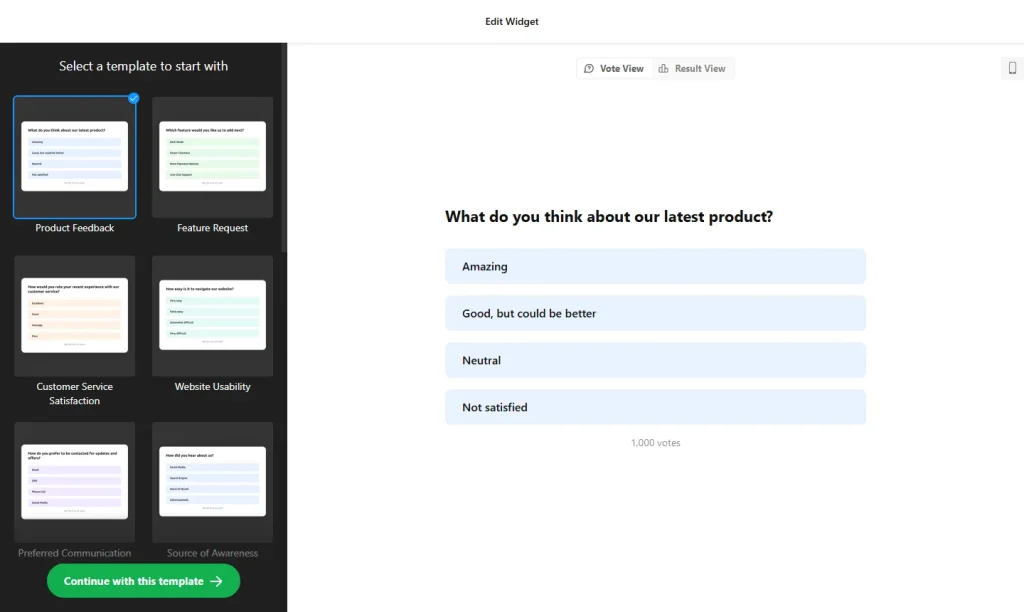
- Choose a template: Pick a design in the builder above, such as Feature Request Poll, Customer Service Satisfaction Poll, Live Poll, Straw Poll or Voting Poll, and click “Continue with this template”. You can also start from scratch.
- Write your question and answers: Enter the question you want to ask and the answer options visitors can vote for.
- Set what happens after voting: Show the live results, add a custom thank-you message, and optionally add a button that sends voters to another page or offer.
- Translate the text: If your audience speaks another language, translate the questions, labels and buttons right in the editor.
- Customize the design: Use the color theme generator to build a palette from one main color, or change the header, buttons and background one by one.
- Save your widget: Click “Add to website for free” and sign up on the next page to save your widget.
- Copy the embed code: Paste it into your website where you want the poll to appear. It starts collecting votes right away.
Key features of the Poll widget
- Live results: Vote counts and percentages update as soon as someone votes, so visitors see how others answered.
- Ready-made templates: Start from polls for feature requests, customer satisfaction, voting, quick straw polls and more.
- Thank-you message: Confirm each vote with your own message.
- Button after voting: Add a call-to-action on the results screen, for example to recommend a product that matches the answer or to send people to your next step.
- Translation: Every question, label and interface text can be translated for international visitors.
- Color theme generator: Pick one main color and get a matching design, or fine-tune each element with a live preview.
- Mobile-friendly: Polls work on desktop, tablet and phone screens.
When to use a poll on your website
A poll is the quickest way to ask visitors one question and get an answer in a single click. Because it’s so easy to take part, more people respond than to a long survey. Use a poll to:
- Find out which feature or product your customers want next
- Check how satisfied customers are with your service
- Let your audience choose between options, like an event date, a new product name or a design
- Add a fun, interactive question to a blog post or community page
Tip: Keep it to one clear question with a few answer options. If you need written answers, contact details or several questions, use the Form Builder instead.
How to add the Poll widget to your website
After you save the widget, Elfsight gives you a short embed code. Paste it into a custom HTML or embed block where you want the poll to show. It works on WordPress, Wix, Squarespace, Shopify, Webflow, Google Sites and any other website that accepts custom HTML. For step-by-step instructions for each platform, see our guide on how to add embed code to any website builder.
Good places for a poll are the end of a blog post, a product or feature page, and your newsletter landing page. Use the button on the results screen to point voters to a related product, article or offer, so the poll leads somewhere useful instead of being a dead end.
How to manage your Poll widget
Log in to your Elfsight dashboard to edit your widget at any time, for example to change the question or add a new answer. Changes go live automatically, so you don’t need to replace the embed code on your website. From the dashboard you can also create more widgets, copy the embed code again and see how many views your widget has used this month.
Frequently asked questions
Is the poll widget free?
Yes. Elfsight’s free plan includes one widget with up to 200 views per month on unlimited websites, with a small Elfsight branding link. Paid plans start at $5 per month (billed yearly) and add more views and remove the branding.
Do visitors see the poll results right away?
Yes. Vote counts and percentages update as soon as someone votes, so visitors see live results.
What happens after someone votes?
You can show a custom thank-you message and add a call-to-action button that sends voters to another page, offer or next step.
Can I translate the poll into another language?
Yes. All questions, labels and interface text can be translated directly in the editor.
Will the poll widget work on my website builder?
Yes. It works on any website that lets you add custom HTML, including WordPress, Wix, Squarespace, Shopify, Webflow and Google Sites.
More widgets to collect feedback
- Form Builder
Create surveys, feedback forms and lead forms - Contact Form widget
Let visitors send you a message - Subscription Form widget
Grow your email list - FAQ widget
Answer common questions in an accordion - Comments widget
Let visitors discuss your content