
Use the widget builder below to create your free Google Play reviews widget. Select a template and click “Continue with this template” to get started.
Show your app’s Google Play rating and real user reviews on your website. No coding needed, and new reviews are added automatically.
How to use the Google Play Reviews widget builder
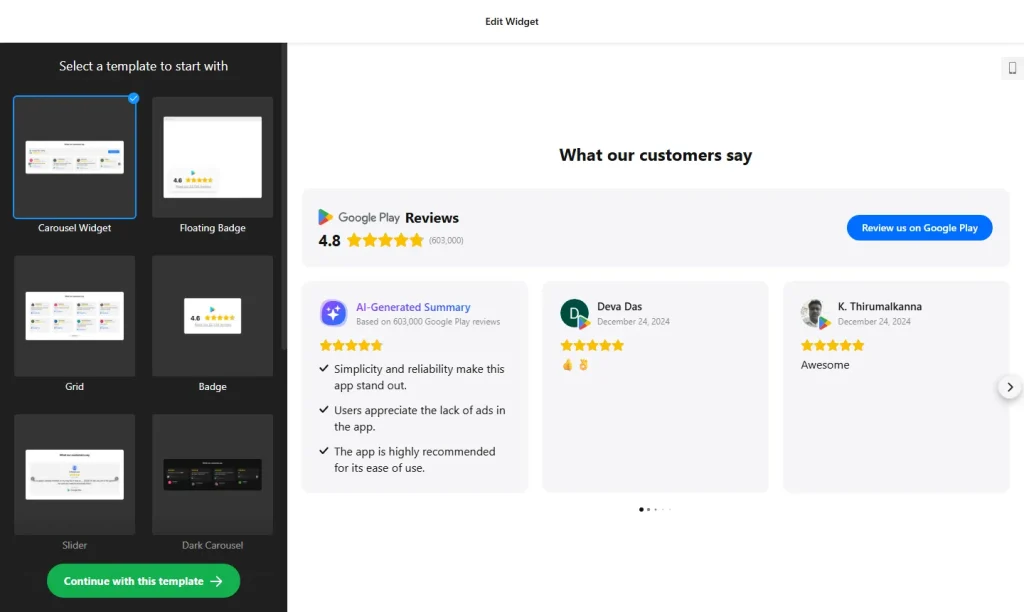
- Choose a template: Pick a design in the builder above and click “Continue with this template”. You can change the layout and style later.
- Add your app: Paste the link to your app’s Google Play store page. The widget imports your rating and user reviews from there.
- Filter reviews: Show all reviews or only 4–5 star ratings, exclude reviews by keyword or author, and hide reviews without a written comment.
- Sort reviews: Show the newest reviews first or display them in random order.
- Pick a layout and header: Choose how reviews are displayed, then show or hide your star rating, total number of reviews and the “Write a review” button.
- Customize the look: Recolor the text, review background and rating stars, choose a transparent, color or image background, or start from the Dark or Light color scheme.
- Save your widget: Click “Add to website for free” and sign up on the next page to save your widget.
- Copy the embed code: Paste it into your website where you want your app reviews to appear.
Key features of the Google Play Reviews widget
- Star rating header: Shows your app’s overall rating and total number of reviews at the top of the widget.
- Automatic updates: Reviews are imported from Google Play and the widget updates as new feedback is published.
- Review filters: Show only 4–5 star ratings, exclude keywords or authors, and hide reviews without text.
- Sorting: Newest reviews first, or a random order that keeps the widget fresh for returning visitors.
- AI review summary: An optional AI summary card highlights the common themes and overall sentiment in your reviews.
- Review button: An optional “Write a review” button takes visitors to your app’s Google Play page.
- Translation: All labels and headings are editable. Automatic translation of review text is available on Pro plans and higher.
Why show Google Play reviews on your website?
People who land on your app’s website often want proof before they install. Showing real ratings and comments from Android users answers that question on the spot, without sending them away to the store first. A Google Play reviews widget is useful for:
- App landing pages and product websites
- “Get the app” and download sections
- Developer and studio portfolio sites
- Press, media and investor pages
Tip: If your app is also on iPhone, add the Apple App Store Reviews widget as well, so both groups of users see ratings from their own store. To combine several review sources in one feed, use the All-in-One Reviews widget.
How to add the Google Play Reviews widget to your website
After you save the widget, Elfsight gives you a short embed code. Paste it into a custom HTML or embed block where you want the reviews to show. It works on WordPress, Wix, Squarespace, Shopify, Webflow, Google Sites and any other website that accepts custom HTML. For step-by-step instructions for each platform, see our guide on how to add embed code to any website builder.
Good places for app reviews are right below your app’s screenshots, next to the Google Play download button, and on your pricing or features page.
How to manage your Google Play Reviews widget
Log in to your Elfsight dashboard to edit your widget at any time. Changes go live automatically, so you don’t need to replace the embed code on your website. From the dashboard you can also create more widgets, copy the embed code again and see how many views your widget has used this month.
Frequently asked questions
Is the Google Play reviews widget free?
Yes. Elfsight’s free plan includes one widget with up to 200 views per month on unlimited websites, with a small Elfsight branding link. Paid plans start at $5 per month (billed yearly) and add more views and remove the branding.
How does the widget get my Google Play reviews?
Add the link to your app’s Google Play page. The widget imports your user reviews automatically and updates as new reviews are published.
Can I show only positive Google Play reviews?
Yes. You can show only 4–5 star ratings, exclude reviews by keyword or author, and hide reviews that have no written comment.
Can visitors leave a review from my website?
Yes. An optional Write a review button sends visitors to your app’s Google Play page, where they can rate and review it.
Can the reviews be shown in another language?
All labels and headings can be edited, so you can use any language. Automatic translation of review text is available on Pro plans and higher.
More review widgets
- Apple App Store Reviews widget
Show ratings from iPhone and iPad users - All-in-One Reviews widget
Combine reviews from 20+ platforms in one feed - Google Reviews widget
Show your Google Business rating and reviews - Testimonials Slider
Add your own customer quotes in a carousel - G2 Reviews widget
Show reviews of your software from G2