
Use the widget builder below to create your free LinkedIn recommendations widget. Select a template and click “Continue with this template” to get started.
Show endorsements from colleagues, clients and partners on your website, in a clean LinkedIn style. No coding needed.
How to use the LinkedIn Recommendations widget builder
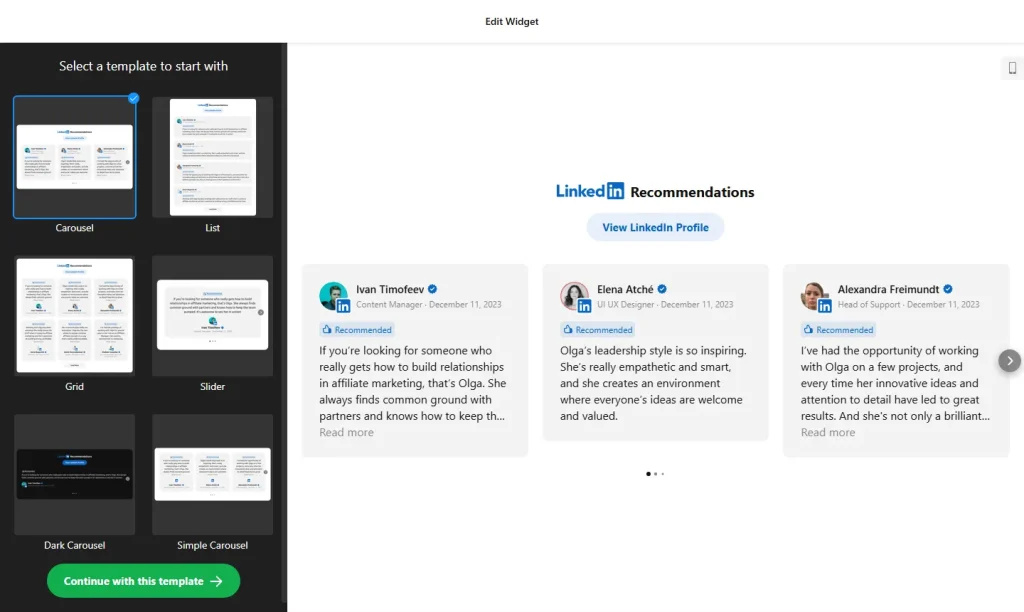
- Choose a template: Pick a design in the builder above and click “Continue with this template”. You can change the layout and style later.
- Add your recommendations: Add the LinkedIn recommendations you want to show. They aren’t imported automatically, so you choose exactly which ones appear.
- Add the details: For each recommendation, add the person’s photo, job title and LinkedIn profile link, and show a verification badge if you like.
- Pick a layout: Choose List, Grid, Slider, Masonry or Carousel. The carousel can rotate recommendations automatically.
- Set up the header: Customize the header and add a call-to-action button that takes visitors to your LinkedIn page.
- Customize the look: Change card colors, fonts and backgrounds, pick a Dark or Light theme, or add custom CSS.
- Save your widget: Click “Add to website for free” and sign up on the next page to save your widget.
- Copy the embed code: Paste it into your website where you want your recommendations to appear.
Key features of the LinkedIn Recommendations widget
- LinkedIn-style design: Widget elements follow LinkedIn’s original design, so recommendations look familiar and credible.
- Real names and faces: Show each person’s photo, job title, verification badge and a direct link to their LinkedIn profile.
- Five layouts: List, Grid, Slider, Masonry and Carousel, with optional autoplay for the carousel.
- Hand-picked content: Choose the recommendations that best show your skills and sort them the way you want.
- Call-to-action button: A button in the header sends visitors to your LinkedIn page, where they can connect or recommend you.
- Multiple languages: The widget supports multiple languages, so it fits sites with an international audience.
- Custom styling: Colors, backgrounds, fonts, Dark or Light themes and custom CSS.
Who should show LinkedIn recommendations?
LinkedIn recommendations come from people who put their own name, photo and job title behind what they say. That makes them strong proof when someone is deciding whether to hire you or work with your team. Because each card links to the recommender’s LinkedIn profile, visitors can check who wrote it. They are especially useful for:
- Freelancers and consultants
- Coaches, trainers and speakers
- Agencies and B2B service companies
- Job seekers with a personal website or online portfolio
Good to know: Recommendations are added by hand, so update the widget when you receive new ones on LinkedIn. If you want to show your company’s LinkedIn posts instead, use the LinkedIn Feed widget.
Tip: Ask for permission before you show someone’s photo and recommendation on your website, especially if they are a client.
How to add the LinkedIn Recommendations widget to your website
After you save the widget, Elfsight gives you a short embed code. Paste it into a custom HTML or embed block where you want the recommendations to show. It works on WordPress, Wix, Squarespace, Shopify, Webflow, Google Sites and any other website that accepts custom HTML. For step-by-step instructions for each platform, see our guide on how to add embed code to any website builder.
Good places for recommendations are your homepage, your about page, your services page and next to a contact or booking form.
How to manage your LinkedIn Recommendations widget
Log in to your Elfsight dashboard to edit your widget at any time, for example to add a new recommendation. Changes go live automatically, so you don’t need to replace the embed code on your website. From the dashboard you can also create more widgets, copy the embed code again and see how many views your widget has used this month.
Frequently asked questions
Is the LinkedIn recommendations widget free?
Yes. Elfsight’s free plan includes one widget with up to 200 views per month on unlimited websites, with a small Elfsight branding link. Paid plans start at $5 per month (billed yearly) and add more views and remove the branding.
Are new LinkedIn recommendations added automatically?
No. At the moment, recommendations are added manually in the editor, so add new ones whenever you receive them on LinkedIn.
Which layouts are available?
You can choose List, Grid, Slider, Masonry or Carousel. The carousel can rotate recommendations automatically.
What details can each recommendation show?
Each card can show the person’s photo, job title, a verification badge and a link to their LinkedIn profile, in a style that follows LinkedIn’s design.
Can I change the colors and fonts?
Yes. You can customize the header, card colors, fonts and backgrounds, choose a Dark or Light theme, or add your own CSS.
More testimonial and LinkedIn widgets
- LinkedIn Feed widget
Show your company’s LinkedIn posts - Testimonials Slider
Add your own customer quotes in a carousel - All-in-One Reviews widget
Combine reviews from 20+ platforms in one feed - Team Showcase widget
Introduce the people behind your business - G2 Reviews widget
Show reviews of your software from G2