
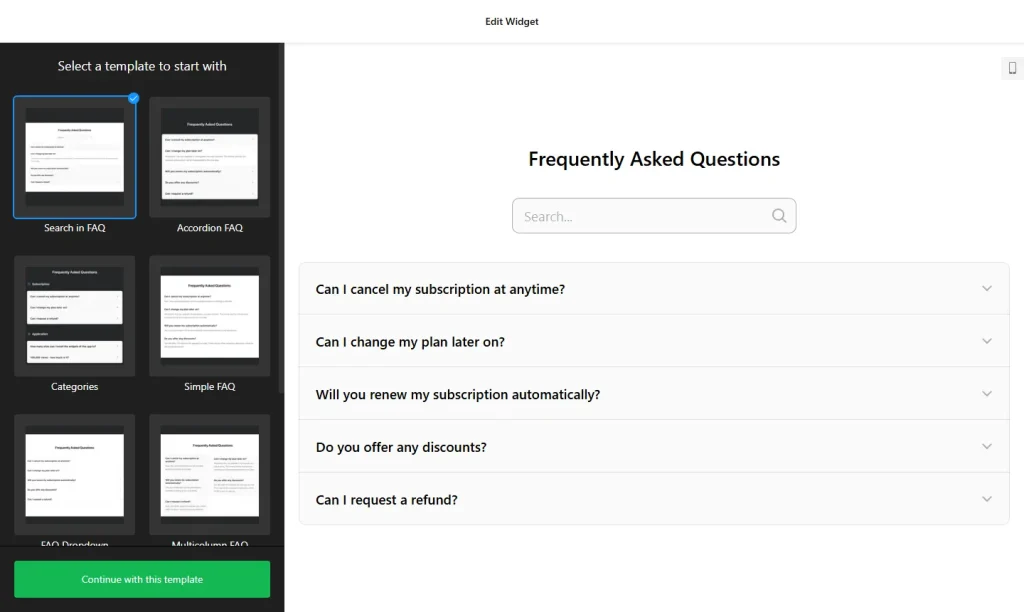
Use the builder below to create a free FAQ widget for your Wix website. Pick a template and click “Continue with this template” to start adding your questions.
Wix sites for salons, cleaners, tutors and other local services get the same questions again and again: Do you cover my area? How do I book? What does it cost? An FAQ widget puts those answers on the page in a tidy accordion, so visitors find them without calling or messaging you. You build it in your browser and add it with a Wix Embed HTML element. No app from the Wix App Market is needed.
How to add an FAQ widget to Wix
1. Create your widget
- Choose a template: start from one such as Categories, Collapsible FAQ, FAQ Toggle, Q&A or Knowledge Base, or start from scratch.
- Add categories and questions: group questions under categories such as Booking, Prices and Service Area, each with its own title and icon. Answers support HTML, so you can add links, bold text and line breaks.
- Pick a layout: List shows every answer, Accordion opens an answer on click, and Multicolumn splits the questions into columns.
- Style it: choose from 30+ category icons, a cross or arrow icon for the accordion, and colors that match your Wix theme.
- Save it: click “Add to website for free“, sign up on the next page and copy your embed code.
2. Add it to your Wix site
- Open your site in the Wix Editor and go to the page for your FAQ, such as a Services, Booking or Contact page.
- Click Add Elements (+), then Embed Code › Popular Embeds › Embed HTML. In Wix Studio the element is called Embed code.
- Click Enter Code, make sure Code is selected, paste the FAQ code and click Update.
- Drag the bottom edge of the box down until the full list of questions fits. Wix embed boxes keep a fixed height, so with the Accordion layout leave room for your longest answer to open.
- Switch to the mobile editor and resize the box there too. On a phone the questions wrap onto more lines, so the box usually needs to be taller.
- Publish your site, then open a few questions on the live page and on your phone to check nothing is cut off.
Where to put the FAQ widget on your Wix site
- On your services or prices page, under the price list, to answer questions about what’s included, deposits and cancellations.
- On your booking or contact page, above the form, so people find quick answers before they write to you.
- On a dedicated FAQ page, with categories, so it works like a small help center for your business.
- Near the bottom of your homepage, with the three or four questions new customers ask most.
Do you need a paid Wix plan?
No. The Embed HTML element works on Wix’s free and premium plans, so you can add the FAQ to any page without upgrading. The widget’s own free plan covers one widget with up to 200 views a month on unlimited websites, with a small Elfsight link; paid widget plans start at $5 a month, billed yearly.
The FAQ is an inline section, so you don’t need Wix’s site-wide Settings › Custom Code, which needs a premium plan with a connected domain. Wix runs embedded code inside its own frame, so the FAQ always stays within the box you drew. That is why the box size matters more on Wix than on most builders.
FAQ widget features
- Three layouts: List, Accordion and Multicolumn, so short and long FAQs both stay easy to read.
- Unlimited categories, each with its own title and icon, or hide the titles to show one simple list.
- No strict question limit: a short list of five questions or a full knowledge base on the same widget.
- HTML in answers, for links to your booking page, bold text and line breaks.
- 30+ icons for categories, plus a cross or arrow icon for the accordion.
- Instant updates: edit an answer in the builder and your Wix page changes automatically.
Frequently asked questions
Is the FAQ widget free on Wix?
Yes. The builder is free, and the free plan includes one widget with up to 200 views a month on unlimited websites, with a small Elfsight branding link. Paid plans start at $5 a month, billed yearly, for more views and no branding.
Do I need a Wix premium plan to add the FAQ?
No. The Embed HTML element works on free Wix sites too. The FAQ sits inline on the page, so you don’t need Wix’s Custom Code settings, which require a premium plan with a connected domain.
Why are my FAQ answers cut off on Wix?
The Embed HTML box has a fixed height. When a long answer opens, it can run past the bottom of the box. Select the element in the Wix Editor, drag it taller, then do the same in the mobile editor and publish again.
Can I edit the questions after adding the FAQ to Wix?
Yes. Edit the widget in your Elfsight dashboard and save. Your Wix page updates on its own, so you don’t need to paste the code again.
Can I show different FAQs on different Wix pages?
Yes. You can place the same widget on several pages, or create separate FAQ widgets for different services. The free plan covers one widget, so more than one needs a paid plan.
More Wix widgets
- FAQ widget
All templates and features - Wix Form Builder widget
Any form: quotes, sign-ups, surveys - Wix Google Reviews widget
Your Google Business reviews and rating - Wix Contact Form widget
A simple contact form - Wix Instagram Feed widget
Your latest Instagram posts and reels - 20 best Wix widgets
Our roundup of the best apps and widgets for Wix