
Use the builder below to create a free event calendar for your Squarespace website. Pick a template, click “Continue with this template” and add your events.
Studios, galleries, venues and creative businesses on Squarespace often have more going on than one page can show: workshops, classes, exhibitions, live sets and open studio days. This calendar shows them as a month grid, a list or an image slider that you style to sit well with the rest of your site. If you already keep your schedule in Google Calendar, you can sync it instead of typing events again. Then add the calendar to any page with a Code Block.
How to add an Event Calendar widget to Squarespace
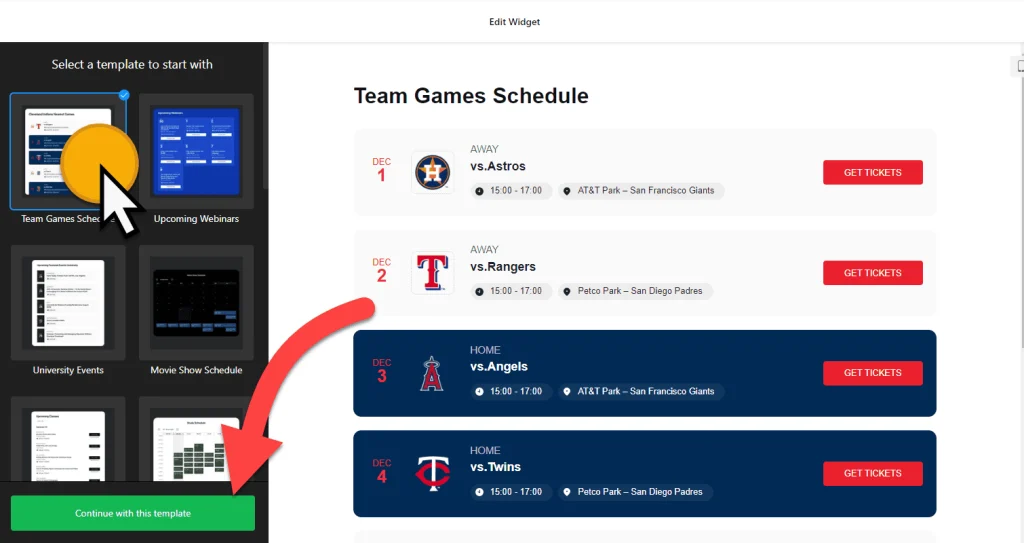
1. Create your widget
- Choose a template: pick one of 17, such as Slider Exhibition, Club Events, Upcoming Webinars, Movie Show Schedule or Convention Center.
- Add your events: enter them by hand or connect Google Calendar to sync them. Add images, descriptions, videos, file attachments and a call-to-action button, such as a ticket or sign-up link.
- Organize them: set event types, hosts and venues, so a class, an opening and a talk are easy to tell apart.
- Match your site’s look: choose List, Grid, Masonry, Slider, Month, Week or Day, then set the font, background and maximum width. Custom CSS covers anything else.
- Save it: click “Add to website for free“, sign up on the next page and copy your embed code.
2. Add it to your Squarespace site
- Go to the page where the calendar should appear and click Edit.
- Click an Add Block point (+) in the section you want and choose Code.
- Paste the calendar code, set the mode to HTML and turn off Display Source.
- Give the block plenty of width if you use a Month or Week layout, so the dates have room. A List or Slider fits narrower spaces.
- Save the page, then open the live site to check the calendar. The live page is the place to test it, not the editor.
Where to put the Event Calendar widget on your Squarespace site
- On an Events or Workshops page, with a Month layout so people can plan ahead.
- On your homepage, with a Slider or Grid layout and event images that show what’s next.
- On a class or studio page, next to your pricing or membership details.
- On an exhibition or portfolio page, listing upcoming openings, shows and artist talks.
Do you need a paid Squarespace plan?
Yes, for most sites. Plain HTML works in a Code Block on every Squarespace plan, but JavaScript needs a higher-tier plan: Core or above on current plans, or Business or above on older ones. The calendar loads with a script, so on a plan without JavaScript the block shows nothing at all, and Squarespace gives no error message.
The widget itself has a free plan: one widget, up to 200 views a month on unlimited websites, with a small Elfsight link. Paid widget plans start at $5 a month, billed yearly, for more views and no branding.
Event Calendar widget features
- 17 responsive templates, from exhibitions and club events to webinars and show schedules.
- Seven layouts: List, Grid, Masonry, Slider, Month, Week and Day.
- Google Calendar sync, or add and edit events by hand.
- Rich event details: images, descriptions, call-to-action buttons, videos and file attachments.
- Event types, hosts and venues to keep different kinds of events organized.
- Style and display settings: font, background, maximum width, past events, click actions, language and custom CSS.
Frequently asked questions
Which Squarespace plan do I need for the event calendar?
One that allows JavaScript in Code Blocks: Core or above on current plans, or Business or above on older plans. On lower plans the calendar’s script doesn’t run, so nothing appears.
Why is the calendar blank on my Squarespace page?
Check three things: your plan allows JavaScript, the Code Block is set to HTML, and Display Source is off. Then look at the live site rather than the editor.
Can I sync events from Google Calendar?
Yes. Connect Google Calendar in the builder and your events sync automatically to the calendar on your Squarespace page. You can also add events by hand.
Is the event calendar free?
Yes. The builder is free, and the free plan includes one widget with up to 200 views a month on unlimited websites, with a small Elfsight branding link. Paid plans start at $5 a month, billed yearly.
Do I need to update the code when I add events?
No. Add or edit events in your Elfsight dashboard and save. The calendar on your Squarespace site updates on its own, so the Code Block never needs changing.
More Squarespace widgets
- Event Calendar widget
All templates and features - Squarespace Appointment Booking widget
Online booking with time slots - Squarespace Business Hours widget
Opening hours with an open-now status - Squarespace Restaurant Menu widget
Your menu with prices and photos - Squarespace Google Reviews widget
Your Google Business reviews and rating - 25 best Squarespace widgets
Our roundup of plugins and widgets for Squarespace