
Use the builder below to create a free Facebook feed for your WordPress website. Pick a template and click “Continue with this template” to connect your Facebook Page.
On a WordPress blog or business site, a Facebook feed keeps pages fresh between posts and shows readers where else to follow you. Instead of installing and maintaining another plugin, you build the feed here and paste one short code into a Custom HTML block. It works the same way in the block editor, in Elementor and in the classic editor, including on WooCommerce shop pages.
How to add a Facebook Feed widget to WordPress
1. Create your widget
- Choose a template: Medium Widgets, Small Widgets, Large Widgets, Facebook Posts, Facebook Videos or Full-Width Posts. Large Widgets or Full-Width Posts suit a full-width page; Small Widgets suits a narrow content column.
- Connect your Facebook Page: sign in with your Facebook account and pick the Page you manage, so the widget can fetch its posts.
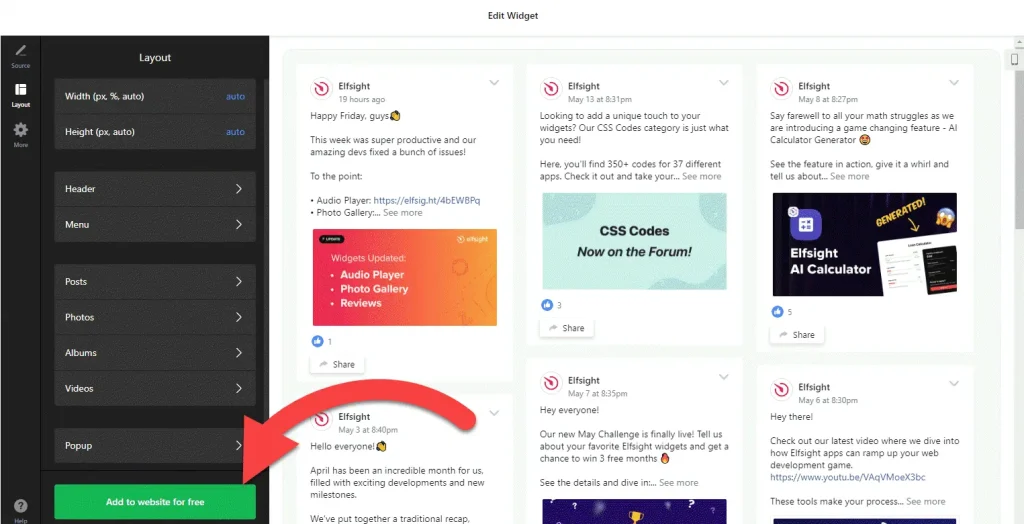
- Adjust the layout: set the width and height and choose which elements to show, so the feed fits your theme’s content width.
- Save it: click “Add to website for free“, sign up on the next page and copy your embed code.
2. Add it to your WordPress site
- Open the page or post in the WordPress block editor.
- Click the block inserter (+) and add a Custom HTML block where the feed should go.
- Paste the Facebook feed code, then switch to Preview inside the block to check it.
- Click Update or Publish and view the page.
- Using Elementor? Drag in the HTML widget and paste the code there. In the classic editor, paste the code into the Text tab, not Visual.
Where to put the Facebook Feed widget on your WordPress site
- On your homepage or About page, so visitors who arrive from search see recent news and can follow your Page.
- At the end of popular blog posts, as a next step for readers who want more of your updates.
- On a News or Community page that collects your Facebook updates, so you don’t have to repost them as WordPress posts.
- On WooCommerce shop or product pages, with recent Facebook posts about new arrivals and offers.
Do you need a paid WordPress plan?
Not on self-hosted WordPress. WordPress.org sites accept the widget’s script out of the box, on any host, with no plugin. On WordPress.com it depends on your plan: <script> tags only work on plans that allow plugins. On other plans they are removed when you save, so the Custom HTML block ends up empty.
If you use a performance plugin that delays or combines JavaScript, exclude the widget’s script if the feed loads late or not at all. The widget’s own free plan covers one widget with up to 200 views a month on unlimited websites, with a small Elfsight link; paid plans start at $5 a month, billed yearly.
Facebook Feed widget features
- Six templates: Medium Widgets, Small Widgets, Large Widgets, Facebook Posts, Facebook Videos and Full-Width Posts.
- Posts from your own Page: connect the Facebook Page you manage and the widget fetches its posts for you.
- A video template for Pages that share more clips than photos.
- Layout settings: set the width and height and choose which elements are visible.
- One dashboard to create more Facebook feeds, edit existing ones and copy the embed code again, with nothing to update inside WordPress.
Frequently asked questions
Do I need a plugin to add a Facebook feed to WordPress?
No. On self-hosted WordPress you paste the code into a Custom HTML block, or Elementor’s HTML widget, and it works. On WordPress.com you need a plan that allows plugins, because other plans remove script tags when you save.
Why doesn’t the Facebook feed show on my WordPress site?
Check three things: the code is in a Custom HTML block or the classic editor’s Text tab, your WordPress.com plan allows plugins, and no performance plugin is delaying or combining the widget’s script. If one is, exclude the widget script in that plugin’s settings.
Can I use the Facebook feed with Elementor?
Yes. Drag the HTML widget into your layout, paste the embed code and update the page. The feed then shows in the live page.
Which Facebook Page can I show?
A Page you manage. In the builder you sign in with your Facebook account and connect that Page, and the widget fetches its posts.
Is the Facebook feed widget free for WordPress?
Yes. The free plan includes one widget with up to 200 views a month on unlimited websites, with a small Elfsight branding link. Paid plans start at $5 a month, billed yearly, for more views and no branding.
More WordPress widgets
- Facebook Feed widget
All templates and features - WordPress Instagram Feed widget
Your latest Instagram posts and reels - WordPress TikTok Feed widget
Your TikTok videos in a grid or slider - WordPress YouTube Gallery widget
Videos from a YouTube channel or playlist - WordPress LinkedIn Feed widget
Company posts from LinkedIn - How to add embed code to any website
Where to paste widget code on every website builder