
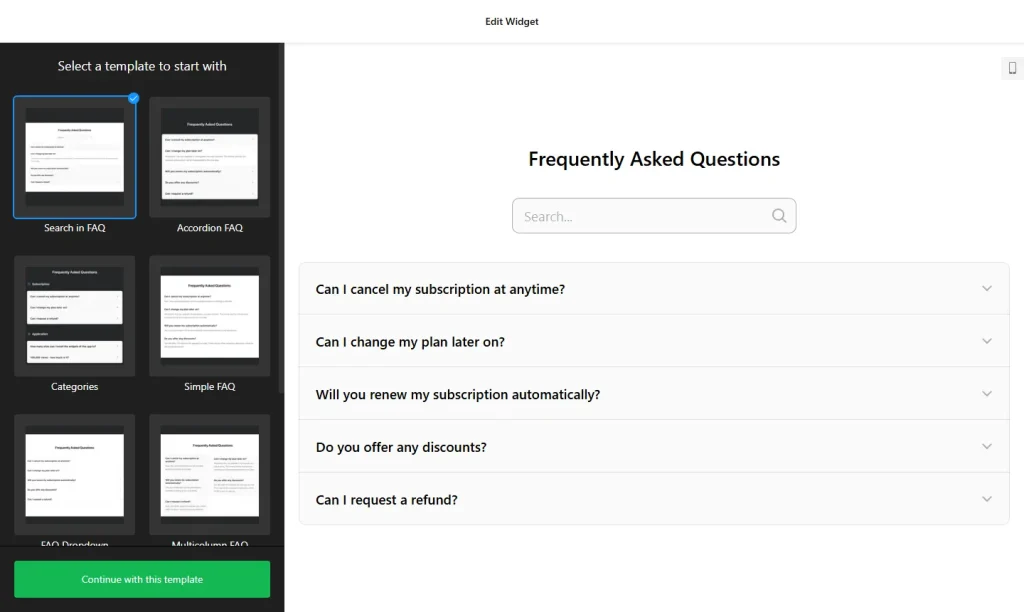
Use the builder below to create a free FAQ widget for your Shopify store. Pick a template and click “Continue with this template” to add your questions.
Shoppers who can’t find your shipping times, return policy or sizing details often leave instead of asking. An FAQ widget puts those answers on your Shopify store in a compact accordion, close to where people decide to buy. You build it here and add it with a Custom Liquid section in the theme editor, so there’s no app to install.
How to add an FAQ widget to Shopify
1. Create your widget
- Choose a template: start from Categories, Collapsible FAQ, FAQ Toggle, Q&A or Knowledge Base, or start from scratch.
- Create store categories: for example Shipping, Returns, Sizing and Payments, each with its own title and icon.
- Write short answers: answers support HTML, so you can link to your full shipping or refund policy and bold delivery times.
- Pick a layout and style: Accordion keeps a long FAQ compact on product pages; set colors to match your theme.
- Save it: click “Add to website for free“, sign up on the next page and copy your embed code.
2. Add it to your Shopify site
- In your Shopify admin, go to Online Store › Themes and click Customize.
- Use the page selector at the top to open the template for your FAQ: the home page, the default product template, or a custom page such as Shipping & Returns.
- Click Add section and choose Custom Liquid.
- Paste the FAQ code into the Liquid box and drag the section into position, for example just below the main product section.
- Click Save, then open a product or page in your store and click a few questions to check them.
Where to put the FAQ widget on your Shopify site
- On product pages, below the product details, for sizing, materials, delivery and returns. Adding it to the default product template shows the same FAQ on every product page.
- On collection pages, for questions that apply to a whole range, such as care instructions or gift wrapping.
- On the cart page, if your theme lets you add sections there, to answer delivery and payment questions just before checkout.
- On a Help or FAQ page, with a category for each topic, so customers check it before they email you.
Do you need a paid Shopify plan?
No extra plan or app is needed. The Custom Liquid section is part of the theme editor, so you can add the FAQ on the plan your store already uses. The main thing to get right is the template: a section added to a template appears on every page that uses it. Keep shared questions in the FAQ and put product-specific details in each product description.
Busy product pages can use up views quickly. The widget’s free plan covers one widget with up to 200 views a month on unlimited websites, with a small Elfsight link; paid widget plans start at $5 a month, billed yearly, for more views and no branding.
FAQ widget features
- Accordion, List and Multicolumn layouts, so even a long FAQ stays compact on a product page.
- Unlimited categories with titles and icons, such as Shipping, Returns and Payments.
- HTML in answers, for links to your policies and bold delivery times.
- No strict question limit, from a few questions to a full help center.
- 30+ icons and color settings to match your Shopify theme.
- Instant updates: change a delivery time in the builder and every page with the FAQ shows the new answer.
Frequently asked questions
Do I need a Shopify app for the FAQ widget?
No. Paste the code into a Custom Liquid section in the theme editor. There’s nothing to install from the Shopify App Store.
Why does the FAQ show on all my product pages?
You added it to the default product template, and every product that uses that template shows it. That suits general questions about shipping and returns. Put details for a single product in its description.
I added the section but can’t see the FAQ. What’s wrong?
Check that you added the Custom Liquid section to the template you’re viewing, pasted the full embed code and clicked Save. Then open the matching page in your store.
Can I update answers without editing my theme?
Yes. Edit the widget in your Elfsight dashboard and save. The FAQ in your store updates on its own, so the Custom Liquid section stays as it is.
Is the FAQ widget free for Shopify stores?
Yes. The free plan includes one widget with up to 200 views a month on unlimited websites, with a small Elfsight branding link. Paid plans start at $5 a month, billed yearly.
More Shopify widgets
- FAQ widget
All templates and features - Shopify Form Builder widget
Any form: quotes, sign-ups, surveys - Shopify Google Reviews widget
Your Google Business reviews and rating - Shopify Contact Form widget
A simple contact form - Shopify Instagram Feed widget
Your latest Instagram posts and reels - How to add embed code to any website
Where to paste widget code on every website builder