
Use the builder below to create a free contact form for your Squarespace website. Choose a template and click “Continue with this template” to set up your fields.
Photographers, designers, studios and consultants on Squarespace usually need more than a name and a message. They want the date of the shoot, the type of project, a reference image. This builder lets you ask for exactly that, with file uploads, drop-downs and fields that only appear when they’re relevant. You paste the finished form into a Squarespace Code Block. Check your plan first: the form runs on JavaScript, which Squarespace only allows on some plans.
How to add a Contact Form widget to Squarespace
1. Create your widget
- Choose a template: Extended Form gives you room for project details, while Simple Form or Email Form suit a short enquiry. Blank lets you start from nothing.
- Add the questions a client brief needs: a date field for an event or shoot, a drop-down for the service, file upload for reference images and a consent box. Mark the essential fields as required.
- Use conditional logic to keep the form short, for example showing a venue field only when someone picks wedding photography.
- Match your site’s look: choose a color scheme and accent color that fit your Squarespace template, and add custom CSS if you need finer control.
- Save it: click “Add to website for free“, sign up on the next page and copy your embed code.
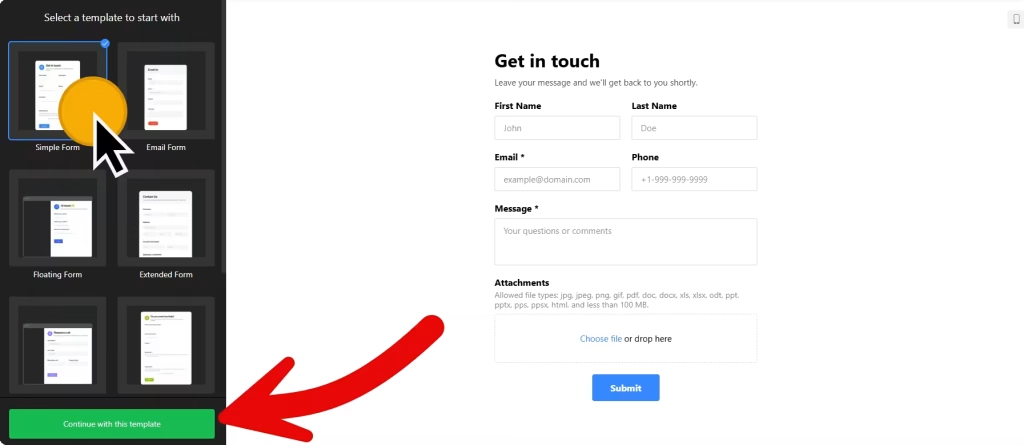
2. Add it to your Squarespace site
- Open the page where the form should go, usually your Contact or Enquire page, and start editing it.
- Click an Add Block point (+) where the form should appear and choose Code.
- Paste the form code, set the mode to HTML and turn off Display Source.
- Save the page, then check the form on the live site rather than only in the editor.
- Send yourself a test message to confirm that the email notification arrives and that any file upload goes through.
Where to put the Contact Form widget on your Squarespace site
- On your Contact or Enquire page, under a short note on what you need to know and how soon you reply.
- At the end of a portfolio or case study page, so someone who likes your work can get in touch right there.
- On a services or pricing page, with a drop-down for the package they’re interested in.
- On a booking enquiry page for shoots, sessions or consultations, with date and time fields.
Do you need a paid Squarespace plan?
Yes, for most sites. Plain HTML and CSS work on every Squarespace plan, but JavaScript in a Code Block needs Core or above on current plans, or Business or above on older plans. The contact form loads with a script, so on a plan without JavaScript the block shows nothing, with no error message. If the form is blank on your live site, check your plan before anything else.
The Floating pane embed type needs the code on every page, which Squarespace handles through Settings › Advanced › Code Injection. It has the same plan requirement. The widget itself is free for one widget with up to 200 views a month on unlimited websites, with a small Elfsight link; paid widget plans start at $5 a month, billed yearly.
Contact Form widget features
- File upload, so clients can send briefs, mood boards or reference photos with their message.
- 17 field blocks, including date, time, choice, image choice, drop-down and consent.
- Conditional logic that only shows a field when an earlier answer makes it relevant.
- Two embed types: Inline on the page or a Floating pane, with fields arranged vertically or horizontally.
- Email notifications and auto-replies, plus entries sent to Mailchimp, Google Sheets or Zapier.
- After-submit options: show a success message, redirect to another page or hide the form.
Frequently asked questions
Which Squarespace plan do I need for the contact form?
Core or above on current plans, or Business or above on older ones. Those plans allow JavaScript in Code Blocks, which the form needs to load.
Why is my contact form blank on Squarespace?
Usually because your plan doesn’t allow JavaScript, so the script doesn’t run and Squarespace shows no error. Also check that the Code Block is set to HTML and that Display Source is off.
Can clients upload files through the form?
Yes. Add the file upload field in the builder. Use it for briefs, floor plans, reference images or anything else you need before you quote.
Is the contact form free?
Yes. The free plan includes one widget with up to 200 views a month on unlimited websites, with a small Elfsight branding link. Paid plans start at $5 a month, billed yearly. Your Squarespace plan is a separate cost.
Do I need to update the Code Block when I change the form?
No. Edit the form in your Elfsight dashboard and save, and the version on your Squarespace site updates automatically.
More Squarespace widgets
- Contact Form widget
All templates and features - Squarespace WhatsApp Chat widget
A WhatsApp chat button or bubble - Squarespace AI Chatbot widget
Answers questions using your own content - Squarespace Google Reviews widget
Your Google Business reviews and rating - Squarespace Instagram Feed widget
Your latest Instagram posts and reels - 25 best Squarespace widgets
Our roundup of plugins and widgets for Squarespace