
Use the builder below to create a free Facebook feed for your Google Site. Pick a template and click “Continue with this template” to connect your Facebook Page.
Schools, clubs, sports teams and nonprofits often post their news on a Facebook Page first: match results, closures, fundraiser photos. A Facebook feed shows those posts on your Google Site, so parents, members and volunteers who rarely open Facebook still see them. You build the feed here, then paste it into an Embed code box. Google Sites shows every embed in its own frame, so the main job is sizing that box to fit the feed.
How to add a Facebook Feed widget to Google Sites
1. Create your widget
- Choose a template: Medium Widgets, Small Widgets, Large Widgets, Facebook Posts, Facebook Videos or Full-Width Posts. Small or Medium Widgets are the easiest to fit in a Google Sites embed box.
- Connect your Facebook Page: sign in with your Facebook account and pick the Page you manage, such as your club or school Page.
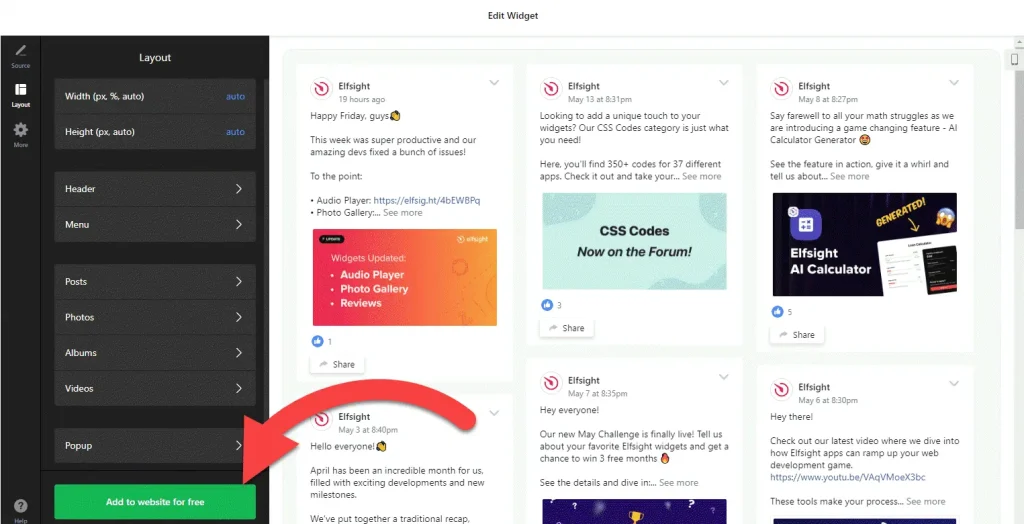
- Adjust the layout: set the width and height and choose which elements to show. A fixed height makes it easier to size the embed box later.
- Save it: click “Add to website for free“, sign up on the next page and copy your embed code.
2. Add it to your Google Site
- Open your site in Google Sites and go to the page where the feed should appear.
- In the Insert panel on the right, click Embed and open the Embed code tab.
- Paste the Facebook feed code, click Next, then Insert.
- Drag the edges of the embed box until every post fits. The feed can’t grow past the box, so anything outside it stays hidden.
- Publish the site and check the page on a phone as well as a computer.
- If the feed doesn’t load, try the widget’s iframe version, where one is available.
Where to put the Facebook Feed widget on your Google Site
- On the home page of a school, club or team site, so families and members see the latest news first.
- On a News or Announcements page, instead of copying each Facebook post into Google Sites by hand.
- On an Events or Fixtures page, next to your calendar, for photos and results after each event.
- On a Volunteer or Fundraising page of a nonprofit site, showing recent thank-you posts and appeals.
- On an internal team site, so staff can see what your organization has shared on its public Page.
Do you need a paid Google Sites plan?
No. Adding embed code to Google Sites doesn’t depend on a paid plan. The limits are technical: Google Sites puts every embed in its own isolated frame, and there’s no way to add code to every page at once. For a feed that’s fine, because it belongs on a page anyway. If you want it on several pages, insert an embed box on each one.
The widget’s own free plan covers one widget with up to 200 views a month on unlimited websites, with a small Elfsight link. Paid widget plans start at $5 a month, billed yearly, if your site gets more visits than that.
Facebook Feed widget features
- Six templates: Medium Widgets, Small Widgets, Large Widgets, Facebook Posts, Facebook Videos and Full-Width Posts.
- Posts from your own Page: connect the Facebook Page you manage and the widget fetches its posts for you.
- A video template for Pages that share match highlights, performances and other clips.
- Layout settings: set the width and height and choose which elements are visible.
- One dashboard to create more Facebook feeds, edit existing ones and copy the embed code again.
Frequently asked questions
Can I embed a Facebook feed on Google Sites?
Yes. Paste the widget code into Insert, Embed, Embed code, then resize the box so the whole feed shows. Publish the site to make it live.
Why is my Facebook feed cut off on Google Sites?
The embed box is smaller than the feed. Select the box and drag its edges until every post fits. Google Sites keeps the feed inside that frame, so it can’t expand on its own.
Do I need to pay for Google Sites or the widget?
Google Sites doesn’t need a paid plan for embeds. The widget’s free plan includes one widget with up to 200 views a month on unlimited websites, with a small Elfsight link. Paid plans start at $5 a month, billed yearly.
What if the Facebook feed won’t load in Google Sites?
Check that you pasted the code in the Embed code tab and that the box is big enough to show the posts. If the script still won’t load, try the widget’s iframe version, where one is available.
Who can connect our club or school Facebook Page?
Someone who manages that Page. The builder connects through a Facebook account and only lists Pages that account manages, so ask your Page admin to set it up if it isn’t you.
More Google Sites widgets
- Facebook Feed widget
All templates and features - Google Sites Instagram Feed widget
Your latest Instagram posts and reels - Google Sites TikTok Feed widget
Your TikTok videos in a grid or slider - Google Sites YouTube Gallery widget
Videos from a YouTube channel or playlist - Google Sites LinkedIn Feed widget
Company posts from LinkedIn - Essential Google Sites widgets
10+ widgets that work well on Google Sites