
Use the builder below to create a free appointment booking widget for your Squarespace website. Pick a template and click “Continue with this template” to set up your services and hours.
Photographers, designers, coaches, yoga and pilates studios, and other service businesses on Squarespace often take bookings by email, one message at a time. This widget puts a booking form on your site instead: clients choose a service, see its duration and price, and pick a time within the hours you set. You and the client both get an email, and the booking can go straight to Google Calendar. Build it here and add it with a Code Block.
How to add an Appointment Booking widget to Squarespace
1. Create your widget
- Choose a template: Booking Form Only suits a page of its own, Call Booking works for discovery calls, and Floating Booking button adds a button that stays on screen.
- Describe your services: name, short description, image, duration and price, for example a portrait session or a 1:1 coaching call. Prices can be fixed, free, hidden or a minimum rate.
- Set your availability: the hours people can book, plus the minimum and maximum advance booking time, so nobody books tomorrow morning when you need a week’s notice.
- Add your details and tools: contact details, website and logo; email notifications for you and the client; and Google Calendar, Google Sheets or Zapier.
- Save it: click “Add to website for free“, sign up on the next page and copy your embed code.
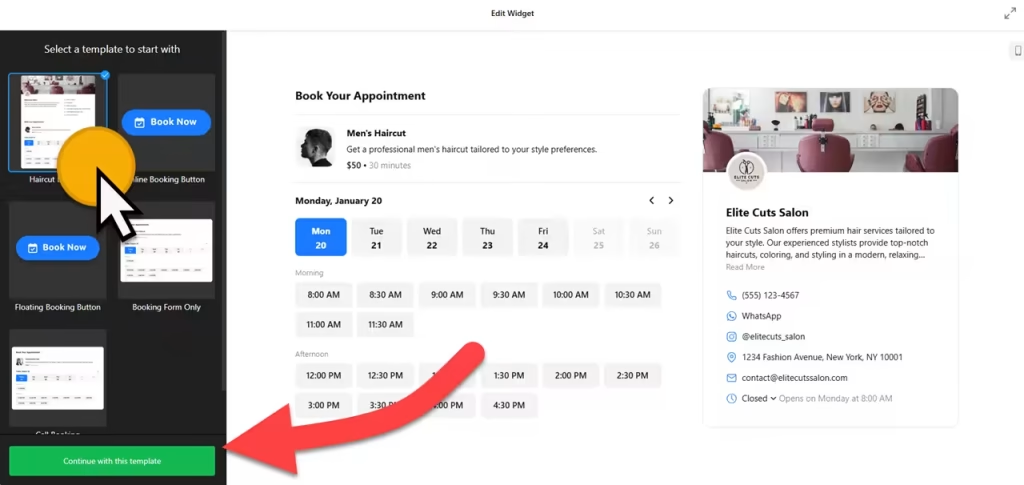
2. Add it to your Squarespace site
- Go to the page where clients should book, such as Book a Session or Contact, and click Edit.
- Click an Add Block point (+) and choose Code.
- Paste the booking code, set the mode to HTML and turn off Display Source.
- Give the block enough width for the form, then save the page.
- Open the live site and make a test booking. The live page is the place to check the form, not the editor.
Where to put the Appointment Booking widget on your Squarespace site
- On a Book a Session page, with the form as the main content and a short note on what happens next.
- On your services or pricing page, right under the packages you offer.
- On a class or studio page, with each class or private session set up as a service with its own duration.
- As a floating button on every page, so someone browsing your portfolio can book without hunting for a link.
Do you need a paid Squarespace plan?
Yes, for most sites. Plain HTML works in a Code Block on every Squarespace plan, but JavaScript needs a higher-tier plan: Core or above on current plans, or Business or above on older ones. The booking form loads with a script, so on a plan without JavaScript the block shows nothing at all, and Squarespace gives no error message.
For a floating booking button on every page, paste the code under Settings › Advanced › Code Injection instead of a Code Block; it needs the same plan. The widget itself has a free plan: one widget, up to 200 views a month on unlimited websites, with a small Elfsight link. Paid widget plans start at $5 a month, billed yearly.
Appointment Booking widget features
- Templates such as Call Booking, Floating Booking button and Booking Form Only.
- Inline form or floating button, depending on how you want clients to book.
- Services with flexible pricing: duration, image and a fixed, free, hidden or minimum price in your currency.
- Working hours and advance booking limits, from the minimum notice you need to how far ahead people can book.
- Email notifications for you and the client, each of which you can turn on or off.
- Google Calendar, Google Sheets and Zapier integrations, plus language settings and custom CSS and JavaScript.
Frequently asked questions
Which Squarespace plan do I need for the booking widget?
One that allows JavaScript: Core or above on current plans, or Business or above on older plans. That applies to Code Blocks and to Code Injection. On lower plans the script doesn’t run and the form doesn’t appear.
Why doesn’t the booking form show on my Squarespace site?
Check that your plan allows JavaScript, the Code Block is set to HTML and Display Source is off. Then look at the live site rather than the editor.
How do I add a floating Book Now button to every page?
Choose the floating button embed type in the builder, then paste the code under Settings › Advanced › Code Injection. It needs the same Core-or-above plan as Code Blocks.
Will I get an email for each booking?
Yes, if email notifications are on. You can turn notifications on or off for yourself and for the client, and also send bookings to Google Calendar, Google Sheets or Zapier.
Can I change my services or hours later?
Yes. Edit the widget in your Elfsight dashboard and save. The form on your Squarespace site updates on its own, so you don’t need to touch the Code Block again.
More Squarespace widgets
- Appointment Booking widget
All templates and features - Squarespace Business Hours widget
Opening hours with an open-now status - Squarespace Event Calendar widget
Upcoming events in a calendar or list - Squarespace Restaurant Menu widget
Your menu with prices and photos - Squarespace Google Reviews widget
Your Google Business reviews and rating - 25 best Squarespace widgets
Our roundup of plugins and widgets for Squarespace