
Use the builder below to create a free YouTube gallery for your Webflow site. Pick a template, click “Continue with this template” and add your channel or playlist.
If you publish product demos, tutorials, webinars or customer stories on YouTube, adding them to your Webflow site one video at a time gets old fast. A gallery brings a whole channel or playlist into one block, so visitors can browse your videos without leaving the page. Choose your sources, style the grid or slider to fit your design, and place it in any section with a Code Embed element.
How to add a YouTube Gallery widget to Webflow
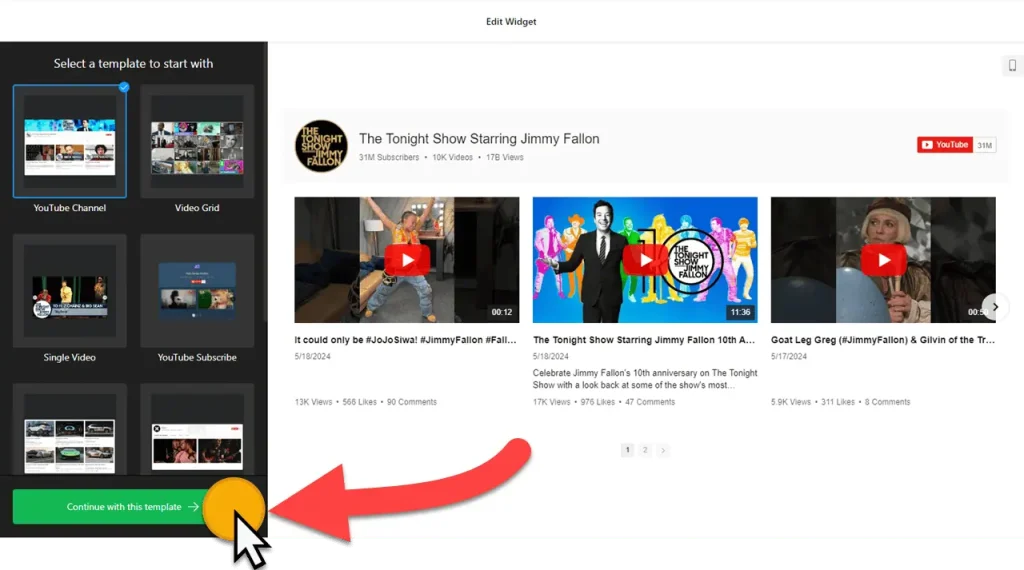
1. Create your widget
- Choose a template to set the starting design. You can change everything later.
- Add your sources: paste your YouTube channel URL. Under Source Groups, you can build custom groups from channels, playlists and single videos.
- Set the layout: header, columns and rows, video, popup and slider settings. Each part has its own options, so shape the gallery to the section it will sit in.
- Style it in the Appearance tab, with a Custom CSS field for fine details. Advanced settings include an AdSense tab and a language tab for front-end messages.
- Save it: click “Add to website for free“, sign up on the next page and copy your embed code.
2. Add it to your Webflow site
- Open the page in the Webflow Designer and add a section or container where the gallery should go, so it follows your page’s width and spacing.
- Open the Add panel and drag a Code Embed element into that section.
- Paste the gallery code and click Save & Close.
- The canvas only shows an empty embed, because scripts don’t render inside the Designer. Publish the site or open Preview to see the videos.
- On the live page, click a video to check the popup player, then look at the layout on a phone.
Where to put the YouTube Gallery widget on your Webflow site
- On your homepage, as a slider of your latest videos below the hero.
- On product or feature pages, with a playlist of demos for that product.
- On a resources or learn page, with tutorial playlists organized in Source Groups.
- On a case study or about page, with customer stories or behind-the-scenes videos.
Do you need a paid Webflow plan?
Yes. Webflow only runs the Code Embed element and custom code on a paid site plan or workspace plan. On a free project, the gallery script won’t load, so the published page shows nothing where the gallery should be. The widget has its own free plan: one widget with up to 200 views a month on unlimited websites, with a small Elfsight link. Paid widget plans start at $5 a month, billed yearly.
The gallery sits inside the page, so you don’t need Webflow’s site-wide custom code for it. To show the same gallery on more than one page, paste the same code into a Code Embed element on each page. When you edit the widget later, every copy updates.
YouTube Gallery widget features
- Any YouTube source: channels, playlists and single videos.
- Source Groups to sort videos into custom groups.
- Layout control: header, columns and rows, video, popup and slider settings.
- Appearance settings with a Custom CSS field.
- AdSense tab to monetize video content, and a language tab to translate front-end messages.
Frequently asked questions
Do I need a paid Webflow plan to embed a YouTube gallery?
Yes. The Code Embed element needs a paid Webflow site plan or workspace plan. On a free project, Webflow won’t run the gallery script.
Why is my YouTube gallery blank in the Webflow Designer?
Webflow doesn’t run scripts inside the Designer canvas. Publish the site or open Preview to see the videos. If the live page is still empty, check that the code is in a Code Embed element and that your plan allows custom code.
Can I show a playlist instead of my whole channel?
Yes. Under Source Groups you can add playlists or single videos as well as channels, and organize them into custom groups.
Can I change the videos after adding the gallery to Webflow?
Yes. Edit the widget in your Elfsight dashboard and save. The gallery on your Webflow site updates on its own, so you don’t need to paste the code again.
Is the YouTube Gallery widget free?
Yes. The free plan includes one widget with up to 200 views a month on unlimited websites, with a small Elfsight branding link. Paid plans start at $5 a month, billed yearly.
More Webflow widgets
- YouTube Gallery widget
All templates and features - Webflow Instagram Feed widget
Your latest Instagram posts and reels - Webflow Facebook Feed widget
Posts from your Facebook Page - Webflow TikTok Feed widget
Your TikTok videos in a grid or slider - Webflow LinkedIn Feed widget
Company posts from LinkedIn - How to add embed code to any website
Where to paste widget code on every website builder