
Use the builder below to create a free TikTok feed for your Shopify store. Pick a template and click “Continue with this template” to add your TikTok account.
If you sell on Shopify and post product videos on TikTok, those clips can work in your store too: unboxings, try-ons, how-to videos and behind-the-scenes packing. A TikTok feed shows them in a grid or slider on any template, so shoppers can see products in use before they buy. No Shopify app is needed: you add the feed with a Custom Liquid section in the theme editor.
How to add a TikTok Feed widget to Shopify
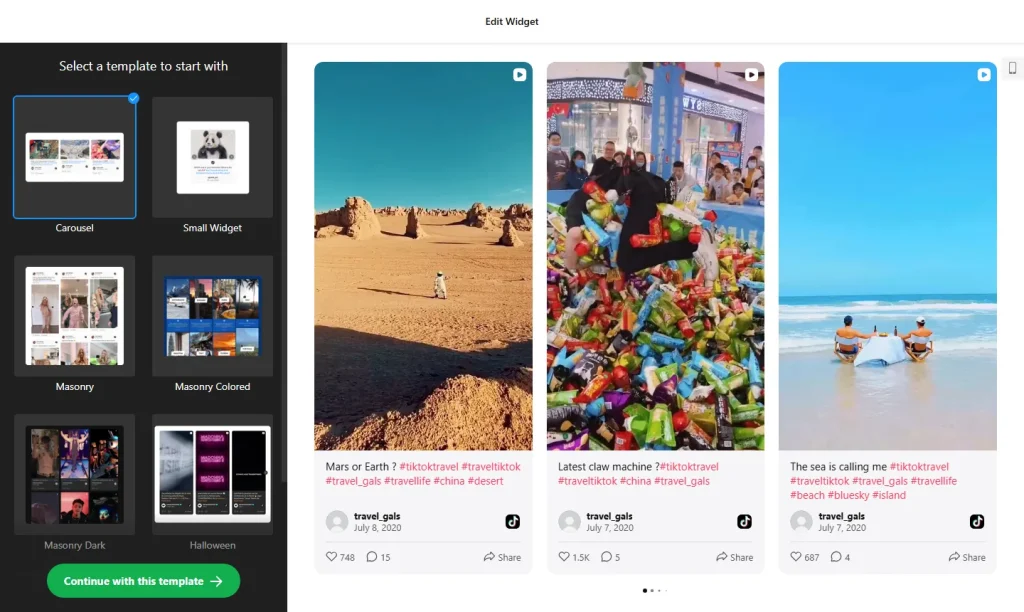
1. Create your widget
- Choose a template and click “Continue with this template“.
- Add your store’s TikTok account as the source, so the widget shows its videos. You can also use a hashtag, or combine a profile and a hashtag in one feed.
- Pick a grid or a slider: a slider fits under product details without making the page much longer; a grid suits the home page or a dedicated page.
- Check the preview and adjust the layout to match the width of your theme’s other sections.
- Save it: click “Add to website for free“, sign up on the next page and copy your embed code.
2. Add it to your Shopify site
- In your Shopify admin, go to Online Store › Themes and click Customize.
- Use the page selector at the top to open the template you want: the home page, the default product template or a custom page.
- Click Add section and choose Custom Liquid.
- Paste the TikTok feed code into the section, then drag the section into position, for example under your featured collection.
- Click Save and check the feed in your live store on desktop and mobile.
Where to put the TikTok Feed widget on your Shopify site
- On the home page, as a slider section under your featured collection.
- On the product template, below the product details. A section on the default product template shows on every product page, which suits videos about your whole range.
- On a collection template, under the product grid, for a collection you promote on TikTok.
- On a custom page, such as an “As seen on TikTok” page, using the grid layout.
- In the footer area, if you want the feed on every page. Sections added there appear site-wide.
Do you need a paid Shopify plan?
No upgrade or extra app is needed for the feed. It goes into a Custom Liquid section in your theme editor, the same place Shopify gives you for other embed code, so nothing is installed from the Shopify App Store. To remove the feed later, delete the section.
Plan your views. A section on the default product template loads on every product page, and one in the footer loads on every page, so a busy store can use the widget’s free 200 views a month quickly. The free plan covers one widget on unlimited websites with a small Elfsight link; paid plans start at $5 a month, billed yearly.
TikTok Feed widget features
- Your TikTok videos on your site, from a profile, a hashtag or both. New videos usually appear within 12–36 hours.
- Five layouts: Grid, Masonry, List, Carousel or Slider, from a full wall of videos to a compact row that takes less space.
- Video cards and popup: show or hide likes, views and author names, add a Follow button, and let visitors open a video with its comments in a popup.
- No app: build the feed in your browser and paste one short code into a Custom Liquid section.
- Easy updates: change the widget in your Elfsight dashboard and your store updates without editing the theme again.
- Free plan: one widget with up to 200 views a month, on unlimited websites.
Frequently asked questions
Do I need a Shopify app to show TikTok videos in my store?
No. Paste the embed code into a Custom Liquid section in the theme editor, under Online Store, Themes, Customize. Nothing is installed in your store.
Where will the TikTok feed appear in my store?
On every page that uses the template you added it to. On the default product template it shows on all product pages; on the home page it shows only there. A section in the footer area shows it site-wide.
Should I use a grid or a slider on Shopify?
A slider works well on product pages, where the space below the product details is limited. A grid suits the home page or a dedicated page where shoppers can browse the videos.
Is the TikTok feed widget free for Shopify?
Yes. The free plan includes one widget with up to 200 views a month on unlimited websites, with a small Elfsight branding link. Paid plans start at $5 a month, billed yearly, which suits stores with more traffic.
Do I need to edit my theme again when I change the feed?
No. Edit the widget in your Elfsight dashboard and save. The feed in your Shopify store updates on its own, so the Custom Liquid section stays as it is.
More Shopify widgets
- TikTok Feed widget
All templates and features - Shopify Instagram Feed widget
Your latest Instagram posts and reels - Shopify Facebook Feed widget
Posts from your Facebook Page - Shopify YouTube Gallery widget
Videos from a YouTube channel or playlist - Shopify LinkedIn Feed widget
Company posts from LinkedIn - How to add embed code to any website
Where to paste widget code on every website builder