
Use the builder below to create a free TikTok feed for your Webflow website. Pick a template and click “Continue with this template” to add your TikTok account.
Brands, agencies and creators use Webflow for sites where the design matters. A TikTok feed adds motion to those pages: your latest short videos in a grid or slider, placed exactly where your layout has room. Build the feed here, then drop it into a Code Embed element. It’s a simple way to bring a campaign’s TikTok content onto its landing page without uploading each video again.
How to add a TikTok Feed widget to Webflow
1. Create your widget
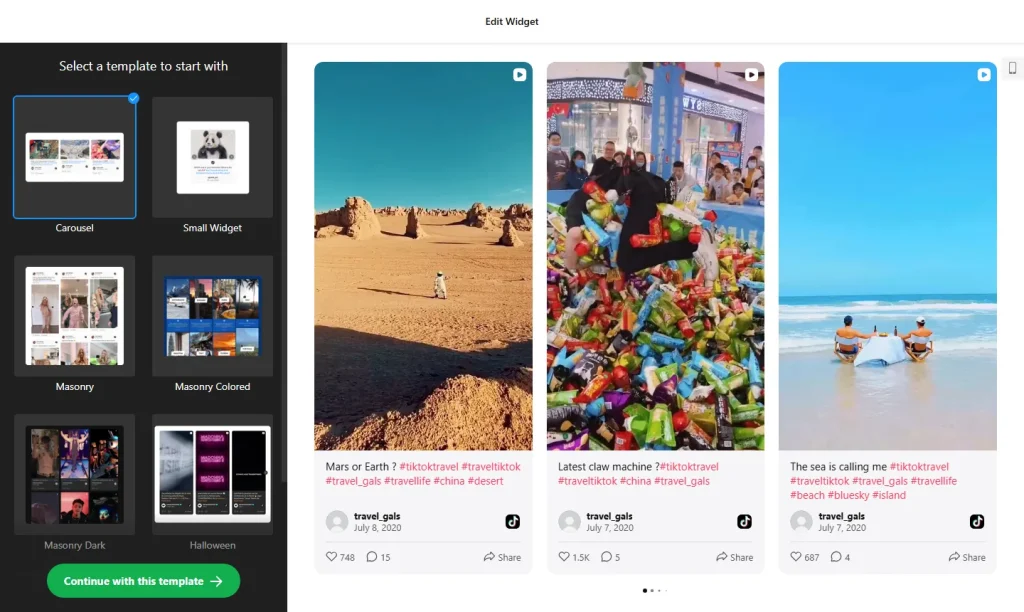
- Choose a template and click “Continue with this template“.
- Add your TikTok account as the source, so the widget shows your videos. You can also use a hashtag, or combine a profile and a hashtag in one feed.
- Pick a grid or a slider: a grid fills a full-width section, while a slider fits a narrower block in your layout.
- Check the preview and adjust the layout so it follows your site’s spacing and style.
- Save it: click “Add to website for free“, sign up on the next page and copy your embed code.
2. Add it to your Webflow site
- Open the page in the Webflow Designer.
- Open the Add panel and drag a Code Embed element into the section or div where the videos should appear.
- Paste the TikTok feed code and click Save & Close.
- Expect an empty box on the canvas. Scripts don’t render inside the Designer, so this is normal.
- Publish the site, or open Preview, to see the feed, and check it on desktop, tablet and phone sizes.
Where to put the TikTok Feed widget on your Webflow site
- On a campaign landing page, with the campaign’s TikTok videos close to the call to action.
- On the homepage, in a full-width section with a slider.
- On a Work or Case Studies page of an agency or creator site, showing clips from your own TikTok account.
- On a product or launch page, with short demo and teaser videos.
Do you need a paid Webflow plan?
Yes. In Webflow, the Code Embed element and custom code require a paid site plan or workspace plan, so you can’t add the feed without one. Site-wide code under Site settings › Custom code › Footer code is meant for code that loads on every page; a feed belongs in a Code Embed element where you want the videos to sit.
The widget’s own free plan covers one widget with up to 200 views a month on unlimited websites, with a small Elfsight link. Paid widget plans start at $5 a month, billed yearly, if a busy landing page needs more views or you want to remove the link.
TikTok Feed widget features
- Your TikTok videos on your site, from a profile, a hashtag or both. New videos usually appear within 12–36 hours.
- Five layouts: Grid, Masonry, List, Carousel or Slider, from a full wall of videos to a compact row that takes less space.
- Video cards and popup: show or hide likes, views and author names, add a Follow button, and let visitors open a video with its comments in a popup.
- No coding: build the feed in your browser and paste one short code into a Code Embed element.
- Easy updates: change the widget in your Elfsight dashboard and the published site updates without republishing.
- Free plan: one widget with up to 200 views a month, on unlimited websites.
Frequently asked questions
Which Webflow plan do I need for the TikTok feed?
A paid site plan or workspace plan, because Webflow requires one for the Code Embed element and custom code. The widget itself has a free plan.
Why can’t I see the TikTok feed in the Webflow Designer?
Scripts don’t run inside the Designer canvas, so the Code Embed shows as an empty box. Open Preview or publish the site to see the videos.
Where can I put the feed in my Webflow layout?
Anywhere you can drag a Code Embed element, such as a section or a div you’ve styled. Then choose a grid or a slider in the builder to suit the space.
Do I need to republish Webflow when I change the feed?
Not for widget changes. Edit the widget in your Elfsight dashboard and save, and the published site updates on its own. You only republish when you move or remove the Code Embed element.
Is the TikTok feed widget free?
Yes. The free plan includes one widget with up to 200 views a month on unlimited websites, with a small Elfsight branding link. Paid plans start at $5 a month, billed yearly.
More Webflow widgets
- TikTok Feed widget
All templates and features - Webflow Instagram Feed widget
Your latest Instagram posts and reels - Webflow Facebook Feed widget
Posts from your Facebook Page - Webflow YouTube Gallery widget
Videos from a YouTube channel or playlist - Webflow LinkedIn Feed widget
Company posts from LinkedIn - How to add embed code to any website
Where to paste widget code on every website builder