
Use the builder below to create a free TikTok feed for your Google Site. Pick a template and click “Continue with this template” to add your TikTok account.
School clubs, sports teams, student media groups and nonprofits use TikTok to share highlights and quick updates. A TikTok feed brings those videos onto your Google Site in a grid or slider, for families and members who don’t use the app. You build the feed here and paste it into an Embed code box. Google Sites keeps every embed in its own frame, so most of the setup is sizing that box.
How to add a TikTok Feed widget to Google Sites
1. Create your widget
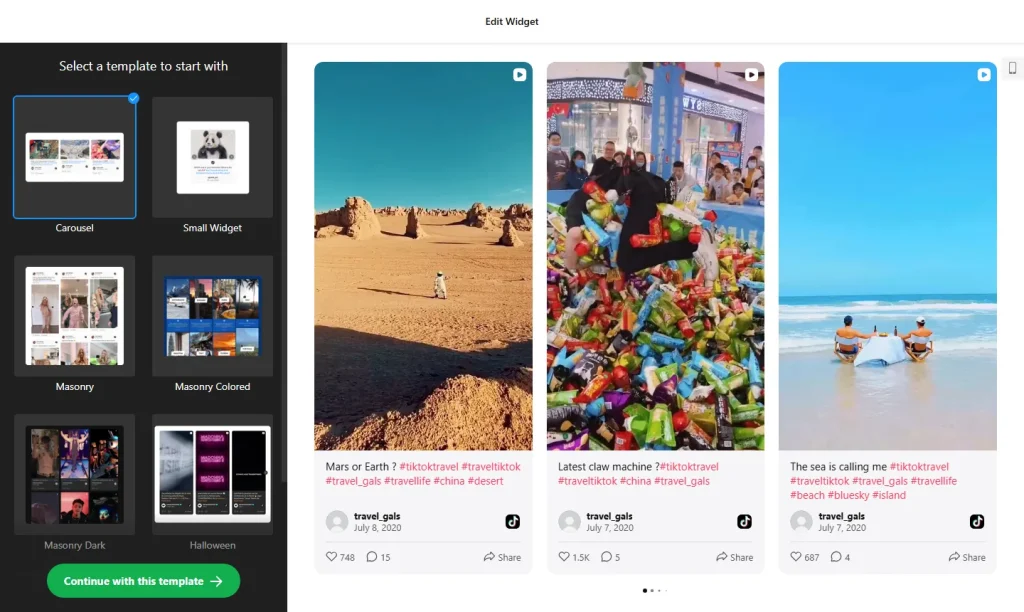
- Choose a template and click “Continue with this template“.
- Add your TikTok account as the source, such as your club’s or team’s account. You can also use a hashtag, or combine a profile and a hashtag in one feed.
- Pick a grid or a slider: a slider keeps the embed box short, which is easier to fit on a busy Google Sites page.
- Check the preview and adjust the layout until it looks right at the size you plan to use.
- Save it: click “Add to website for free“, sign up on the next page and copy your embed code.
2. Add it to your Google Site
- Open your site in Google Sites and go to the page where the videos should appear.
- In the Insert panel on the right, click Embed and open the Embed code tab.
- Paste the TikTok feed code, click Next, then Insert.
- Drag the edges of the embed box until the whole grid or slider fits. TikTok videos are tall, so pull the bottom edge further than you would for a photo widget.
- Publish the site and check the page on a phone as well as a computer.
- If the feed doesn’t load, try the widget’s iframe version, where one is available.
Where to put the TikTok Feed widget on your Google Site
- On the home page of a club or team site, with a slider of recent highlights.
- On a Media or Highlights page, using the grid so visitors can browse.
- On a school club page, such as drama, music or robotics, showing performances and projects.
- On a nonprofit’s Events or Campaign page, with short clips from recent events.
Do you need a paid Google Sites plan?
No. Adding embed code to Google Sites doesn’t depend on a paid plan. The limits are technical: every embed sits in its own isolated frame, and there’s no way to add code to every page at once. A feed belongs on a page anyway, so insert an embed box on each page where you want the videos.
The widget’s own free plan covers one widget with up to 200 views a month on unlimited websites, with a small Elfsight link. Paid widget plans start at $5 a month, billed yearly, if your site gets more visits than that.
TikTok Feed widget features
- Your TikTok videos on your site, from a profile, a hashtag or both. New videos usually appear within 12–36 hours.
- Five layouts: Grid, Masonry, List, Carousel or Slider, from a full wall of videos to a compact row that takes less space.
- Video cards and popup: show or hide likes, views and author names, add a Follow button, and let visitors open a video with its comments in a popup.
- No coding: build the feed in your browser and paste one short code into a Google Sites embed box.
- Easy updates: change the widget in your Elfsight dashboard and your site updates without pasting the code again.
- Free plan: one widget with up to 200 views a month, on unlimited websites.
Frequently asked questions
Can I embed a TikTok feed on Google Sites?
Yes. Paste the widget code into Insert, Embed, Embed code, then resize the box so the whole feed shows. Publish the site to make it live.
Why is my TikTok feed cut off on Google Sites?
The embed box is smaller than the feed. TikTok videos are tall, so drag the bottom edge of the box down until every video fits. Google Sites keeps the feed inside that frame, so it can’t expand on its own.
Should I use a grid or a slider on Google Sites?
A slider keeps the embed box short, which is easier to fit next to other content. A grid works best on a page made just for videos.
What if the TikTok feed won’t load in Google Sites?
Check that you pasted the code in the Embed code tab and that the box is big enough. If the script still won’t load, try the widget’s iframe version, where one is available.
Do I need to pay for Google Sites or the widget?
Google Sites doesn’t need a paid plan for embeds. The widget’s free plan includes one widget with up to 200 views a month on unlimited websites, with a small Elfsight link. Paid plans start at $5 a month, billed yearly.
More Google Sites widgets
- TikTok Feed widget
All templates and features - Google Sites Instagram Feed widget
Your latest Instagram posts and reels - Google Sites Facebook Feed widget
Posts from your Facebook Page - Google Sites YouTube Gallery widget
Videos from a YouTube channel or playlist - Google Sites LinkedIn Feed widget
Company posts from LinkedIn - Essential Google Sites widgets
10+ widgets that work well on Google Sites