
Use the builder below to create a free restaurant menu for your Squarespace website. Pick a template, click “Continue with this template” and add your dishes.
If your café, bakery, wine bar or catering business runs on Squarespace, you’ve probably put care into how the site looks. The menu should match. This widget lets you set a light, dark or custom color scheme, an accent color and a font, and lists each dish with its price, photo, badges and nutrition info. When prices change, you update them in your Elfsight dashboard instead of uploading a new PDF. It goes onto any Squarespace page with a Code Block.
How to add a Restaurant Menu widget to Squarespace
1. Create your widget
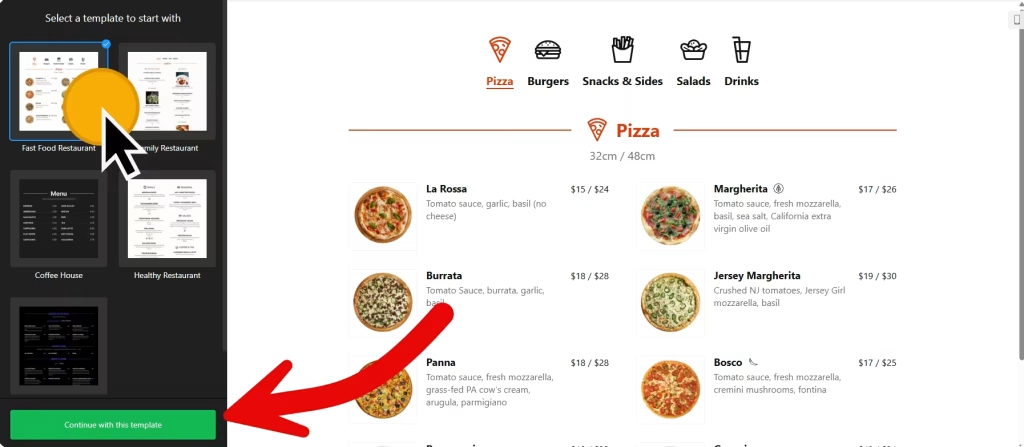
- Choose a template: Coffee House, Cocktail Bar, Healthy Restaurant, Family Restaurant or Fast Food Restaurant. Click “Continue with this template“.
- Add your menus: in the Menus tab, click “Add Menu” and give each one a name, caption and icon, such as Brunch, Dinner and Wine.
- Add items: click “Add item” and enter the caption, price, image and badges, plus calories, fat, carbs and protein if you want to show them.
- Match your brand: choose tabs or a list for menus and a list, masonry or tabs for sections, then set the color scheme, accent color and font to match your site.
- Save it: click “Add to website for free“, sign up on the next page and copy your embed code.
2. Add it to your Squarespace site
- In Squarespace, open the page where the menu should go and click Edit.
- Click an Add Block point (+) and choose Code.
- Paste the menu code, set the mode to HTML and turn off Display Source.
- Save the page and exit the editor.
- Open the live page and click through each menu tab. If the block is empty, check your Squarespace plan (see below).
Where to put the Restaurant Menu widget on your Squarespace site
- On a Menu page in your main navigation, with one tab for each menu.
- On your homepage, under the hero image, with a short list of signature dishes or drinks.
- On a catering or private dining page, with each package set up as its own menu.
- On an events page, for a tasting night, a holiday set menu or a pop-up.
Do you need a paid Squarespace plan?
Probably, yes. Squarespace runs JavaScript in Code Blocks only on higher-tier paid plans: Core or above on current plans, Business or above on older ones. The menu loads with a script, so on a plan without JavaScript the Code Block shows nothing at all, and Squarespace doesn’t show an error. If the block is empty on your live site, check your plan first.
The widget has its own free plan: one widget with up to 200 views a month on unlimited websites, with a small Elfsight link. Paid widget plans start at $5 a month, billed yearly. You don’t need Code Injection under Settings › Advanced for a menu; a Code Block on the page is enough.
Restaurant Menu widget features
- Templates such as Coffee House, Cocktail Bar, Healthy Restaurant, Family Restaurant and Fast Food Restaurant.
- Several menus, each with a name, caption and icon.
- Prices, photos and badges for every item.
- Nutrition info: calories, fat, carbs and protein.
- Light, dark or custom color schemes, an accent color and a font family, plus custom CSS and JavaScript.
Frequently asked questions
Which Squarespace plan do I need for the menu?
A plan that runs JavaScript in Code Blocks: Core or above on current Squarespace plans, or Business or above on older ones. On other plans the code is saved but the menu doesn’t appear.
Why is my menu blank on Squarespace?
Usually the plan doesn’t allow JavaScript, so the menu script never runs. If you see the code itself as text, set the Code Block to HTML and turn off Display Source. Always check the live page, not just the editor.
Can the menu match my Squarespace design?
Yes. Choose a light, dark or custom color scheme, set an accent color and pick a font family. For anything else, use the custom CSS option in the builder.
How do I update prices or add a seasonal menu?
Edit the menu in your Elfsight dashboard and save. You can change prices, add items or add a new menu tab, and your Squarespace page updates on its own.
Is the restaurant menu widget free?
Yes. The free plan includes one widget with up to 200 views a month on unlimited websites, with a small Elfsight branding link. Paid plans start at $5 a month, billed yearly.
More Squarespace widgets
- Restaurant Menu widget
All templates and features - Squarespace Appointment Booking widget
Online booking with time slots - Squarespace Business Hours widget
Opening hours with an open-now status - Squarespace Event Calendar widget
Upcoming events in a calendar or list - Squarespace Google Reviews widget
Your Google Business reviews and rating - 25 best Squarespace widgets
Our roundup of plugins and widgets for Squarespace