
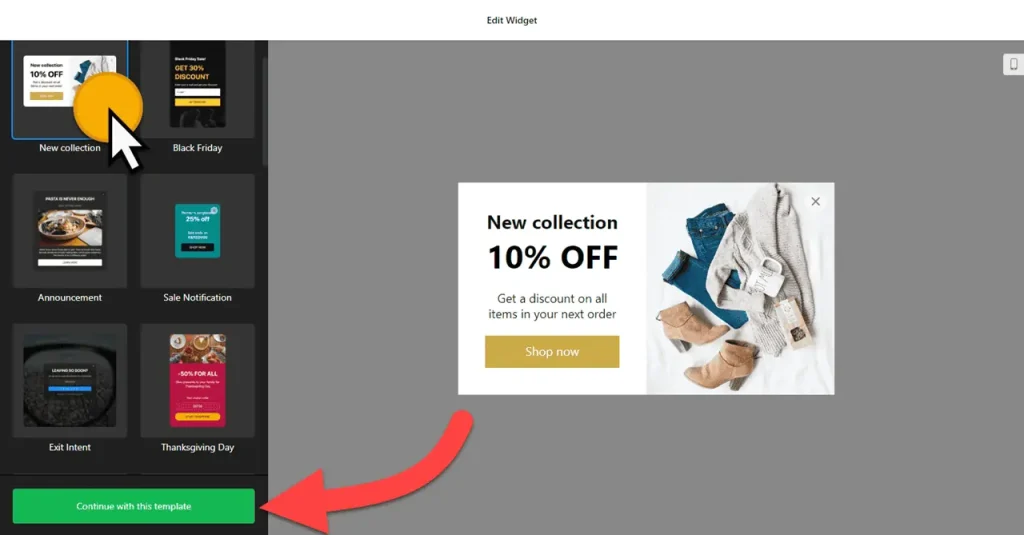
Use the builder below to create a free popup for your WordPress website. Pick a template and click “Continue with this template” to get started.
Popup plugins for WordPress come with their own settings pages, add-ons and updates to manage. This builder takes a different route: you design the popup in your browser, set its triggers and display rules there, and paste one short code into WordPress. Bloggers use it for newsletter sign-ups, business sites for announcements and quote requests, and WooCommerce stores for discount codes and exit-intent offers.
How to add a Popup widget to WordPress
1. Create your widget
- Choose a template: pick from more than 20, such as Newsletter Subscribe, Exit Intent, New Collection (a coupon popup), 3-day only or Announcement.
- Add your content: use the AI Popup Generator, or add elements by hand: heading, text, form, coupon, timer, video, image, button or HTML embed.
- Pick a layout: modal, left or right pane, left or right slide-in, or a top or bottom bar, and set the maximum width. Add a close button, backdrop or reopen button.
- Set display rules and triggers: which pages and devices, a schedule, how often each visitor sees it, and whether it opens on page load, after a time, on click, on scroll or on exit intent.
- Save it: click “Add to website for free“, sign up and copy your embed code.
2. Add it to your WordPress site
- For one page or post, open it in the block editor, click the block inserter (+) and add a Custom HTML block. The popup opens over the page wherever the block sits, so the end of the content is a tidy spot.
- Paste the popup code, switch to Preview inside the block, then click Update or Publish.
- Using Elementor? Drag in the HTML widget and paste the code. In the classic editor, paste it into the Text tab, not the Visual tab.
- For every page, add the code once to a part of your theme that loads on every page, such as the footer, and use the popup’s display settings to choose where it appears.
- If the popup doesn’t open, check performance plugins that delay or combine JavaScript, exclude the widget script and clear your cache.
When and where to show a popup on your WordPress site
- A newsletter sign-up on blog posts, triggered on scroll once the reader is part-way through the article.
- A WooCommerce welcome discount on shop pages for first-time visitors, using the New Collection coupon template.
- An exit-intent offer on product or pricing pages, as a last reminder before the visitor leaves.
- An announcement on a business site for a new service, an event or office closures, shown once per visitor.
Do you need a paid WordPress plan?
Not on self-hosted WordPress (WordPress.org). It accepts scripts out of the box, so you don’t need a popup plugin at all. On WordPress.com, <script> tags only work on plans that allow plugins; on other plans they’re removed when you save, and the popup never loads.
Because the code runs in the page itself, the modal, slide-in and bar layouts all float over your content as designed. The widget’s free plan covers one widget with up to 200 views a month, with a small Elfsight link; paid widget plans start at $5 a month, billed yearly.
Popup widget features
- 20+ responsive templates, including coupon, announcement, exit-intent, newsletter and recent-sales popups.
- AI Popup Generator plus 14 elements for building popups by hand.
- Layouts: modal, left and right pane, left and right slide-in, top and bottom bar.
- Triggers: page load, time on page, click, scroll and exit intent, alone or together.
- Display rules: pages, devices, schedule and frequency per visitor.
- Popup link, reopen button, backdrop and close button, with custom CSS and JavaScript for styling and tracking.
Frequently asked questions
Do I need a popup plugin for WordPress?
No. On self-hosted WordPress, paste the code into a Custom HTML block and the popup works. On WordPress.com, you need a plan that allows plugins, because other plans remove scripts.
How do I show the popup on every page of my WordPress site?
Add the code once to a part of your theme that appears on every page, such as the footer. Then use the popup’s display settings to choose the pages, devices and schedule.
Why doesn’t my popup open on WordPress?
Make sure the code is in a Custom HTML block or the Text tab, not a paragraph. Check that a performance plugin isn’t delaying the script, clear your cache, and remember the popup may wait for its trigger or show only once per visitor.
Can I use the popup for a WooCommerce discount?
Yes. Use the New Collection coupon template or add a Coupon element with a code you’ve already set up in WooCommerce. Exit intent and time on page work well as triggers.
Does the popup work with Elementor?
Yes. Drag the HTML widget onto the page and paste the code. Preview or publish the page to see the popup open.
More WordPress widgets
- Popup widget
All templates and features - WordPress Countdown Timer widget
Count down to a sale or launch - WordPress Pricing Table widget
Compare plans and prices - WordPress Google Reviews widget
Your Google Business reviews and rating - WordPress Contact Form widget
A simple contact form - How to add embed code to any website
Where to paste widget code on every website builder